EasyManua.ls Logo

Philips AJ 3010 - User Manual

Philips AJ 3010
77 pages
Print Icon
To Next Page IconTo Next Page
Loading...
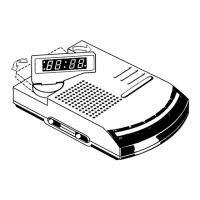
Clock Radio
AJ 3010
ALARM
T
IM
E
DISPLA
Y
A
LA
R
M
ALARM
RESET/
RA
D
IO
OF
F
A
L
A
R
M
V
O
L
U
M
E
S
L
E
E
P
O
F
F
R
A
D
I
O
B
U
Z
Z
E
R
A
J
3
0
1
0
C
L
O
C
K
RADIO
F
M
A
M
ALARM
SET
RAD
IO O
N
TIME
SET
ALA
RM
RESET/
RA
DIO
O
FF
A
L
A
R
M
V
O
L
U
M
E
S
L
E
E
P
O
F
F
R
A
D
I
O
B
U
Z
Z
E
R
A
J
3
0
1
0
C
L
O
C
K
RADIO
F
M
A
M
ALARM
SET
R
AD
IO
ON
TIME
SET
R
E
P
E
A
T
A
L
A
R
M
B
R
IG
H
T
N
E
S
S
C
O
N
T
R
O
L
R
E
P
E
A
T
A
L
A
R
M
B
R
IG
H
T
N
E
S
S
C
O
N
T
R
O
L
R
E
P
E
A
T
A
L
A
R
M
B
R
I
G
H
T
N
E
S
S
C
O
N
T
R
O
L
BAN
D
• MW
• FM
TUNING
BAN
D
• MW • FM
TUNING
100 • 104 • 108
Megahartz
FM
1
0
0
0
1
3
0
0
1
6
0
0
k
ilo
h
e
r
t
z
M
W
FM
M
e
g
a
h
a
rtz
88 • 92 • 96 •
M
W
k
ilo
h
e
r
tz
530 630 800
100 • 104 • 108
Megahartz
FM
1
0
0
0
1
3
0
0
1
6
0
0
k
il
o
h
e
r
tz
M
W
FM
M
e
g
a
h
a
rtz
88 • 92 • 96 •
M
W
k
ilo
h
e
rtz
530 630 800
XP AJ3010/00 20-06-2000 16:33 Pagina 1

Other manuals for Philips AJ 3010

Question and Answer IconNeed help?

Do you have a question about the Philips AJ 3010 and is the answer not in the manual?

Summary

Product Controls Overview

Display and Time Settings

Shows clock/alarm times and allows setting clock and alarm.

Radio and Alarm Operations

Controls for radio playback, alarm modes (buzzer/radio), volume, and tuning.

Brightness, Sleep, and Repeat Alarm

Adjusts display brightness, sets sleep timer, and activates repeat alarm.

Power, Reset, and Backup

Details mains cord, reset function, battery compartment, and aerial.

Installation and Setup

Power Supply and Demo Mode

Connects to mains supply, activates demo mode, and exits it to set time.

Power Breakdown Backup

Uses batteries for backup to retain clock and alarm times during power failure.

Basic Features and Operation

Illumination Brightness Control

Adjusts display brightness through different levels.

Setting the Clock

Steps to set the current time using HR and MIN buttons.

Radio Operation

Instructions for switching on, tuning, and switching off the radio.

Alarm Functions

Setting the Alarm Time and Mode

Sets the alarm time and selects alarm mode (buzzer or radio).

Switching Off The Alarm

Methods to stop the alarm: 24-hour reset, complete cancellation, or repeat.

Repeat Alarm Function

Repeats the alarm call at 8 to 9 minute intervals.

Sleep Timer and Maintenance

Sleep Timer Operation

Sets a timer to automatically switch off the radio after a selected period.

Maintenance Recommendations

Advice on storage, avoiding environmental hazards, and cleaning the unit.

Troubleshooting Guide

No Sound or Power Issues

Addresses problems with volume not adjusted or plug connection.

Display and Control Malfunctions

Solutions for no display backlight or unresponsive controls.

Audio Interference and Reception

Fixes for crackling sounds during FM/AM broadcasts and weak reception.

Alarm Not Functioning

Diagnoses issues with alarm time/mode setting, volume, or radio tuning.

Summary

Product Controls Overview

Display and Time Settings

Shows clock/alarm times and allows setting clock and alarm.

Radio and Alarm Operations

Controls for radio playback, alarm modes (buzzer/radio), volume, and tuning.

Brightness, Sleep, and Repeat Alarm

Adjusts display brightness, sets sleep timer, and activates repeat alarm.

Power, Reset, and Backup

Details mains cord, reset function, battery compartment, and aerial.

Installation and Setup

Power Supply and Demo Mode

Connects to mains supply, activates demo mode, and exits it to set time.

Power Breakdown Backup

Uses batteries for backup to retain clock and alarm times during power failure.

Basic Features and Operation

Illumination Brightness Control

Adjusts display brightness through different levels.

Setting the Clock

Steps to set the current time using HR and MIN buttons.

Radio Operation

Instructions for switching on, tuning, and switching off the radio.

Alarm Functions

Setting the Alarm Time and Mode

Sets the alarm time and selects alarm mode (buzzer or radio).

Switching Off The Alarm

Methods to stop the alarm: 24-hour reset, complete cancellation, or repeat.

Repeat Alarm Function

Repeats the alarm call at 8 to 9 minute intervals.

Sleep Timer and Maintenance

Sleep Timer Operation

Sets a timer to automatically switch off the radio after a selected period.

Maintenance Recommendations

Advice on storage, avoiding environmental hazards, and cleaning the unit.

Troubleshooting Guide

No Sound or Power Issues

Addresses problems with volume not adjusted or plug connection.

Display and Control Malfunctions

Solutions for no display backlight or unresponsive controls.

Audio Interference and Reception

Fixes for crackling sounds during FM/AM broadcasts and weak reception.

Alarm Not Functioning

Diagnoses issues with alarm time/mode setting, volume, or radio tuning.

Philips AJ 3010 Specifications

General IconGeneral
BrandPhilips
ModelAJ 3010
CategoryClock Radio
DisplayYes
AlarmYes
Dual AlarmNo
Snooze FunctionYes
Radio TunerYes
Tuner BandsFM

Related product manuals