EasyManua.ls Logo

Philips AJ 3180 - User Manual

Philips AJ 3180
8 pages
Print Icon
To Next Page IconTo Next Page
Loading...
Question and Answer IconNeed help?

Do you have a question about the Philips AJ 3180 and is the answer not in the manual?

Summary

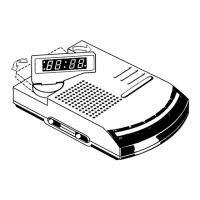
Product Controls Identification

Display

Shows the time and alarm indicator.

Slumber Function

Button to activate the sleep timer for the radio.

Hour Setting

Button used for setting the hours for time and alarm.

Repeat Alarm;Slumber Off

Temporarily silences alarm or turns off slumber.

Minute Setting

Button used for setting the minutes for time and alarm.

Waveband Selection

Switch to select between radio wavebands (AM/FM).

Tuning Dial

Dial for locating radio stations.

Volume Control

Adjusts the audio output volume.

Time Set Switch

Switch to set the clock or alarm time.

Function Switch

Selects operating mode: radio, alarm, or off.

Power Supply and Connection

Power Supply Requirements

Specifies voltage and frequency for connection.

Disconnecting the Unit

Instructions for safely unplugging the device.

Radio Operation

Turning Radio On

Steps to activate and tune the radio.

Turning Radio Off

Procedure to switch the radio off.

Aerial Adjustment

Guidance for optimizing FM reception.

Clock and Alarm Functions

Setting the Clock Time

Procedure for adjusting the current time display.

Setting the Alarm Time

How to configure the desired wake-up time.

Alarm Activation Methods

Options for waking up: radio or buzzer.

Turning Off the Alarm

Methods to silence the alarm temporarily or permanently.

Slumber Function Details

Activating Slumber

How to use the feature to fall asleep to the radio.

Slumber Time Duration

Specifies the default duration for the sleep timer.

Disabling Slumber

How to switch off the radio before the slumber time ends.

Power Failure Handling

Impact of Power Outage

What happens to the clock radio during a power failure.

Battery Backup Function

Using a battery to maintain clock function during outages.

Battery Replacement Recommendation

Advice on periodic battery replacement for backup.

Maintenance and Safety

Long-Term Storage

Recommendations for storing the device when not in use.

Cleaning Instructions

Guidelines for cleaning the clock radio safely.

Environmental Precautions

Warnings about heat, moisture, and placement.

UK Mains Plug Wiring

Specific instructions for wiring a UK mains plug.

Fuse Requirements

Guidance on appropriate fuse ratings for the apparatus.

EC Radio Interference Compliance

Statement of conformity with European regulations.

Type Plate Location

Information on where to find the device's identification plate.

Summary

Product Controls Identification

Display

Shows the time and alarm indicator.

Slumber Function

Button to activate the sleep timer for the radio.

Hour Setting

Button used for setting the hours for time and alarm.

Repeat Alarm;Slumber Off

Temporarily silences alarm or turns off slumber.

Minute Setting

Button used for setting the minutes for time and alarm.

Waveband Selection

Switch to select between radio wavebands (AM/FM).

Tuning Dial

Dial for locating radio stations.

Volume Control

Adjusts the audio output volume.

Time Set Switch

Switch to set the clock or alarm time.

Function Switch

Selects operating mode: radio, alarm, or off.

Power Supply and Connection

Power Supply Requirements

Specifies voltage and frequency for connection.

Disconnecting the Unit

Instructions for safely unplugging the device.

Radio Operation

Turning Radio On

Steps to activate and tune the radio.

Turning Radio Off

Procedure to switch the radio off.

Aerial Adjustment

Guidance for optimizing FM reception.

Clock and Alarm Functions

Setting the Clock Time

Procedure for adjusting the current time display.

Setting the Alarm Time

How to configure the desired wake-up time.

Alarm Activation Methods

Options for waking up: radio or buzzer.

Turning Off the Alarm

Methods to silence the alarm temporarily or permanently.

Slumber Function Details

Activating Slumber

How to use the feature to fall asleep to the radio.

Slumber Time Duration

Specifies the default duration for the sleep timer.

Disabling Slumber

How to switch off the radio before the slumber time ends.

Power Failure Handling

Impact of Power Outage

What happens to the clock radio during a power failure.

Battery Backup Function

Using a battery to maintain clock function during outages.

Battery Replacement Recommendation

Advice on periodic battery replacement for backup.

Maintenance and Safety

Long-Term Storage

Recommendations for storing the device when not in use.

Cleaning Instructions

Guidelines for cleaning the clock radio safely.

Environmental Precautions

Warnings about heat, moisture, and placement.

UK Mains Plug Wiring

Specific instructions for wiring a UK mains plug.

Fuse Requirements

Guidance on appropriate fuse ratings for the apparatus.

EC Radio Interference Compliance

Statement of conformity with European regulations.

Type Plate Location

Information on where to find the device's identification plate.

Philips AJ 3180 Specifications

General IconGeneral
BrandPhilips
ModelAJ 3180
CategoryClock Radio
Display TypeLED
Radio TunerAnalog
Presets20
Alarm FunctionYes
Alarm typeBuzzer, Radio
Snooze FunctionYes
Sleep timerYes
Power SourceAC
Power supply230V
Tuner BandsFM
Backup batteryYes

Related product manuals