EasyManua.ls Logo

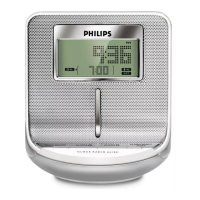
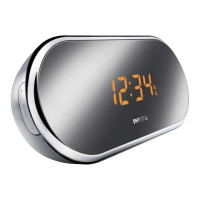
Philips AJ100/12 - User Manual

Philips AJ100/12
14 pages
Print Icon
To Next Page IconTo Next Page
Loading...
User manual
Clock Radio
AJ100
IFU_AJ100_eur_ENG 2006.11.10 13:42 Page 1

Other manuals for Philips AJ100/12

Question and Answer IconNeed help?

Do you have a question about the Philips AJ100/12 and is the answer not in the manual?

Summary

Clock Radio User Manual

Product Controls and Setup

Supplied Accessories

Lists the included AC adapter for the clock radio.

Top and Front Panel Controls

Details buttons and functions on the front and top of the clock radio.

Side Panel Controls and Power

Side Panel Controls

Describes the buttons and ports located on the side of the clock radio.

Power Supply Connection

Information on connecting the mains adapter and power requirements.

Core Clock Radio Functions

Self-Powered Back-up

Explains storing settings during power interruptions.

Basic Features: Reset and Brightness

Covers reset functionality and display illumination adjustment.

Setting the Clock Time

Step-by-step guide to setting the current time on the clock radio.

Radio Operation

Radio On;Off and Volume

Instructions for switching the radio on/off and adjusting sound level.

Tuning Radio Stations

Details automatic and manual tuning methods for radio reception.

Storing and Using Preset Stations

Guide to saving and recalling favorite radio stations.

Alarm Settings and Management

Alarm Modes and Setup

Explains the two alarm modes (radio and buzzer) and general setup.

Setting Alarm Time and Mode

Step-by-step process for setting alarm times and selecting modes.

Switching Off and Canceling Alarms

Methods to stop alarms, including 24-hour reset, repeat, and complete cancellation.

Sleep Timer Function

About the Sleep Timer

Explains the built-in sleep timer function for automatic radio shutoff.

Setting and Deactivating Sleep

Steps to activate, select time options, and deactivate the sleep timer.

Maintenance, Safety, and Disposal

Maintenance and Safety Precautions

Guidelines for installation, cleaning, and avoiding hazards.

Product Disposal Instructions

Instructions on responsible disposal of the product and its components.

Troubleshooting Common Issues

Summary

Clock Radio User Manual

Product Controls and Setup

Supplied Accessories

Lists the included AC adapter for the clock radio.

Top and Front Panel Controls

Details buttons and functions on the front and top of the clock radio.

Side Panel Controls and Power

Side Panel Controls

Describes the buttons and ports located on the side of the clock radio.

Power Supply Connection

Information on connecting the mains adapter and power requirements.

Core Clock Radio Functions

Self-Powered Back-up

Explains storing settings during power interruptions.

Basic Features: Reset and Brightness

Covers reset functionality and display illumination adjustment.

Setting the Clock Time

Step-by-step guide to setting the current time on the clock radio.

Radio Operation

Radio On;Off and Volume

Instructions for switching the radio on/off and adjusting sound level.

Tuning Radio Stations

Details automatic and manual tuning methods for radio reception.

Storing and Using Preset Stations

Guide to saving and recalling favorite radio stations.

Alarm Settings and Management

Alarm Modes and Setup

Explains the two alarm modes (radio and buzzer) and general setup.

Setting Alarm Time and Mode

Step-by-step process for setting alarm times and selecting modes.

Switching Off and Canceling Alarms

Methods to stop alarms, including 24-hour reset, repeat, and complete cancellation.

Sleep Timer Function

About the Sleep Timer

Explains the built-in sleep timer function for automatic radio shutoff.

Setting and Deactivating Sleep

Steps to activate, select time options, and deactivate the sleep timer.

Maintenance, Safety, and Disposal

Maintenance and Safety Precautions

Guidelines for installation, cleaning, and avoiding hazards.

Product Disposal Instructions

Instructions on responsible disposal of the product and its components.

Troubleshooting Common Issues

Philips AJ100/12 Specifications

General IconGeneral
BrandPhilips
ModelAJ100/12
CategoryClock Radio
Display TypeLED
Radio TunerFM
Presets20
Snooze FunctionYes
Sleep TimerYes
Battery BackupYes
Weight0.5 kg
AlarmDual Alarm
Power SourceAC Power

Related product manuals