Enjoy mood light
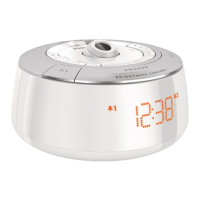
The clock radio features decorative mood light with different colors.
To turn on/off mood light:
1 Press to turn on mood light.
You can press •
twice to change mood light to low
brightness level.
2 To turn off mood light, press again.
To select mood light color:
1 Press COLOR.
The color of mood light begins to change gradually. »
2 To select your favorite color, press COLORagaintoconrm.
To wake up with mood light:
1 SwitchWAKE TO LIGHT to ON.
To deactivate this feature, switch • WAKE TO LIGHT to OFF.
Adjust display brightness
Press BRIGHTNESS CONTROL repeatedly to select different
brightness level: high, mid, and low.
7 Product information
Note
Product information is subject to change without prior notice. •



 To Next Page