EasyManua.ls Logo

Philips AS660C/41 - Page 10

Philips AS660C/41
128 pages
Print Icon
To Next Page IconTo Next Page
To Previous Page IconTo Previous Page
Loading...
650
06
SOd
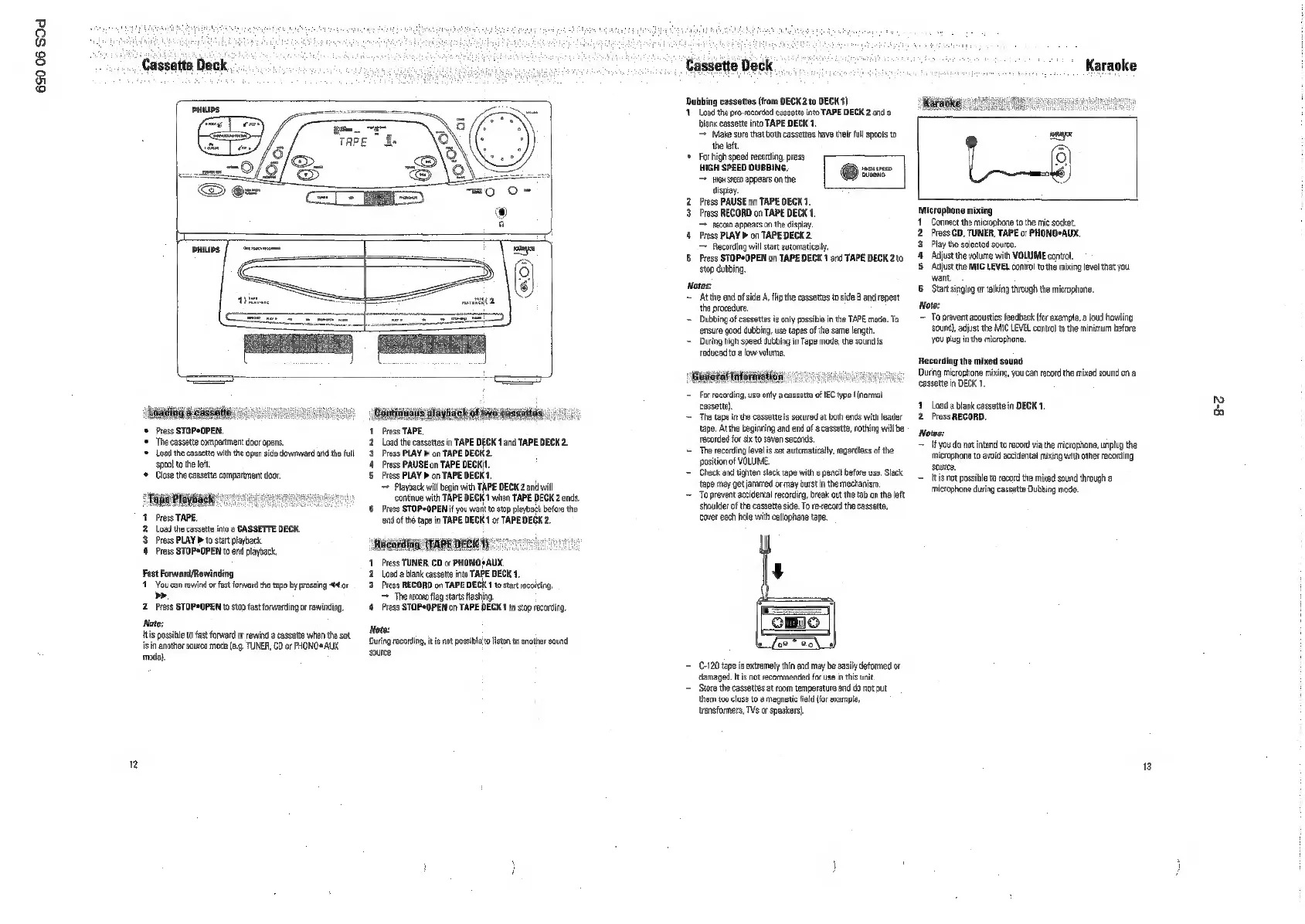
Cassette
Deck.
+
Press
STOPCOPEN.
‘The
cassette
compartment
door
opens.
*
Load
the
cassete
withthe
open
side
downward
and
the
ful
spool
ta
the
lft.
+
Close
the
cassette
compartment
door.
‘Tapa
Playbacke
*
1
Press
TAPE.
2.
Load
the
cessette
into
@
CASSETTE
DECK.
3
Press
PLAY
>to
slr
playback
4
Press
STOP+OPEN
to
end
playback.
Fast
Forward/Rewinding
11
You
can
cowind
or
fast
forward
the
tape
by
pressing
4
or
>.
2.
Press
STOPeOPEN
to
stop
fast
forwarding
of
rewinding
Note:
itis
possible
to
fast
forward
or
rewind
a
cassette
when
te
set
iin
another
source
mode
(e.g.
TUNER,
CD
or
PHONO*
AUX
mode)
2
Contos
playhaick
of
wa
dassatios,
Press
TAPE,
Load
the
cassettes
in
TAPE
DECK
1
and
TAPE
DECK
2
Press
PLAY
>
on
TAPE DECK
2.
Press
PAUSE
on
TAPE
DECK.
Press
PLAY
b
on
TAPE
DECK
1
Playback
will
bgia
with
TAPE
DECK
2
and wil
continue
with
TAPE
DECK
1
when
TAPE DECK
2
ends
6
Press
STOPeOPEN
if
you
want
to
stop
playback
before
the
tend
ofthe
tape
in
TAPE
DECK
1
or
TAPE
DECK
2.
1.
Press
TUNER,
CD
or
PHONO?
AUX.
2
Load
a
blank
cassette
into
TAPE
DECK
1,
2
Press
RECORD
on
TAPE
DECK
1
to
start
rocotding.
=
The
reaono
fag
starts
flashing.
4
Press
STOPeOPEN
on
TAPE DECK
1
to
stop
recording.
Note:
‘During
recording,
itis
not
possible
to
listen
to
another
sound
source
Cassette
Deck
Dethng
essnts
(rom
DECK
200
DECK)
Load
the
pre-recorded
cassette
into
TAPE
DECK
2
and a
blank
cassette
into
TAPE
DECK
1.
=
Make
sure
that
both
cassettes
have
their
full
spools
to
the
let.
‘©
Forhigh
speed
recording,
press
HIGH
SPEED
DUBBING.
snsusreco
reo
appears
onthe
icuaeh
display.
Press
PAUSE
on
TAPE
DECK
1.
Prass
RECORD
on
TAPE
DECK
1
recon
appears
on
the
dspay
4
ress
PLAY
on
TAPE
DECK
2
=
Recording
will
start
automaticaly
85
Press
STOP*OPEN
on
TAPE
DECK
1
and
TAPE
DECK
2to
stop
dubbing
Notes:
Atte
end
of
side
A
lip
the
cassettes
to
side
B
and
repeat
the
procedure.
~
Dubbing
of
cassettes
is
only
possible
inthe
TAPE
made.
To
ensure
good
dubbing,
use
tapes
ofthe
same
length.
~
During
high
speed
dubbing
in
Tape
mode,
the
sound
is
reduced
10
a
low
volume.
=
For
recording,
use
only
2
cassette)
The
tape
inthe
cassette
is
secured
at
bath
ends
with
leader
tape,
At
the
beginning
and
end
of
a
cassette,
nothing
wil
be
recorded
fr
six
to
seven
seconds.
~The
recording
level
is
set
automatically,
regardless
of
the
position
of
VOLUME,
~~
Check
end
tighten
stack
tape
with
a
penell
before
use,
Slack
tape
may
get
jammed
or
may
burst
in
the
mechanism,
~
To
prevent
accidental
recording,
break
out
the
tab
onthe
left
shoulder
ofthe
cassette
side.
To
record
the
cassette,
cover
eath
hole
with
cellophane
tape,
ett
oF
IEC
type
{normal
=
€-120
tape
is
extremely
thin
and
may
be
easily
deformed
or
damaged.
tis
not
recommended
for
use
in
his
unit
‘Store
the
cassettes
at
room
temperature
and
do
not
put
them
to
clase
to
magnetic
field
{for
example,
transformers,
TVs
or
speakers).
a.
ae
ae
Microphone
mining
Connect
the
microphone
tothe
mic
socket.
Press
CD,
TUNER,
TAPE
or
PHONO*AUX.
Play
the
selected
source.
‘Adjust
the
volume
with
VOLUME
contol,
Adjust
the
MIC
LEVEL
contol
to
the
mixing
level
that
you
want
Star
singing
or
talking
through
the
microphone.
Note:
=
To
prevent
avoustcs
feedback
{fr
example,
a
loud
howling
sour},
adjust
the
MIC
LEVEL
contralto
the
minimum
before
you
plug
in
the
microphone.
Recording
the
mixed sound
‘uring
mirophone
mixing,
you
can
record
the
mixed sound
on
@
cassette
in
DECK
1
1
Load
a
blank
cassette
in
DECK
1,
2
Press
RECORD.
Notes:
Ifyou
do
not
intend
to
record
via
the
microphone,
unplug
the
‘microphone
to
avoid
accidental
mixing
with
other
recording
source,
[tis
not
possible
to
record
the
mixed
sound
through
a
rmiophone
during
cassette
Dubbing
made.
ee

Related product manuals