EasyManua.ls Logo

Philips AS660C/41 - Page 9

Philips AS660C/41
128 pages
Print Icon
To Next Page IconTo Next Page
To Previous Page IconTo Previous Page
Loading...
850
06
SOd
10
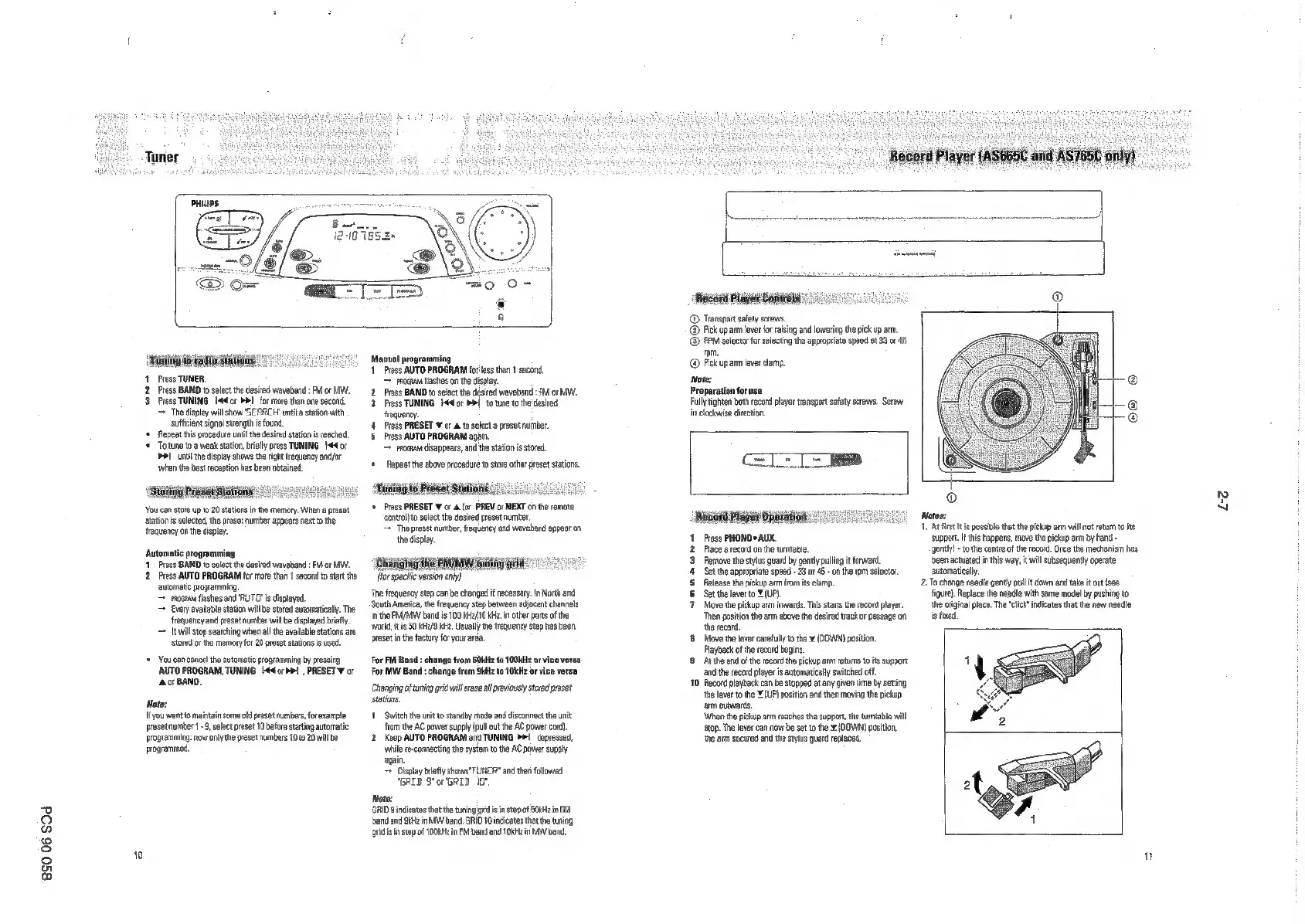
1.
Press
TUNER,
2
Press
BAND
to
select
the
desired
waveband
:
FM
or
MI.
3.
Press
TUNING
[44cr
PI
for
more
than one
second,
=
The
display
will
show
SEARCH
th
sufficient
signal
strength
is
found,
‘+
Repeat
this
procedure
until
the
desired station
is
ached.
‘+
Totune
toa
weak
station,
briefly
press
TUNING
[44
or
>>
until
the
display
shows
the
right
frequency
and/or
‘when
the
best
reception
has
been
obtained
‘You
can
store
upta20
stations
inthe
memary.
When
a
preset
stations
selected,
the
preset
umber
appears
net
to
the
frequency
onthe
display.
‘Automatic
programming
11
Press
BAND
to
solect
the
desired
waveband
:
FM
or
MW.
2
Press
AUTO
PROGRAM
for
more
than
1
second
to
star
the
automatic
programming
moguus
flashes
and
RUTO"
is
displayed.
Every
avaliable
station
wil
be
stored
automatically.
The
frequency
and
preset
number
will
be
displayed
brie
~
till
stop
searching
when
al
the
availabe
stations
are
stored
or
the
memory
for
20
preset
stations
is
used.
+
Youcan
canoe
th
automatic
programming
by
oressng
AUTO
PROGRAM,
TUNING
[44
orb!
,
PRESET
¥
or
‘Ao
BAND,
Note:
It
you
want
to
maintain
some
old
preset
numbers,
for
example
preset
number
1-9,
solactpreset
10
before
starting
automatic
programming:
now
only
the
preset
numbers
10
to
20
willbe
programmed,
Manual
programming
1
Press
AUTO
PROGRAM
foress
than
1
second,
=
rognant
flashes
onthe
display.
2
Press
BAND
to
select
the
desired
waveband
:
FM
or
MW.
3.
Press
TUNING
I4or
Pi
totune
tothe
desiced
frequency.
4.
Press
PRESET
¥
or
a.
to
selecta
preset
number.
5
Press
AUTO
PROGRAM
apain.
=
rrocnan
disappears,
and
the
station
is
stored
Repeat
the
above
procedure
to
store
other
preset
stations.
Taniag
to:
Preset
Stations
2.0.)
+
ress
PRESET
¥
or a.
(or
PREV
oc
NEXT
onthe
emote
‘contralto
solect
the
desired
preset
number.
=
The
preset
number,
frequency
and
waveband
appeor
on
the
display
‘Chaiiglig
he
EMMnW
saning
Bd
for
specific
version
ony)
‘The
frequency
step
canbe
changed
if
necessary.
In
Nrth
and
South
America,
the
frequency
step
between
adjacent
channels
in
the
PM/MWY
band
is
100
kHa/10
KH
nother
parts
ofthe
‘wor
its
80
kHa/9
Ke,
Usually
the
frequency
step
has
been
preset
inthe
factory
for
your
ara,
For
FM
Band
:
change
from
50kHz
to
100kHz
or
vice
versa:
For
MW
Band
:
change
from
Skt
to
10kHz
or
vice
versa
Changing
of
tuning
grid
wil
erase
all
previously
stared
preset
stations.
1
Switch
the
unt
to
standby
mode
and
disconnect
tha
unit
{onthe
AC
power
suoply
(oul
out
the
AC
power
cord.
2.
Keep
AUTO
PROGRAM
and
TUNING
>>!
dopressed,
‘while
re-connecting
the
system
tothe
AC
power
supply
and
then
followed
‘BRIB
S*or‘GRID.
1G
Note:
GID
indicates
thatthe
tuning
gris
instep
of
SOKHe
in
FM
bend
and
Ski
in
MW
bard.
GRID
10
indicates
tha the
tring
Aidisin
step
of
100k
in
FM
banc
and
TOK
in
MW
band,
@
Transpar
safety
screws.
@
Fick
up
aim
lever
for
rising
and
lowering
the
pick
up
arm.
©
PPM
seiector
or
selecting
the
approoriate
sped
et 33
or
45
‘om,
Fick
up
am
lever
clamp,
Note:
Preparation
for
use
Fully
tighten
both
record
payer
transport
safety
screws.
Screw
in
clockwise
direction.
Geli
Record
Player
Operation:
Press
PHONO
AUX.
Pace
a
record
onthe
turntable
Remove
the
stylus
guard
by
gently
poling
forward
Set
the
aporoptate
speed
-
33
of
45
-n
the
rpm
selector
Release
the
pickup
arm
from
its
clamp.
Set
the
lever
to
¥
(UP)
Move
the
pickup
arm
inwards.
This
stars
the
record
payer.
‘Then
postion
the
arm
above
the
desired
track
oF
passage
on
‘the
cord.
{8
Move
the
lever
carefully
tothe
x
(DOWN)
position
Playback
ofthe
record
begins,
9
Atthe
end
ofthe
record
the
pickup
arm
returns
to
its
support
and
the
record
player
i
automatically
switched
off
10
Record
playback
can
be
stopped
at
eny
given
time
by
setting
‘the
lever
tothe
¥
(UP)
position
ane
then
moving
the
pickup
arm
outwards
\When
the
pickup
arm
reaches
the
suppor,
the
tumtable
will
stop.
The
lever
can
now
beset
tothe
x
(DOWN)
position,
the
arm
secured
andthe
stylus
guard
replaced.
Notes:
1.
Atfrst
it
is
possible
thatthe
pickup
arm
will
not
return
to
its
suppor.
If
this
heppens,
mave
the
pickup
arm
by
hand
~
(gently!
-
to
the
centre
of
the
record.
Once
the
mechanism
has
been
actuated
in
this
way,
it
wil
subsequent
operate
automatically
2.
To
change
needle
gently
pul
it
down
and
take
it
out
(see
figute)
Replace
the
needie
with
same
model
by
pushing
to
‘the
original
place,
The
“lick”
indicates
that
the
new
needle
is
fined,
"
Le

Related product manuals