EasyManua.ls Logo

Philips AS660C/41 - Page 8

Philips AS660C/41
128 pages
Print Icon
To Next Page IconTo Next Page
To Previous Page IconTo Previous Page
Loading...
280
06
SOd
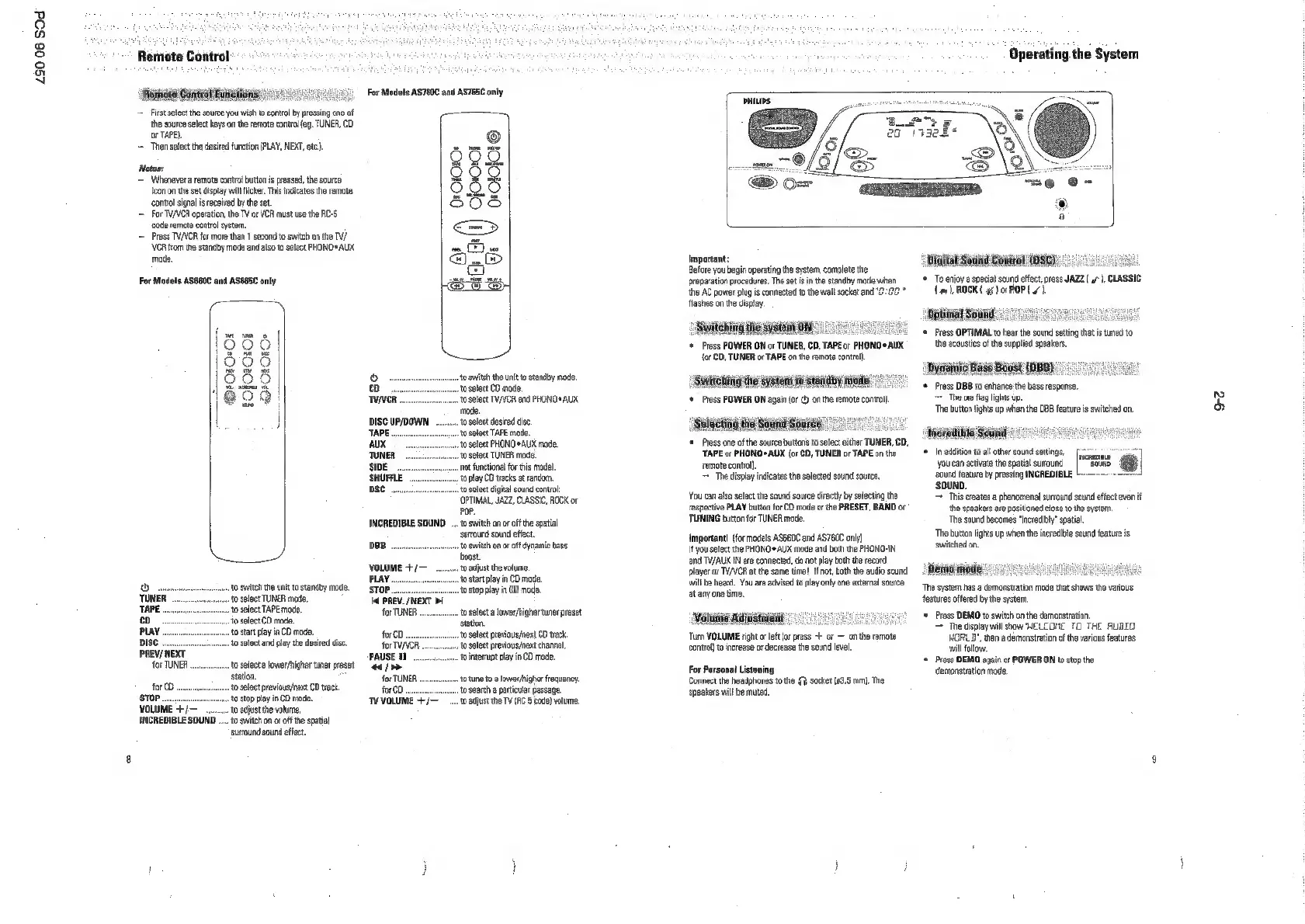
Remote
Control:
; '
i
Remnote
Control
Faiietions:
[90],
For
Models
AS760C
and
AS7E5C
only
=
First
select
the
source
you
wish
to
control
by
pressing
one
of
—_——
the
source
select
keys
on
the
remote
control
{eg.
TUNER,
CD
or
TAPE}.
Then
select
the
desired
function
(PLAY,
NEXT,
etc.)
Notes:
=
Whenever
a
remote
control
button
is
pressed,
the
sourco
icon
on
the
set
display
will
icker.
This
indicates
the
remote
control
signal
is
received
by
the
set
=
For
TVAVER
operation,
the
TV
or
VOR
must
use the
RC-S
code
rernate
control
system.
=
Press
TV/VCR
for
more than
1
second
to
switch
on
the
TV/
OROIOKO+
CJOOo!
OHOIKjOLS
Q
VOR
from
te
standby
mod
and
also
ta
soloct
PHONO*
AUX
Dw
mode.
BQ.
©
t)
For
Models
ASS60C
and
ASBESC
only
LS
(636)
965.
prorat
Oro
eo:
|
o
‘0
switch
the
unit
to
standby
mode,
{eae
aoe
|
co
sonnet
Slest
CD
mode,
|
Goo
TCR...
to
select
TV/VCA
snd
PHONG®
AUX
mode.
lL
|
DISC
UP/DOWN
........to
select
desired
disc.
TAPE
voc
onnonnnnnn
0
Sect
TAPE
mode
AUX
«to
select
PHOND®AUX
mode,
‘TUNER
sven
Sect
TUNER
mode
SE...
“not
fnetional
for
this
model
SHUFFLE
to
pay
C0
tracks
at
random.
DSC
penne
Slt
cigital
sound
control
OPTIMAL,
JAZZ,
CLASSIC,
ROCK
or
POP.
INCREDIBLE
SOUND
to
switch
on or
off
the
spatial
suround
sound
effect,
DB
ev
nnnnnn
tO
Switch
ono
off
dynamic
bass
Ka
want
‘VOLUME
+/—
to
adjust
the
volume,
PLAY...
to
start
play
in
CD
mode.
Dons
to
switch
the
unit
to
standby
made.
gtop
“to
stop
playin
CO
mode.
TUNER
nnn
f0
Sect
TUNER
mode
1
PREV./
NEXT
>I
bie
~~
to
solect
TAPE
mode.
for
TUNER
‘0
select
a
lower/higher
tuner
preset
co.
“0
Select
CD
mode,
station
PLAY
ost
play
ia
CO
mode,
00
CD
orwnnunnnnnnrt0
Slot
previous/next
CD
eck
DISC
oo
enunnnnent0
Select
and
play
the
desired
disc
for
TV/VCR
to
select
previous/next
channel
PREV/
NEXT
PAUSE
11
1
interupt
payin
CD
mode.
FOFTUNER
novo
set
lower
ner
es
44
oy
station
for
TUNER
to
tne
13
lowerhighef
tato
Secneee
at
tours
slovri:
fear
stop
to
stop
play
in
CO
mode
TWVOLUME
“10
adjust
the
TV
(AC
5
code
volume
VOLUME
+/—"
to
acjust
the
volume
INCREDIBLE
SOUND
....
to
switch
on
o
ofthe
spatial
sutround
sound
effect.
Operating
the
System
Important
:
Before
you
begin
operating
the
system,
complete
the
preparation
procedures.
The
set
isin
the
standby
mode when
‘the
AC
power
plug
is
connected
to
the
wall
socket
and
"2:20
*
flashes
on
the
dispay,
Switching
the
system
ONS
‘Press
POWER
ON
or
TUNER,
CD,
TAPEor
PHONG
AUX
{or
€D,
TUNER
or
TAPE
on
the
emate
conto).
«
Switehitig
the
system
to
standby
mode"
‘Press
POWER
ON
again
or
¢)
onthe
remote
contol
electing
the
Sound
Sour:
°°
:
‘ress
one
af
the
sou
bution
to
sooo
either
TUNER,
0D,
‘TAPE
ox
PHONO
AUX
(or
CD,
TUNER
or
TAPE
onthe
remote
contol.
~The
display
indicates
the
selected
sound
source,
‘You
can
also
select
the
sound
source
directly
by
selecting
the
respective
PLAY
button
for
CO
mode
or
the
PRESET,
BAND
or
TUNING
button
for
TUNER
mode.
Important!
(for
models
ASGEDC
and
AS76OC
only}
Ifyou
select
the
PHONO*
AUX
mode
and
both
the
PHONO-IN
‘and
TV/AUX
IN
are
connected,
donot
play
both
the
record
player
or
TV/VCR
at
the
same
time!
If
not,
both
the
audio
sound
‘willbe
heard.
You
ae
advised
to
play onty
one
external
source
at
any
one
time.
‘Voluinie
Adjastigiit:
‘Turn
VOLUME
right
or
lft
(or
press
+
or
on
the
remote
control)
o
increase
or
decrease
the
sound
level.
For
Personal
Listening
Connect
the
headphones
tothe
$7}
socket
(63.6
mm,
The
speakers
will
be
muted.
“Digital
Souiid
Cowtrot
(DSC):
'*
Toenjoy
@
special
sound
effect,
press
JAZZ
y*
),
CLASSIC
(a1
BOCK
gs)
or
POP
4).
©
Press
OPTIMAL
to
hear
the
sound
setting
that
is
tuned
to.
the
acoustics
of
the
supplied
speakers.
«
Dyniamnig
'*
Press
DBB
to
enhance
the
bass
response.
>
The
oes
fiag
lights
up.
‘The
button
tights
up
when
the
DB
feature
is
switched
on.
‘Whredile
Souindl°
‘©
In
addition
to
al
other
sound
settings,
fount
Yaesu
[SRE
‘sound
feature
by
pressing
INCREDIBLE
=
‘SOUND.
This
creates
a
phenomenal
suround
sound
effect
even
it
the
speakers
are
positioned
cose
tothe
system,
‘The
sound
becomes
“increibl"
spatial
‘The
button
lights
up
when
the
incredible
sound
feature
is,
‘switched
on.
“Denia
od
The
system
has
a
demonstration
made
that
shows
the
various
features
offered
by
the
system,
‘+
Press
DEMO
to
switch
onthe
demonstration,
e
display
will
sbow
WELCOME
TO
THE
RUBIO
}ORL_D",
then
a
demonstration
ofthe
various
features
wil
follow.
‘©
Press
DEMO
again
or
POWER
ON
to
stop
the
demonstration
mode,
oe

Related product manuals