EasyManua.ls Logo

Philips AS660C/41 - Page 7

Philips AS660C/41
128 pages
Print Icon
To Next Page IconTo Next Page
To Previous Page IconTo Previous Page
Loading...
950
06
SOd
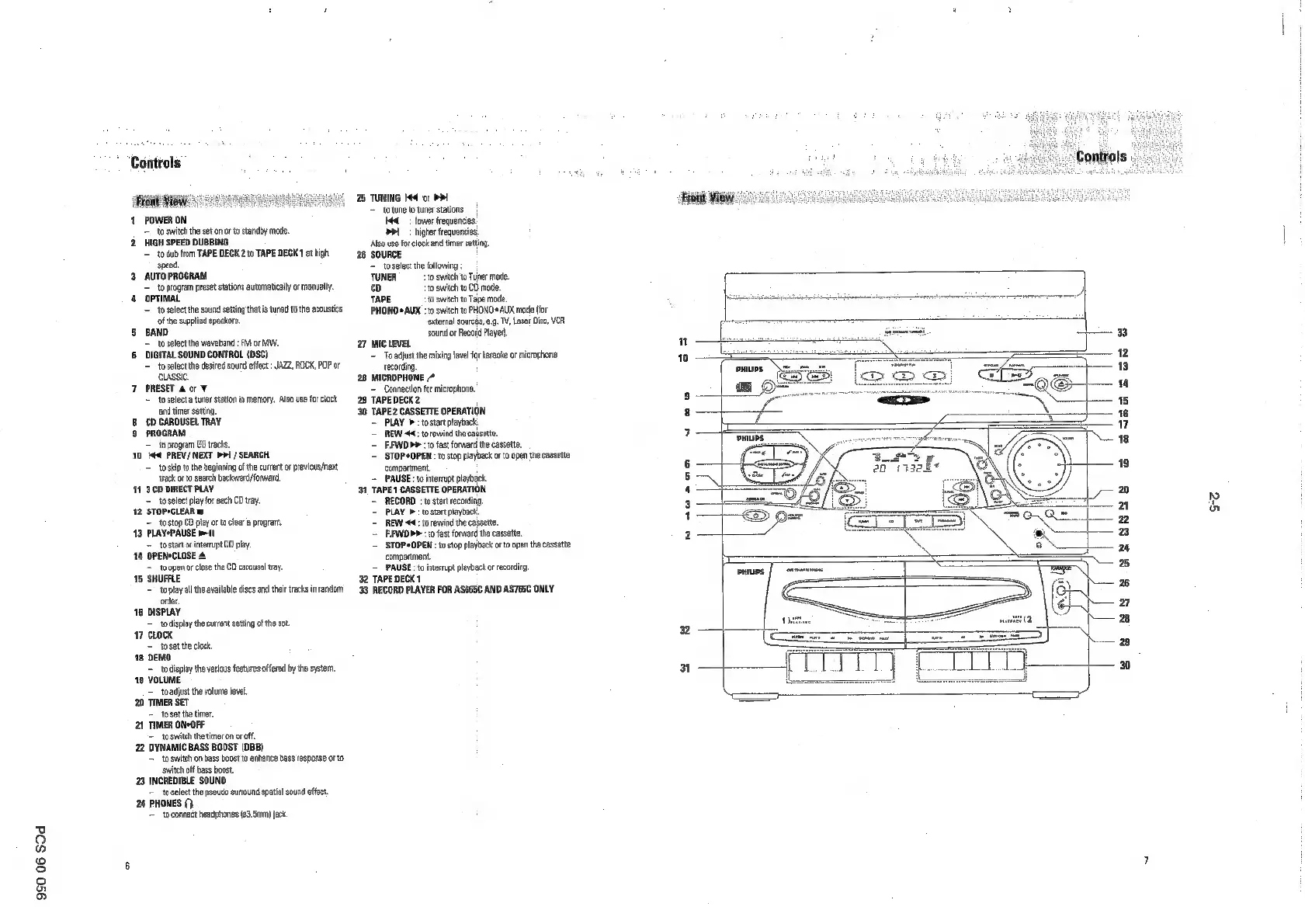
Controls
1
POWER
ON
=
to
switch
the set
on
orto
standby
mode
2.
HIGH
SPEED
DUBBING
=
to
dub
from
TAPE DECK
2
to
TAPE
DECK
1
at
high
speed.
3
AUTO
PROGRAM
=
to
progrem
preset
stations
avtomaticaly
or
manvaly
4
OPTIMAL
=
to
select
the
sound
setting
that
is
tuned
to
the
acoustics
ofthe
supplied
speakers.
5
BAND
to
select
the
waveband
:
FM
or
MW,
6
DIGITAL
SOUND
CONTROL
(DSC)
~
tosolect
the
desired
sound
effec:
JAZZ, ROCK,
POP
or
CLASSIC
7
PRESET
&
or
¥
~
toselec
tuner
sation
in
memory.
Also
use
for
cock
and
timer
setting
8
CD
CAROUSEL
TRAY
9
PROGRAM
=
to
program
CD
tracks.
10
l44
PREV
/NEXT
D>
/SEARCH
=
to
skp
tothe
beginning
ofthe
curent
or
previous/next
track
oto
search
beckward/orwerd
11
300
DIRECT
PLAY
=
to
select
lay
for
each
CD
tray.
12
STOPSCLEAR®
=
to
stop
60
piay
orto
clear
program.
13
PLAYSPAUSE
mi
=
to
tert
interrupt
CD
play
14
OPENSCLOSE
4
=
toopen
or
close
the
CD
carousel
ray.
18
SHUFFLE
=
toplay
all
the
available
dies
and
their
tracks
in
random
order.
16
DISPLAY
to
dispay
the
curent
setting
ofthe
set.
17
CLOCK
=
toset
the
clack
18
DEMO
=
todisplay
the
various
features
offered
by
the
system,
19
VOLUME
=
_toadjust
the
volume
level
20
TIMER
SET
=
tosetthe
timer,
21
TIMER
ON-OFF
=
to
switch
the
timer
on
or
of
22
DYNAMIC
BASS
BOOST
(DBB)
=
to
switch
on
bass
boost
to
enkiance
bass
response
otto
switch
off
bass
boost
23
INCREDIBLE
SOUND
=
toselect
the
pseudo
suround
spatial
sound
effect.
24
PHONES
0}
=
toconnett
headhones
63
Sma
jack
25
TUNING
144
or
DI
=
to
une
to
tuner
stations
Hed
lower
frequencies.
Del
>
higher
frequencies.
‘Also
use
fo
lock
and
timer
setting.
26
SOURCE
=
toselect
the
folowing
;
TUNER
to
swith
to
Tuner
mode.
cy
t0
switch
to
CD
mode.
TAPE
to
switch
to
Tape
mode.
PHONO
®
AUX
:to
switch
to
PHONO*AUX
made
for
‘external
sourcés,
eg.
TV,
Laser
Disc,
VER
sound
or
Record
Payer
27
Mic
LEVEL
=
To
adjust
the
mixing
level
forkaraoke
or
microphone
recording
28
MICROPHONE
*
=
Connection
for
microphone,
29
TAPEDECK2
‘30
TAPE2
CASSETTE
OPERATION
~~
PLAY
b
to
start
payback
=
REW
44:
to
rewind
the
cassette.
'~
FWD
>>
:o
fast
forward
the
cassette,
=
STOP*OPEN
to
stop
playback
or
to
open
the
cassette
compertment.
=
PAUSE
:1oiterupt
playback.
31
TAPE
1
CASSETTE
OPERATION
~
RECORD
:
to
stat
recoding,
PLAY
>to
stat
playback
=
REW 44:
to
rewind
the
cassette
—BEWD
p>
to
fast
forward
he
cassette
STOP*OPEN
:
to
siog
playback
oro
open
the
cassette
compartment
=
PAUSE
:tointerup
playback
or
recording
32
TAPE
DECK
1
'38
RECORD
PLAYER
FOR
ASGE5C
AND
ASTS5C
ONLY
‘Front
View
"
10
yw
ae
nue
parciey
>:
se

Related product manuals