EasyManua.ls Logo

Philips AS660C/41 - Page 11

Philips AS660C/41
128 pages
Print Icon
To Next Page IconTo Next Page
To Previous Page IconTo Previous Page
Loading...
090
06
SOd
4
2g
=
1338
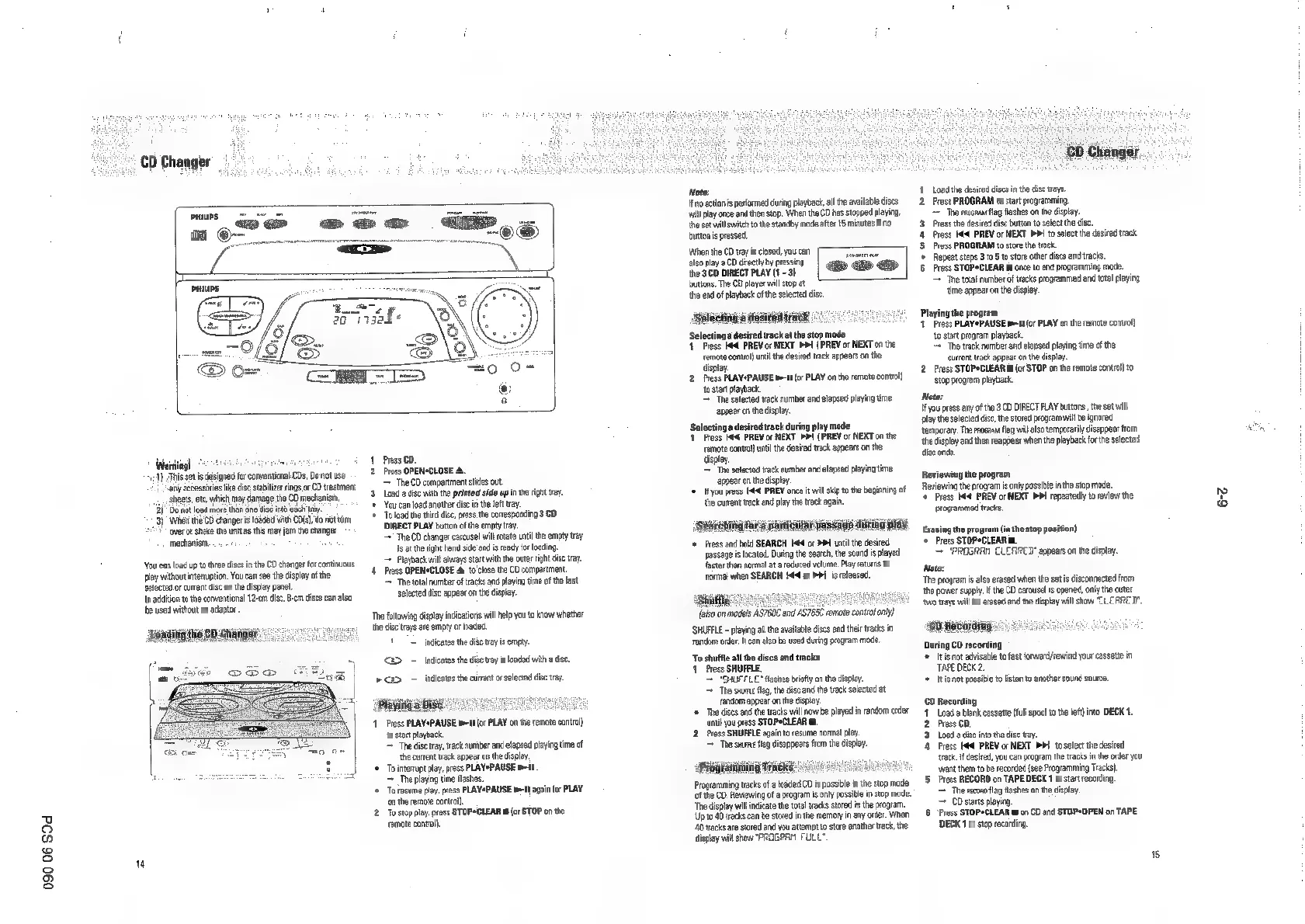
‘Warning!
4)
This
set
is
designed
for
corwentional
CDs,
Doren
any
accessories
lke
dise
stabilizer
rings
or
CD
treatment
sheets,
etc,
which
may
damage
the
CD
mechanism,
2)
Do
not
load
more
than
one
dist
into
each
tray.
3)
When
the
CO
changer
is
toaded
with
CD),
do
nat
turn
‘over
or
shake
the
unit
as
tis
may
jam
the
changer
mechanism,
‘You
can
oad
up
to
three
discs
in
the
CD
changer
for
continuous
play
without
interuption.
You
can
see
te
display
ofthe
selected
or
current
disc
on
the
display
panel.
Indian
to
the
conventional
12-0m
die,
-em
discs
can
also
‘be
used
without
an
adaptor
1
Press
CD.
2
Press
OPENSCLOSE
4.
The
CD
compertment
sides
out
3
Load
a
disc
withthe
printed
side
upin
the
right
Yay.
You
can
load
another
disc
in
the
left
tay.
+
To
lad
the
third
disc,
ress
the
corresponding
3
CO
DIRECT
PLAY
button
of
the
empty
tray.
=
The
CO
changer
carousel
will
rotate
uni
the
empty
tray
is
atthe
right
hand
side
and
is
ready
fr
loading.
=
Playback
will
always
start
with
the
outer
right
dsc
tray.
4
Press
OPENSCLOSE
&
10
close
the
CD
compartment.
The
total
numberof
tracks
and
playing
time
ofthe
last
selected
vise
appear
onthe
display,
‘The
following
display
indications
wal
help
you
to
know
whether
the
dis
trays
are
empty
or
inaded,
1"
indicates
the
disc
tray
is
empty.
2
~
indicates
the
disc
tray
is
loaded
witha
dise
>
2D.
indicates
the
current
or
selected
disc
tay.
‘Playiiig
3
Disc
11
Press
PLAY*PAUSE
meat
[or
PLAY
on
the
remote
control),
to
stat
playback
=
The
aise
tray,
track
number
and
elapsed
playing
time
of
the
curent
track
anpear
on
the
display.
‘©
Tointerrt
play,
press
PLAYePAUSE
mit
=
The
playing
time
flashes.
'*
To
resume
play,
press
PLAYePAUSE
m1
agein
(or
PLAY
‘on
the
remote
conti).
2.
Tostop
play,
press
STOP*CLEAR
m
(or
STOP
on
the
semate
control
Note:
If
no
action
i
performed
during
playback
al
the
available
dises
wil
play
once
and
then
stop.
When
the
CD
has
stopped
playing,
the
set
wil
switch
to
the
standby
made
ater
15
minutes
if
10
bbutonis
pressed.
When
the
CD
tay
is
ciosed,
you
can
also
playa
CD
drecty
by
pressing
‘the
3
CD
DIRECT
PLAY
(1
-
3}
buttons.
The
CD
player
will
stop
at
‘the
end
of
playback
ofthe
selected
disc,
‘Soleetng
a
deiveniragy
1
Pian!
‘a
desired
track
at
the
stop
mode
Press
Ke
PREV
or
NEXT
PP!
(
PREV
or
NEXT
on
the
remote
contro!)
until
the
desired
track
appears
on
the:
display.
2.
Press
PLAY*PAUSE
tHE
(or
PLAY
on
the
remote
contro!)
tosotompere
=
The
selected
track
number
and
elapsed
playing
time
appear
on
the
display.
Seating
desired
ack
during
ply
made
Press
4
PREV
or
NEXT
>I
(
PREV
or
NEXT
on
the
‘emote
contralj
unt
the
desired
track
appears
on
the
display.
=
The
selected
track
number
and
elapsed
playing
time
‘appear
onthe
cislay.
‘©
Ifyou
press
Kf
PREV
once
it
wll
skp
tothe
beginning
of
‘re
curent
track
and
play
the
tack
again.
chia
Yor
a
warticUlar
passage
during
play
‘©
Press
and
hold
SEARCH
I
or
>
until
the
desired
passage
is
located.
During
the
search,
the
sound
is
played
faster
then
normal
ata
reduced
volume.
Play
returns
to
normal
when
SEARCH
He
or
PPI
is
eleased,
‘Shutfle:
[ako
on
noses
ASC
and
ASIC
remot
cot
en)
‘SHUFFLE
~
playing
all
the
available
ciscs
end
thelr
tracks
in
random
order.
can
also
be
used
curing
rogram
mode.
‘To
shutfle
all
the
discs
and
tracks
1
Press
SHUFFLE.
“SHUFFLE”
fashes
briefly
on
the
display.
=
The
swine
fag,
the
disc
and
the
track
selected
at
random
appear
on
th
display.
‘©
Thoddises
and
the
tracks
will
now
be
played
in
rendom
order
until
you
press
STOPeCLEAR
mt
2.
Press
SHUFFLE
again
to
resume
normal
pay.
The
shun
fag
disappears
from
the
display.
ang
TREKS
HHL
Programming
tracks
of
a
lodded
CD
is
possible
in
te
stop
mae
cof
the
CD.
Reviewing
ofa
program
is
only
possible
in
stop
mode.
‘The
display
wil
indicate
the
total
tracks
stored
in
the
progrem.
Up
to
40
tracks
can
be
stored
inthe
memory
in
any
order.
When
40
tracks
are
stored
and
you
attempt
to
store
another
trac,
the
splay
will
show
"PROGRAM
FULL"
11
Load
the
desired
discs
inthe
disc
trays.
2.
Press
PROGRAM
to
start
programming.
The
enc
fag
flashes
onthe
display.
3
Press
the
desired
disc
button
to
select
the
disc
44
Press
Idd
PREV
or
NEXT
PD
to
select
the
desired
tack.
5
Pross
PROGRAM
to
store
the
track.
‘Repeat
steps
3
toto
store
other
cise
and
tracks.
6
Press
STOP*CLEAR
mt
once
to
end
programming
mode.
=
The
total
numberof
tracks
programmed
and
total
playing
time
eppear
onthe
display.
Playing
the
program
1.
Press
PLAYePAUSE
mel
(or
PLAY
on
the
remote
contro!)
to
start
program
playback.
~The
track
number
and
elapsed
playing
time
ofthe
‘eurtent
track
appear
on
te
dispay.
2
Press
STOPeCLEAR
i
(or
STOP
on
the
remote
contra}
to
stop
program
playback
Note:
If
you
press
any
ofthe
3CD
DIRECT
PLAY
buttons
the
set
wil
play
the
selected
dise,
the
stored
program
wil
be
ignored
temporary.
The
rrocana
flag
wil
also
temporarily
disappear
from
the
display
and
then
reappear
when
tha
playback
forthe
selected
disc
ends.
Roviewing
the
program
Reviewing
the
program
is
only
possible
inthe
stop
mode.
‘¢
Press
Hd
PREV
or
NEXT
>!
repeatedly
to
review
the
programmed
tracks.
Erasing
the
program
(in
the
stop
position)
‘Press
STOP*CLEAR
mt
"PROGRAM
CLEARED"
appears
onthe
display.
Note:
‘The
program
is
also
erased
when
the
sets
disconnected
from
the
power
suppy
the
CD
carousels
opened,
only
the
cuter
‘wo
trays
will
be
erased
and
the
csplay
will
show
"CLEARED"
Ch
Recording:
During
CD
recording
+
Itis
not
advisable
to
fast
forwerd/rewind
your
cassete
in
TAPE
DECK
2.
‘+
Itisnot
possible
to
listen
to
another
sound
source.
0
Recording
1
Load
a
blank
cassette
(ull
spool
to
the
left)
into
DECK
1
2.
Press
CD,
3.
Load
a
disc
into
the
disc
tray.
4
Press
Ka
PREV
or
NEXT
PDI
to
select
the
desired
‘tack.
if
desired,
you
can
program
the
tracks
in
the
order
you
‘want
them
to
be
recorded
(see
Programming
Tracks),
5.
Press
RECORD
on
TAPE
DECK
1
to
start
recording.
‘=
The
secon
fag
flashes
onthe
display,
=
CD
stars
playing
6
Pross
STOP*CLEAR
mon
CO
and
STOP*OPEN
on
TAPE
DECK
1
to
stop
recording
CD
Changer.
:
oz
68

Related product manuals