- 12 -
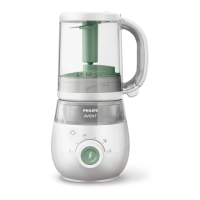
Filling the water tank
Note
• Make sure that the water in the tank does not exceed the MAX water level marking
on the side of the water tank (250 ml) or the MAX water level indication in the water
tank.
• We recommend using soft or puried water, as the minerals in mineral or tap water
cause limescale buildup to occur more quickly inside the water tank.
• Except for materials needed for descaling, never put any liquids other than water in
the water tank.
1 Turn the water tank lid counterclockwise to open the water tank, then follow the
water level markings on the water tank and ll with water to the required level
according to the chapter “Ingredients and steaming time” in the user manual or
the enclosed recipe booklet�
1
2
2 Put the water tank lid on the water tank and turn the lid clockwise to lock it
securely in place�
» When the water tank lid is correctly locked in place, the icon on the water tank
lid will line up with the icon on the water tank.
Note
• Always make sure that you have locked the water tank lid before the appliance
starts operating.


 To Next Page
 Loading...