3 -83 - 8
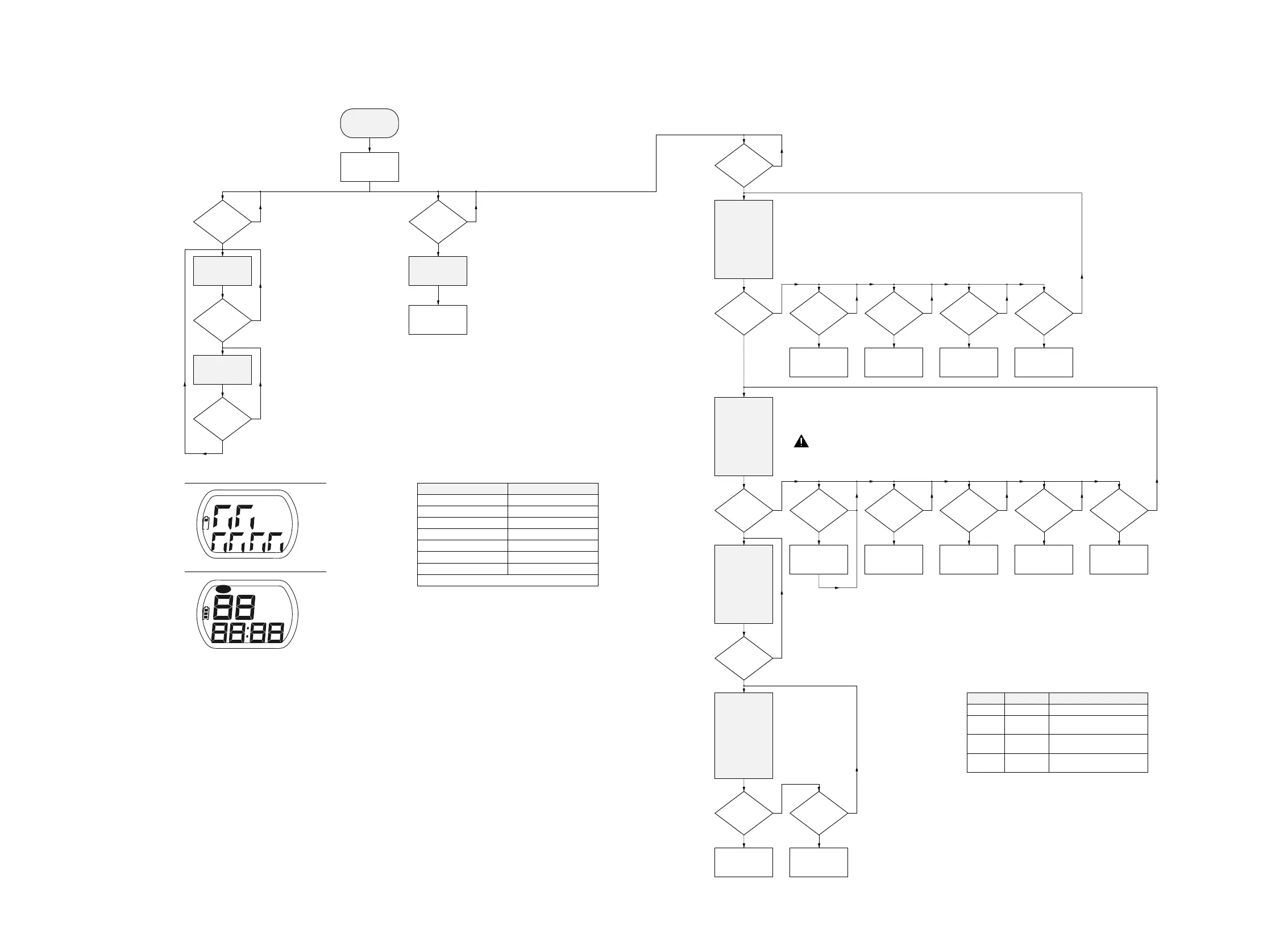
table1 — key test
DISPLAY
1
2
3
5
6
7
8
KEY
DBB
PROGRAM
MODE
PLAY
NEXT
PREVIOUS
ESP
Press “STOP” on the CD-player to exit the key test.
PRELIMINARY
SETUP
Display shows
software-version
(e.g. S-
11 )
DISPLAY TEST 1
display shows
test pattern 1
DISPLAY TEST 2
display shows
test pattern 2
KEY TEST
Display shows
--
To enter service test program open the CD-door and
hold PREVIOUS & PLAY buttons depressed while
turning POWER ON (i.e. connecting the AC/DC adaptor)
NEXT
pressed?
MODE
pressed?
NEXT
pressed?
NEXT
pressed?
Hold key depressed
and check display
according to table1
MAIN MENU
N
Y
N
Y
N
Y
N
Y
test pattern 1 (all segments activated)
test pattern 2 (alternate segments activated)
table2 — focus sensitivity
DISPLAY
-F 01
-F 02
-F 03
-F 04
ESP-FLAG
off
on
on
on
FOCUS SENSITIVITY
Normal focus sensitivity for CDDA
Low focus sensitivity for
high-reflective CD-RW
Medium focus sensitivity for
normal-reflective CD-RW
High focus sensitivity for
low-reflective CD-RW
CUE-MODE
Track servo jumps
16 tracks forwards
PLAY
pressed?
PLAY
pressed?
PLAY
pressed and
focus OK?
PLAY
and focus OK
and speed
OK?
NEXT
depressed?
REVIEW-MODE
Track servo jumps
16 tracks backw.
Slide moves
outside
Slide moves
inside
NEXT
depressed?
PREV
depressed?
MODE
depressed?
PROG
depressed?
N
Y
N
Y
N
Y
N
Y
N
Y
N
Y
N
Y
N
Y
N
Y
N
Y
Toggle focus
sensitivity
(see table2)
BASS
pressed?
N
Y
Disc motor turns
clockwise
(accelerate)
Disc motor turns
counter-clockwise
(brake)
Slide moves
outside
Slide moves
inside
NEXT
depressed?
PREV
depressed?
MODE
depressed?
PROG
depressed?
N
Y
N
Y
N
Y
N
Y
Disc motor turns
clockwise
(accelerate)
Disc motor turns
counter-clockwise
(brake)
ATTENTION: FROM THIS TEST ONWARDS THE
LASER IS SWITCHED ON !!
A AVOID DIRECT EXPOSURE TO BEAM !!
PREV
depressed?
RADIAL TEST
• On track status
r= on track
-r= not on track
• Disc speed status
d = speed OK
-d= speed error
• Focus status
F
x = focus OK
-F
x= focus error
x = focus sensitivity
DISC MOT. TEST
• Disc speed status
d= speed OK
-d= speed error
• Focus status
F
x= focus OK
-F
x= focus error
x = focus sensitivity
(see table2)
FOCUS TEST
• Focus status
F
x= focus OK
-F
x= focus error
x = focus sensitivity
(see table2)
Note: If focus has
been lost, focus
start-up procedure
is entered (ramping).
SERVO TEST
Display shows:
Cd
xy
• State of switches
x = door switch
y = inner switch
0 = closed
1 = open
resume
DBB
program
resume
repeat all
shuffle
hold
SERVICE TEST PROGRAM - FLOW CHART


 To Next Page