CD PLAY
Playing a CD
This CD-player can play all kinds of Audio Discs such
as CD-Recordables and CD-Rewritables. Do not try to
play a CD-ROM, CDi, VCD, DVD, MP3-CD or computer
CD.
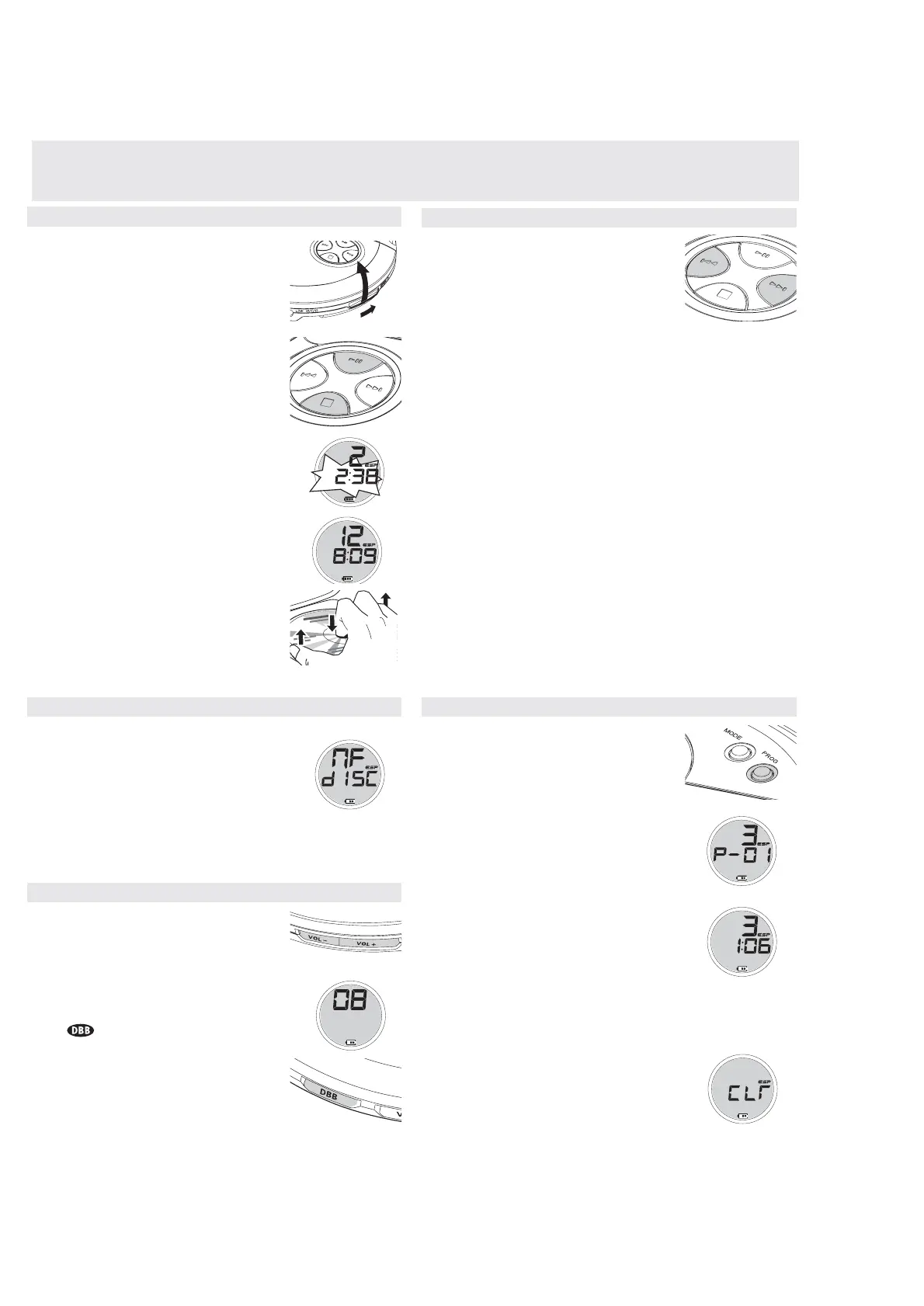
1 Push the OPEN 2 slider to open the player.
2 Insert an audio CD, printed side up, by pressing the
CD onto the hub.
3 Close the player by pressing the lid down.
4 Press 2; to switch the player on and start playback.
yThe current track number and elapsed playing
time are displayed.
•You can pause playback by pressing 2;.
yThe time at which playback was paused starts
flashing.
•You can continue playback by pressing 2; again.
5 Press 9 to stop playback.
yThe total number of tracks and the total playing
time of the CD are displayed.
6 Press 9 again to switch the player off.
•To remove the CD, hold it by its edge and press the
hub gently while lifting the CD.
Note: If there is no activity, the set will automatically
switch off after a while to save energy.
Programming track numbers
You can store up to 30 tracks to play in a program.
A single track may be stored more than once in the
program.
1 While playback is stopped, select a track with
or §
§
§
§
§
.
2 Press PROG to store the track.
yprogram lights up; the track number
programmed and P with the total number of
stored tracks are displayed.
3 Select and store all desired tracks in this way.
4 Press 2; to start playback of your selected tracks.
yprogram is shown and playback starts.
•You can review the program by pressing PROG for
more than 2 seconds.The display shows all the stored
tracks in sequence.
y Display NO Prog if no tracks programmed.
Notes: – If you press PROG and there is no track selected or no tracks pro-
grammed, SEL or NO PRogis displayed.
– If you try to store more than 30 tracks, FULL is displayed.
Clearing the program
•While playback is stopped, press 9 to clear
program.
y CLRis displayed once, program goes off,
and the program is cleared.
Note: The program will also be cleared if the power supply is interrupted, or if
the CD-player lid is opened, or if the set switches off automatically.
Playback information
• If a CD-Recordable (CD-R) or a CD-Rewritable (CD-
RW) is not recorded properly, NF dISC is
displayed, indicating that the CD has not been
finalized. In that case, use FINALIZE on your CD
recorder to complete the recording.
• When playing a CD-Rewritable (CD-RW), please note
that it takes 3–15 seconds after pressing 2; for
sound reproduction to start.
• Playback will stop if you open the CD lid.
• While the CD is read, 1 -:- flashes in the display.
Volume and bass
Volume adjustment
•Adjust the volume by using VOL
/+
on the CD player
or the slider on your remote control.
Bass adjustment
•Press DBB to switch the bass enhancement on or
off
y is shown if the bass enhancement is
activated.
FEATURES
Selecting a track and searching
Selecting a track during playback
• Briefly press or § once or several times to skip to
the current, previous or next track.
yPlayback continues with the selected track, and
the track’s number is displayed.
Selecting a track when playback is stopped
1 Briefly press
or § once or several times to select
the desired track. The track number is displayed.
2 Press 2; to start CD play.
yPlayback starts with the selected track.
Searching for a passage during playback
1 Keep or § pressed to find a particular passage in
a backward or forward direction.
ySearching starts while playback continues at low
volume. After 2 seconds the search speeds up.
2 Release the button when you reach the desired passage.
yPlayback continues from this position.
Notes: – If the player is in SCAN mode (see MODE chapter), searching is not
possible.


 To Next Page