English
DIGITAL TUNER CD PLAYER
12
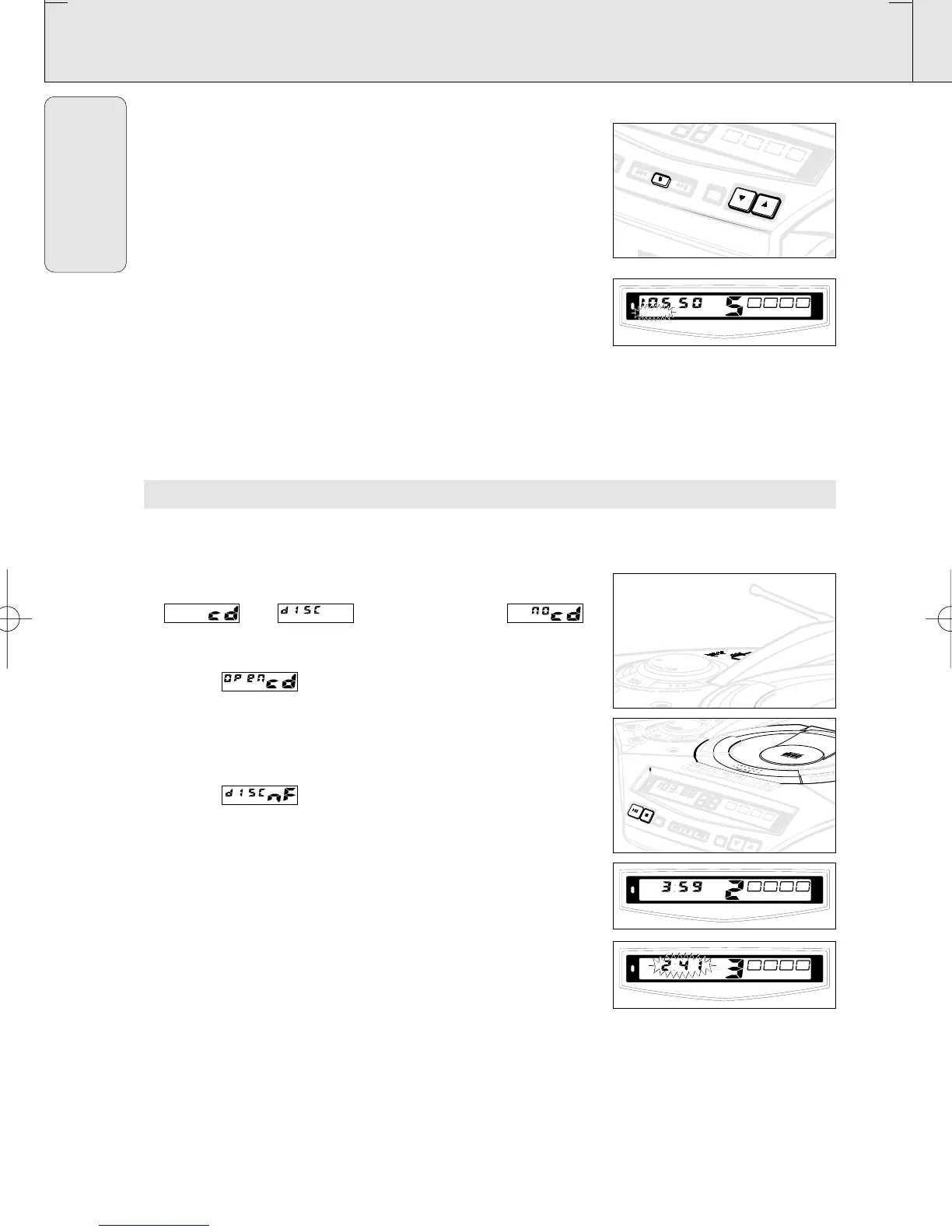
Programming radio stations
You can store up to a total of 30 radio stations in the memory.
1. Tune to your desired station (see Tuning to radio stations).
2. Press PROG to activate programming.
– Display:
PROGRAM flashes.
3. Press PRESET 4 or 3 once or more to allocate a number from
1 to 30 to this station.
4. Press PROG again to confirm the setting.
– Display:
PROGRAM disappears, the preset number and the
frequency of the preset station are shown.
5. Repeat the above four steps to store other stations.
• You can erase a preset station by storing another frequency in
its place.
Tuning to preset stations
Press PRESET 4 or 3 until the desired preset station is
displayed.
PLAYING A CD
This CD player plays Audio Discs including CD-Recordables and
CD-Rewritables.
1. Select CD source.
™ and are displayed briefly, if
no CD is inserted.
2. Press OPEN•CLOSE to open the CD compartment.
™ Display: when you open the CD compartment.
3. Insert a CD with the printed side facing up and press
OPEN•CLOSE to close the CD compartment.
™ Display: the CD player scans the contents of a CD, and then the
total number of tracks and playing time are shown.
Display: is shown if you have inserted a
non-finalized CD-R(W).
4. Press PLAY 2; (for AZ2035 model only:
or on the remote control 2;) to start playback.
™ Display: Current track number and elapsed playing time of the
track during CD playback.
5. To pause playback press PLAY 2;.
Press PLAY 2; again to resume play.
™ Display: the elapsed playing time flashes when playback is on
pause.
6. To stop CD playback, press STOP 9.
Note: CD play will also stop when:
– the CD door is opened;
– the CD has reached the end;
– you select another source: TAPE or TUNER.
AZ 2030 /17 page 12
AZ 2030-2035/17
PLAY
STOP
DECD MODE
• • • SEARCH
• • • SEARCH
SEARCH
• • •
SEARCH • • •
PROG
BANDBAND
P
R
E
S
E
T
FMFM
ST
E
R
E
O
STEREO
BATT
LOW
BATT
LOW
PROGRAM
STEREO
FM
AZ 2030-2035/17
DIGITAL TUNER
BASS REFLEX SPEAKER SYSTEM
BATT
LOW
P
L
A
Y
S
TO
P
CD MODE
•
•
•
S
E
A
R
C
H
S
E
A
R
C
H
•
•
•
P
R
O
G
B
A
N
D
F
M
S
T
E
R
E
O
B
A
T
T
L
O
W
DIGIT
AL
TUNER
BA
S
S
R
E
F
L
E
X
S
P
E
A
K
E
R
S
Y
S
T
E
M
ASS REFLEX SPEAKER SYSTEM
BATT
LOW
XP AZ 203x/17.2 09-01-2001 15:25 Pagina 12



 To Next Page