EasyManua.ls Logo

Philips AZ 8250 - Page 4

Philips AZ 8250
10 pages
Print Icon
To Next Page IconTo Next Page
To Previous Page IconTo Previous Page
Loading...
usiBu3
1.
GENERAL
CONTENTS
Ts
GENERAL
4
GO
TRB
IES
ds
xx
No
Cisl
deduc
is
4
PREC
CLINGS
uota
t
parve
Nap
ልክ
iau
Se
ee
aes
pec
4
2.
BACK
PANEL
and
SUPPLY...
ess
iion
.4
Back
panei
«iocari
A
SE
iie
REL
4
O
ዕዕ
ሰች
AEQ
ከያ
ዓናት
ቸም
በሹ
አርን
uae
.
4
=
Battery
SUDDII
ጀም
foeni
deri
ኬኑ
ይየ
ከዋክ
ለን
ከሃ.
4
-
AC
mans
supply
Mtr
ላን
4
Important
notes
for
users
in
፻7
UK
.......
.....
coccion
5󰌂55
ee
ee
Y
3.
CONTROLS
and
CONNECTIONS
...
..........--
---
5
Top
dnd
front
panel
se
ete
tias
wade
ed
ማዕ
5
A
A
me
ይ󰌂ው
በባ
ክንበ
.5
Stereo
headphone
socket
ss
uuu
ee
e
ser
eee
cen
nnm
5
Microphone
SOCKET:
viii
በጀ
ዘርም
መወ
iia
5
站]
6
FG
getldlS
cd
A
AN
6
A
A
6
A
A
a
ሰም
evens
6
Manual
tuning
to
weak
radio
Stations
ess
ss
6
Preset
radio
Statins
iaceo
i
eves
A
Means
6
BG
PLAYER
ሙም
ቸን
seis
dd
v
tasse
iani
ean
iae
7
CD
handling:
4.
uctor
mst
󰌂
7
Playing
CD...
Tene
"—Á——
eee,
A
ae
|
SRUITIB:
ce
eset
ሚች
ed
eS
al
ምው
ርም
ንን
A
ule
7
PREVIOUS
NOR:
analice
7
Search
teram
AA
A
Programming
track
numbers
...
...››››››
-
vd
6.
CASSETTE
DECK
Compact
cassettes
Cassette
abad
Ea
ee
Cassette
recording
AA
AA
AAA
rr
rr
ሁብ
ጠ'
AL
A
Ariwa
9m
sa
Ce
mde
ዋቀ
9
tht
dnhh
RNA
AAA
AAN
Ap
ዋቀ
ኩውጂቸዱቸፍ
duda
Lt
AME
A
id
tht
tn)
doro
mE
hey
7.
MAINTENANCE
DORSET
sme
its
ios
acd
A
ነን
AN
CD-player
maintenance
Cassette
deck
maintenance
ሥሓህ
dh
ሠሉ
AMMMHYM
AON
VERE
+ሑትላጣፍጭዋዋ፣
ዋጽቀቱኩሁዋ
ፍሎራ»
ፍህ.
dahh
ሠ4ዛህህህቹሞ
carm
vot
A
ገሎ
ቅዋ
ካባ
RARA
ፍጭ.
ቤዜ.
ሎ.ምህ/'
ዋው
ሞመሙ-ዋ
FARA
AM
coh
መዛ
MM
AA
arae
VENA
Ran
መሎ
AM
hh
REO
eR
ሎቸ
ሹቅ
ሃብ
ሑሎዋ
ቡፍ
ፍነ
ditio
ካነ
ኣፍ
8.
TROUBLESHOOTING
መቅ
ኩመ
ለዱ
Tr
ere
AU
gu pM
ae
au
veper
Pi
i
te
ቆፍቱ
oth
ቅሥ።=ቅ
ሬሞ
መዛኑ
RECYCLING
Please
observe
the
local
regulations
regarding
the
disposal
of
packing
matertals,
exhausted
batteries
and
old
equipment.
,
*
All
redundant
packaging
material
has
been
omitted.
We
have
done
our
utmost
to
make
the
packaging
easy
separable
into
three
mono-materials:
-
cardboard
(box)
expandable
polystyrene
(buffer)
polyethylene
(bags,
protective
foam
sheet)
e
Your
set
consists
of
materials
which
can
be
recycled
if
disassembled
by
a
specialized
company.
e
Do
not
dispose
of
exhausted
batteries
vath
your
household
waste.
The
type
plate
is
located
on
the
base
of
the
set
This
product
complies
wath
the
radio
interference
requirements
of
the
European
Community.
Recording
is
permissible
insofar
as
copyright
or
other
rights
of
third
parties
are
not
infringed
2.
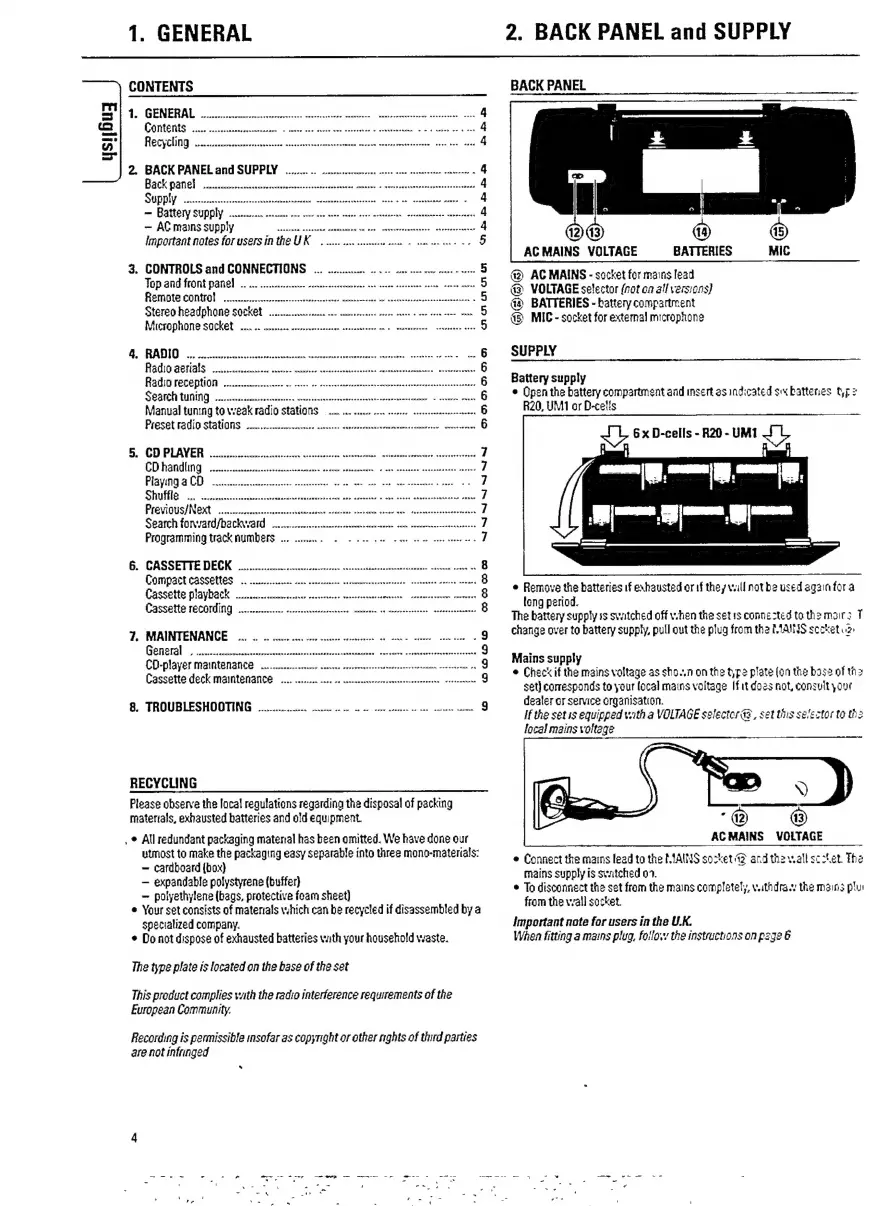
BACK
PANEL
and
SUPPLY
BACK
PANEL
AC
MAINS
VOLTAGE
BATTERIES
@
AC
MAINS
-
socket
for
mains
lead
@
VOLTAGE
selector
(nat
oa
all
versions)
ቁቅ
BATTERIES
-
battery
compartment
a)
MIC
-
socket
for
external
microphone
anh
y
and
y
/ሥ
SUPPLY
Battery
supply
e
Open
the
battery
compartment
aad
insert
as
indicated
sx
battenes
tr
R20,
UM1
or
Delis
6
x
D-cells
-
R20
-
UM1
ብ...
pam
gamm
gme
e
Remove
the
batteries
if
exhausted
or
if
they
vall
not
be
used
again
for
a
long
period.
The
battery
supply
is
switched
off
v.hen
the
set
rs
connected
to
the
mairs
T
change
over
to
battery
supply,
pull
ont
the
plug
from
tha
MAINS
secketuz
Mains
supply
e
Check
if
the
mains
voltage
as
sho..n
on
the
type
plate
(on
the
base
of
the
set)
corresponds
to
your
local
mains
voltage
If
it
does
not,
consult
your
dealer
or
service
organisation.
If
the
setis
equipped
with
a
VOLTAGE
selector
@,
set
this
selector
ta
the
local
mains
voltage
ACMAINS
VOLTAGE
e
Connect
the
mains
lead
ta
the
MAINS
sozket
42
ard
tha
v.all
scztet.
The
mains
supply
is
switched
02.
e
To
disconnect
the
set
from
the
mains
completely,
vatidra.
the
mains
ptu
from
the
wall
socket.
Important
nate
for
users
in
the
U.K.
When
fitting
a
mains
plug,
follow
the
instructions
on
page
6

Related product manuals