EasyManua.ls Logo

Philips AZ 8250 - Controls and Connections

Philips AZ 8250
10 pages
Print Icon
To Next Page IconTo Next Page
To Previous Page IconTo Previous Page
Loading...
3.
CONTROLS
and
CONNECTIONS
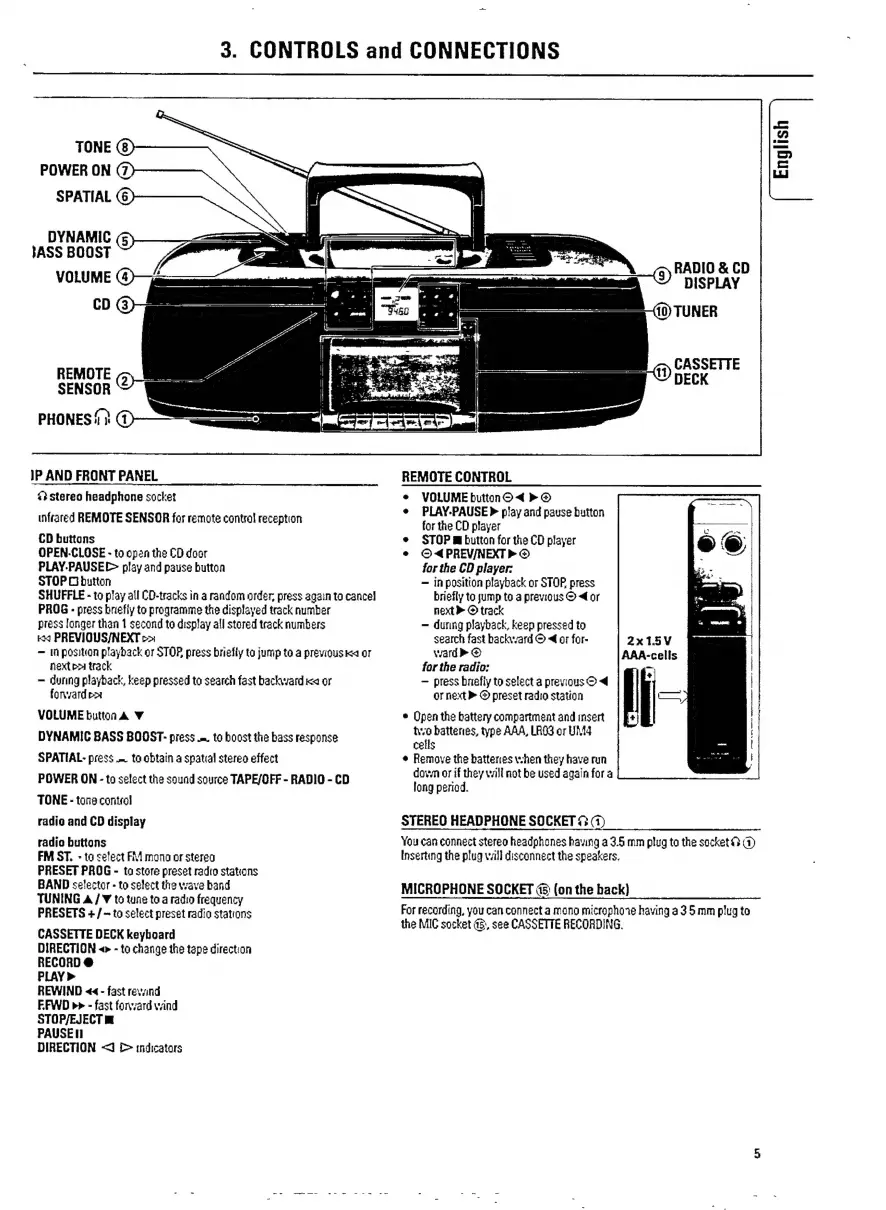
TONE
(8)
POWER
ON
SPATIAL
(6)
DYNAMIC
(5)
SASS
BOOST
VOLUME
(4)
CD
(3)
REMOTE
SENSOR
PHONES
(2)
IP
AND
FRONT
PANEL
&3
stereo
headphone
socket
infrared
REMOTE SENSOR
for
remote
contro!
reception
CD
buttons
OPEN.CLOSE
-
to
open
the
CD
door
PLAY.PAUSEE-
play
and
pause
button
STOP
O
button
SHUFFLE
-
to
play
all
CD-tracks
in
a
random
order;
press
again
to
cancel
PROG
-
press
briefly
to
programme
the
displayed
track
number
press
longer
than
1
second
to
display
all
stored
track
numbers
x
PREVIOUS/NEXT
o>
In
positon
playback
or
STOR
press
briefly
ta
jump
to
a
previous
ka
or
next
pr
track
during
playback,
keep
pressed
to
search
fast
backward
ica
or
forward
VOLUME
button
Y
DYNAMIC
BASS
BOOST-
press
=.
to
boost
the
bass
response
SPATIAL-
press
to
obtain
a
spatial
stereo
effect
POWER
ON
-
to
select
the
sound
source
TAPE/OFF
-
RADIO
-
CD
TONE
-
tone
control
radio
and
CD
display
radio
buttons
FM
ST.
-
ta
select
FM
mono
or
sterea
PRESET
PROG
-
to
store
preset
radio
stations
BAND
selector
-
to
select
the
wave
band
TUNING
/
Y
to
tune
to
a
radio
frequency
PRESETS
+
/
—-
to
select
preset
radio
stations
CASSETTE
DECK
keyboard
DIRECTION
«>
-
to
change
the
tape
direction
RECORD
@
PLAY»
REWIND
««
-
fast
revand
EFWD
p>
-
fast
forvard
wind
STOP/EJECT
IN
ኮለህ5፻
DIRECTION
<i
indicators
English
ጣነ
RADIO
&
CD
DISPLAY
40)
TUNER
CASSETTE
UD
DECK
REMOTE
CONTROL
e
VOLUME
button
O
>
©
e
PLAY.PAUSE
>
play
and
pause
button
for
the
CD
player
e
STOP
E
button
for
the
CD
player
e
O«PREV/NEXT»
O
for
the
CD
player:
in
position
playback
or
STOP.
press
briefly
to
jump
to
a
previous
O
<
or
next
>
©
track
>
during
playback,
keep
pressed
to
search
fast
backward
©
«€
or
for-
ward»
©
for
the
radio:
press
briefly
to
select
a
previous
O
or
next
>
©
preset
radio
station
e
Open
the
battery
compartment
and
insert
two
batteries,
type
AAA,
LAGS
or
UM4
cells
e
Remove
the
batteries
when
they
have
run
down
or
if
they
will
not
be
used
again
for
a
long
period.
STEREO
HEADPHONE
SOCKET
33
(1)
You
can
connect
stereo
headphones
having
a
3.5
mm
plug
ta
the
socket
€»
(1)
Inserting
the
plug
wall
disconnect
the
speakers.
MICROPHONE
SOCKET
&
(on
the
hack)
For
recording,
you
can
connect
a
mono
microphone
having
a
3
5
mm
plug
to
the
MIC
socket
45,
see
CASSETTE
RECORDING.

Related product manuals