EasyManua.ls Logo

Philips AZ 8250 - Digital Audio; Programming Track Numbers

Philips AZ 8250
10 pages
Print Icon
To Next Page IconTo Next Page
To Previous Page IconTo Previous Page
Loading...
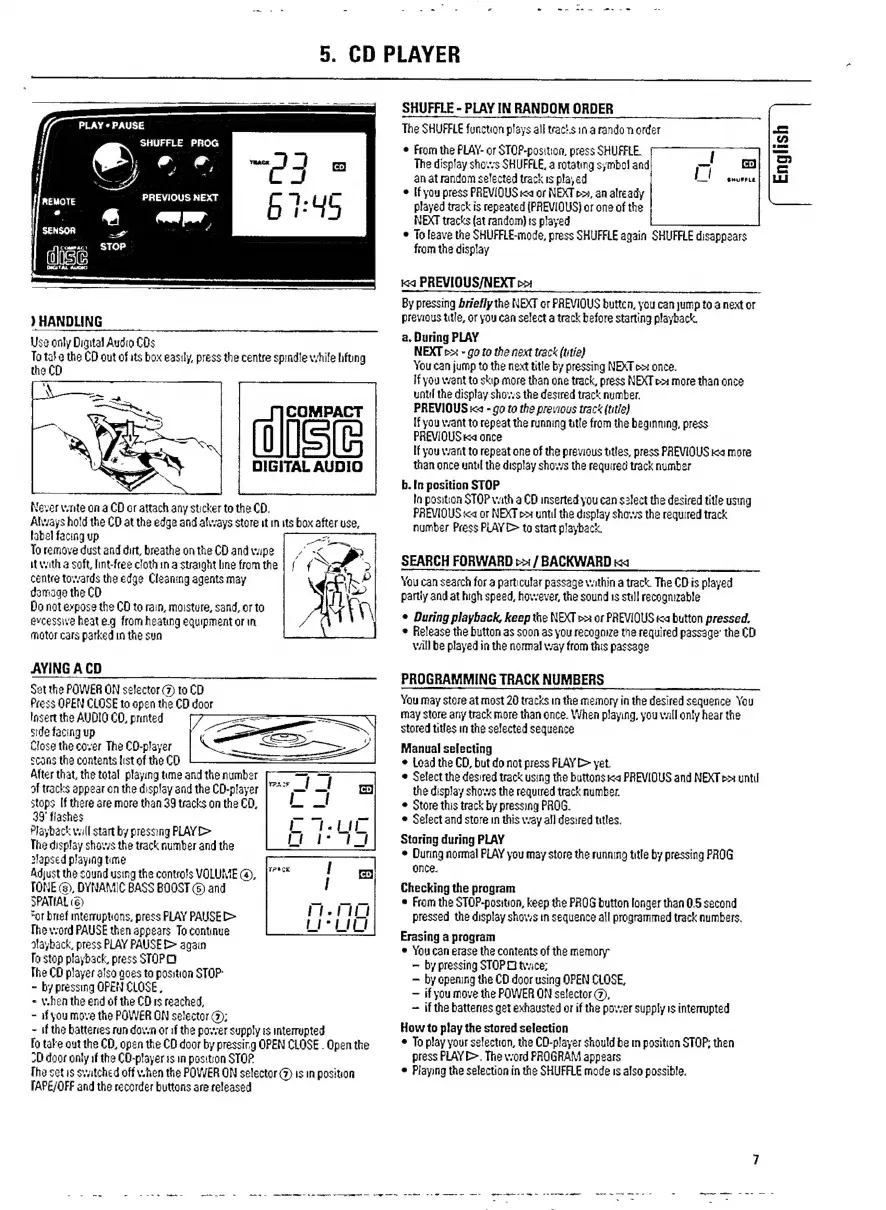
5.
CD
PLAYER
SHUFFLE
-
PLAY
IN
RANDOM
ORDER
The
SHUFFLE
function
plays
all
tracts
in
a
rando
order
e
From
the
PLAY-
or
STOP-position,
press
SHUFFLE,
The
display
shoves
SHUFFLE,
a
rotating
symbol
and
PLAY
«
PAUSE
SHUFFLE
PROG
y
€,
“o
co)
à
SJ
an
at
random
selected
track
is
played
SHUFFLE
.
=e
e
If
you
press
PREVIOUS
«a
or
NEXT
p»,
an
already
dosis
ee
doa
b
1
:
45
played
track
is
repeated
(PREVIOUS)
or
one
of
the
&
aen
asdf
NEXT
tracks
(at
random)
ts
played
||
SENSOR
"—
ot
e
To
leave
the
SHUFFLE-mode,
press
SHUFFLE
again
SHUFFLE
disappears
digi
STOP
from
the
display
Ka
PREVIOUS/NEXT
p>
By
pressing
briefly
the
NEXT
or
PREVIOUS
buttcn,
you
can
jump
to
a
next
or
)
HANDLING
previous
title,
or
you
can
select
a
track
before
starting
playback.
.
During
PLAY
Use
only
Digital
Audio
COs
a
i
]
To
tate
the
CD
out
of
its
box
easily,
press
the
centre
spindle
while
hfbng
NEXT
b>
-
go
to
the
next
track
(tie)
You
can
jump
to
the
next
title
by
pressing
NEXT
p>:
once.
If
you
want
to
skip
more
than
one
track,
press
NEXT
p>
more
than
once
until
the
display
shows
the desired
track
number.
COMPACT
PREVIOUS
ia
-
go
to
the
previous
track
(title)
if
you
vant
to
repeat
the
running
title
from
the
beginmng,
press
PREVIOUS
Ka
once
If
you
warnt
to
repeat
one
of
the
previous
titles,
press
PREVIOUS
ica
more
DIGITAL
AUDIO
than
once
until
the
display
shows
the
required
track
number
b.
[በ
position
STOP
la
position
STOP
vath
a
CD
inserted
you
can
select
the
desired
title
using
PREVIOUS
<a
or
NEXT
po
until
the
display
shows
the
required
track
number
Press
PLAY
&
to
start
playback.
the
CD
Never
vtite
on
a
CD
or
attach
any
sticker
to
the
CD.
Alvays
hold
the
CD
at
the
edge
and
always
store
it
in
its
box
after
use,
label
facing
up
To
remove
dust
and
dirt,
breathe
on
the
CD
and
wipe
it
with
a
soft,
lint-free
cloth
in
a
straight
line
from
the
centre
towards
the
edge
Cleaning
agents
may
damage
the
CD
Do
not
expose
the
CD
to
rain,
moisture,
sand,
or
to
evcessive
heat
e.g.
from
heating
equipment
or
in
motor
cars
parked
in
the
sun
SEARCH
FORWARD
>>:
/
BACKWARD
ka
You
can
search
for
a
particular
passage
vathin
a
track.
The
CD
is
played
partly
and
at
high
speed,
however,
the
sound
1s
still
recognizable
e
During
playback,
keep
the
NEXT
>=
or
PREVIOUS
ka
button
pressed.
Release
the
button
as
soon
as
you
recognize
the
required
passage"
the
CD
will
be
played
in
the
normal
way
from
this
passage
AVING
A
CD
PROGRAMMING
TRACK
NUMBERS
Set
the
POWER
ON
selector
(7)
to
CD
Press
OPEN
CLOSE
to
open
the
CD
door
You
may
store
at
most
20
tracks
in
the
memory
in
the
desired
sequence
You
Insert
the
AUDIO
CO,
printed
may
Store
any
track
more
than
once.
When
playing,
you
vall
only
hear
the
side
facing
up
stored
titles
in
the
selected
sequence
Close
the
cover
The
CO-player
Manual
selecting
scans
the
contents
list
of
the
CD
e
Load
the
CD,
but
do
not
press
PLAY
D>
yet.
After
that,
the
total
playing
tune
and
the
number
e
Select
the
desired
track
using
the
buttons
«a
PREVIOUS
and
NEXT
p
until
af
tracks
appear
on
the
display
and
the
CD-player
the
display
shows
the
required
track
number.
stops
If
there
are
more
than
39
tracks
on
the
CD,
e
Store
this
track
by
pressing
PROG.
39
flashes
e
Select
and
store
in
this
way
all
desired
titles.
Playback
vall
start
by
pressing
PLAY
D>
E
EN
Storing
during
PLAY
su
m
track
number
and
the
*
During
normal
PLAY
you
may
store
the
running
title
by
pressing
PROG
Adjust
the
sound
using
the
controls
VOLUME
(a),
Pisis
TONE
(3),
DYNAMIC
BASS
BOOST
©
and
Checking
the
program
SPATIAL
(6)
“or
brief
mterruptions,
press
PLAY
PAUSE
[>
The
vord
PAUSE
then
appears
To
continue
e
From
the
STOP-position,
keep
the
PROG
button
longer
than
0.5
second
pressed
the
display
shows
in
sequence
all
programmed
track
numbers.
Erasing
a
program
MEAE
ee
:
pid
P
again
e
You
can
erase
the
contents
of
the
memory
"Dac,
by
pressing
STOP
O
twice;
The
CD
player
alsa
goes
ta
position
STOP
by
opening
the
CD
door
using
OPEN
CLOSE,
j
ከክ
E
T
if
you
move
the
POWER
ON
selector
(2),
`
rae
E.
ek
RUE
DN
Bd
O:
if
the
batteries
get
exhausted
or
if
the
power
supply
is
interrupted
-
if
the
batteries
run
down
or
the
power
supply
is
interrupted
How
to
play
the
stored
selection
:
fo
take
out
the
CD,
open
the
CD
door
by
pressing
OPEN
CLOSE
.
Open
the
e
To
play
your
selection,
the
CD-player
should
be
in
position
STOP;
then
door
only
the
CO-player
is
in
position
STOP
press
PLAY
E>.
The
word
PROGRAM
appears
[he
set
is
svatched
off
v.hen
the
POWER
ON
selector
(7)
is
in
position
*
Playing
the
selection
in
the
SHUFFLE
mode
rs
also
possible.
[APE/OFF
and
the
recorder
buttons
are
released
English

Related product manuals