4 User Manual
System Contents
Your BiPAP Auto Bi-Flex system includes the following items:
• Device • Reusable gray foam lter
• User manual • Disposable ultra-ne lter (optional)
• Carrying case • Side cover panel
• Power cord and power supply (Part # 1058190) • SD card
• Flexible tubing, 22 mm (optional 15 mm tubing is also available) • Humidier (optional)
Note: If any of these items are missing, contact your home care provider.
System Overview
The BiPAP Auto system offers several options in how therapy is delivered, so treatment can be personalized to meet
your needs for the treatment of Obstructive Sleep Apnea (OSA).
The system can be set up as a Bi-level or Auto Bi-level device, which delivers two different positive pressure levels:
IPAP (Inspiratory Positive Airway Pressure) and EPAP (Expiratory Positive Airway Pressure). The system can also be
set up as a CPAP (Continuous Positive Airway Pressure) device. Your home care provider will choose the appropriate
pressure settings for you.
When prescribed for you, the device provides several special features to help make your therapy more comfortable.
The ramp function allows you to lower the pressure when you are trying to fall asleep. The air pressure will gradually
increase until your prescription pressure is reached. You also have the option of not using the ramp feature at all.
Additionally, the Flex comfort features provide you with pressure relief when you exhale during therapy.
Several accessories are also available for use with your BiPAP Auto device. Contact your home care provider to
purchase any accessories not included with your system.
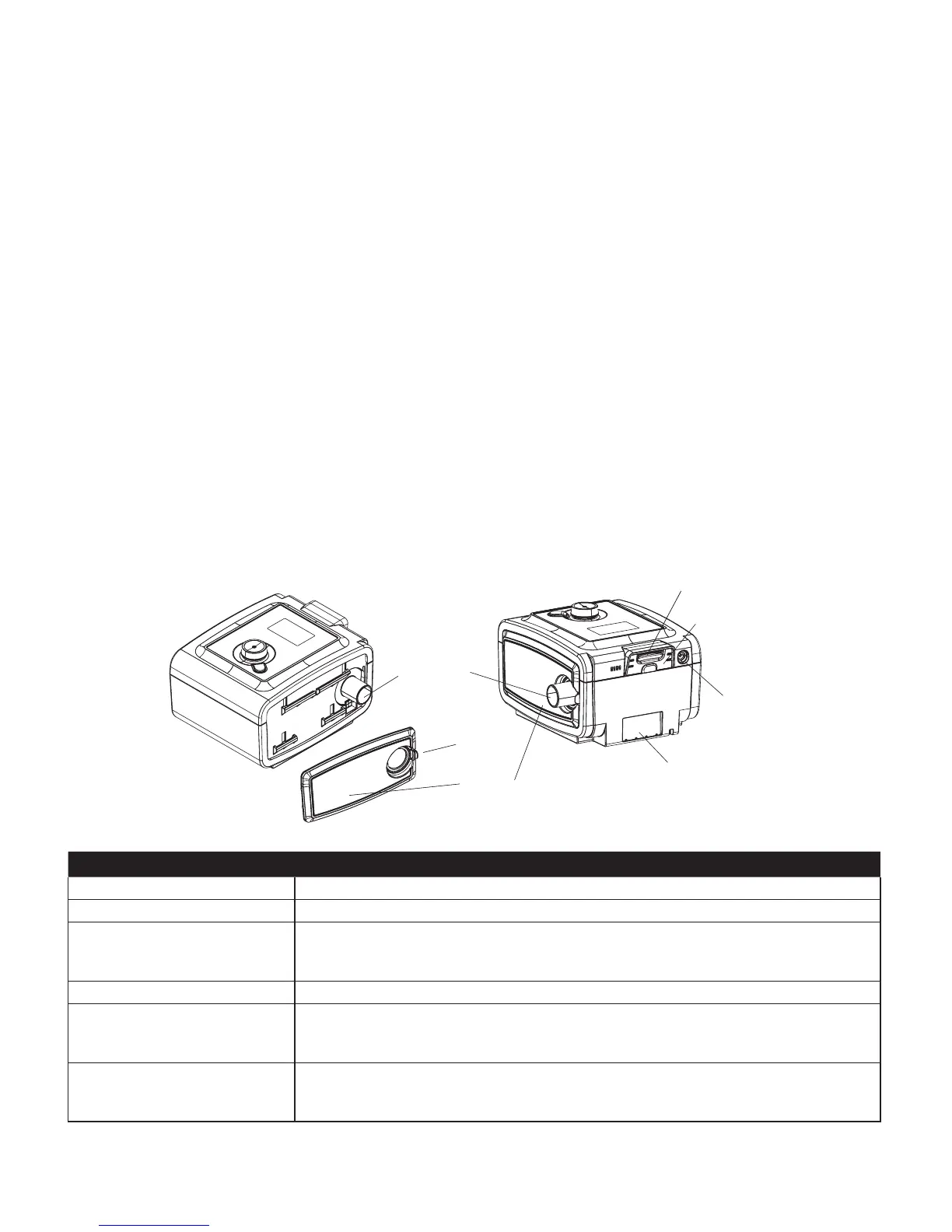
This gure illustrates some of the device features, described in the following table.
De v i c e fe a t u r e De S c r i p t i o n
Air Outlet Port (conical, 22 mm) Connect the exible tubing here.
SD Card (Accessory) Slot If applicable, insert the optional accessory SD card here.
SD Card Cover If applicable, the optional accessories such as a Link Module or Modem can be installed
here. Refer to the instructions supplied with the accessory. When not using an accessory,
this cover must be in place on the device.
Power Inlet Connect the power cord here.
Filter Area A reusable, gray foam lter must be placed in the lter area to screen out normal household
dust and pollens. A white ultra-ne lter can also be used for more complete ltration of
very ne particles.
Side Cover If using a humidier with the device, this side cover can be easily removed with the release
tab before attaching the humidier. Refer to the humidier manual. When not using a
humidier, this cover must be in place on the device.





 To Next Page