EasyManua.ls Logo

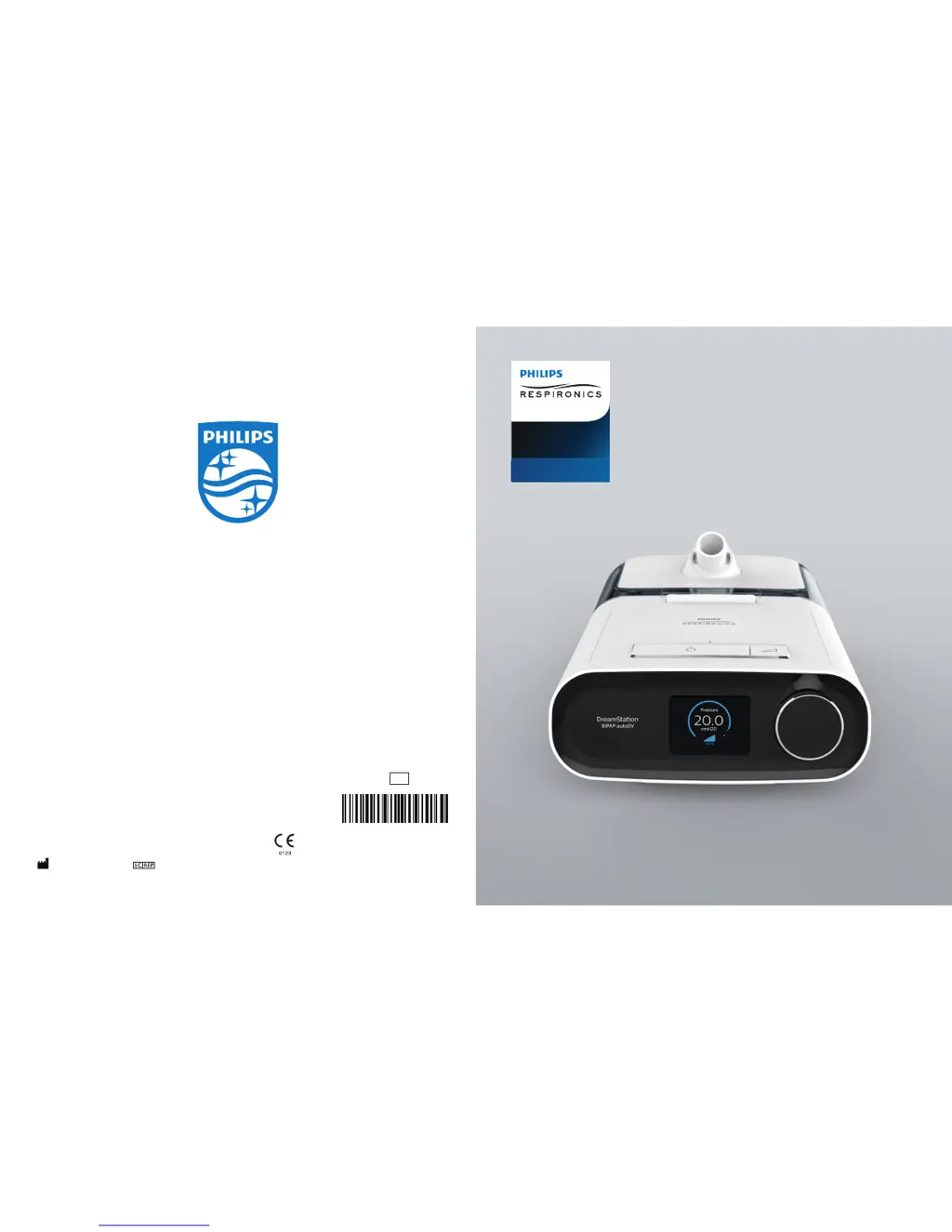
Philips DreamStation BiPAP autoSV - User Manual

Philips DreamStation BiPAP autoSV
72 pages
Print Icon
To Next Page IconTo Next Page
Loading...
1128728 R10
HM 06/13/2017
EN-INTL
Respironics Inc.
1001 Murry Ridge Lane
Murrysville, PA 15668 USA
Respironics Deutschland GmbH & Co. KG
Gewerbestrasse 17
82211 Herrsching, Germany
User manual
DreamStation
BiPAP autoSV
REF 1128728

Questions and Answers

  • B
    bmartinezAug 17, 2025
    How to adjust heated humidifier or tube temperature setting on Philips DreamStation BiPAP autoSV Humidifier?
    • M
      Melissa WhiteAug 17, 2025
      The humidifier and tube temperature settings can only be adjusted from the Therapy ON display screen. Confirm that the blower is on and that the settings are visible on the right side of the screen, then adjust to the desired comfort. If the blower is on but the humidifier settings are not displayed, unplug the device. Check that the humidifier and/or heated tube electrical contacts are not obstructed or damaged. Then, reconnect the humidifier and/or heated tube and reconnect the device’s power supply. Turn the blower on; if the settings are still not visible, contact your provider for assistance.
  • R
    Russell ZimmermanAug 20, 2025
    What to do if Philips DreamStation BiPAP autoSV water runs out before morning?
    • M
      meadowsdamonAug 20, 2025
      Under normal circumstances, a full water chamber should last through a typical sleep session. Many factors can affect water consumption, such as room temperature and humidity, humidifier or heated tube settings, mask leak levels, and sleep duration. First, ensure the water chamber is filled to the maximum fill line before starting your sleep session. Check your mask fit and adjust it to minimize leaks. Verify that the device, humidifier, seals, and tube are properly connected and not leaking. You might also lower your humidifier and/or heated tube settings or switch from Fixed to Adaptive humidification mode to extend the water's duration.
  • J
    jennifer64Aug 22, 2025
    Why is my Philips Humidifier airflow much warmer than usual?
    • E
      Elizabeth JohnsonAug 22, 2025
      The air filters may be dirty, or the device is in direct sunlight or near a heater. Clean or replace the air filters. The air temperature can vary based on the room temperature. Ensure the device has proper ventilation and is away from bedding or curtains that could block airflow. Keep it away from direct sunlight and heating equipment. If using a humidifier, check its settings and lower them if possible. Also, ensure there is water in the humidifier tank and that the humidifier is working correctly. If the issue persists, contact your home care service provider.
  • N
    Nicole JonesAug 26, 2025
    What to do if Philips DreamStation BiPAP autoSV Humidifier display is erratic?
    • B
      Bryan PorterAug 26, 2025
      The device may have been dropped or mishandled, or it is in an area with high Electromagnetic Interference (EMI). Unplug the device and then reapply power. If the problem persists, relocate the device to an area with lower EMI emissions, away from electronic equipment like cellular phones, cordless phones, computers, TVs, electronic games, and hair dryers. If the issue continues, contact your home care service provider.
  • S
    Steven RodriguezAug 28, 2025
    What to do if my Philips Humidifier is leaking or whistling (not mask related)?
    • L
      Lauren WrightAug 28, 2025
      The therapy device air inlet may be obstructed, the humidifier or tube is not fully connected, or the humidifier seals are not fully seated or are missing. Check that the therapy device air inlet is not obstructed and that the filters are free of debris and properly inserted. Confirm that the device, humidifier, and tube are connected properly and are not leaking. Ensure that the humidifier lid seal and dry box seal are present and properly seated; if needed, gently press around the perimeter of the seals to reseat them.
  • K
    Kristy BarrettAug 30, 2025
    What to do if Philips DreamStation BiPAP autoSV airflow does not turn on?
    • J
      Jennifer GrantAug 31, 2025
      There may be a problem with the blower. Ensure the device is powered correctly and that the Home screen appears on the user interface. Press the Therapy button on top of the device to start airflow. If the airflow does not turn on, there may be a problem with your device. Contact your home care service provider for assistance.
  • J
    Jessica SandersSep 3, 2025
    What to do if I spilled water in Philips DreamStation BiPAP autoSV basin?
    • L
      lindsey42Sep 3, 2025
      A small amount of water spilled in the basin of the humidifier will not harm your device, it will evaporate under normal use. However, too much water could spill over the humidifier lid hinge and might damage your furniture. Disconnect power from the device. Remove the water chamber, pour out any excess water until the water level is at or below the maximum fill line, and set the chamber aside. Separate the humidifier from the therapy device and pour out the spilled water. Once the heater plate has cooled, wipe the inside of the humidifier with a paper towel or soft cloth. If needed, dry the underside of the humidifier and confirm that your table top is dry. Reconnect the humidifier and power supply, and reinstall the water chamber.
  • T
    Tara JonesSep 5, 2025
    Why Philips DreamStation BiPAP autoSV Humidifier Ramp feature does not work?
    • C
      Carolyn AndersonSep 5, 2025
      Your home care provider may not have prescribed Ramp for you, or your therapy pressure is already set to the minimum setting. If Ramp has not been prescribed, discuss this feature with your home care provider to see if they will change your prescription. If your provider has enabled Ramp, but the feature still does not work, check the current pressure setting on the Therapy screen. If the therapy pressure is set to the minimum setting (4.0 cm H O), the Ramp feature will not work. Make sure that the ramp time setting is at least 5 minutes.
  • T
    Tyler KennedySep 8, 2025
    What to do if Philips Humidifier airflow pressure feels too high or low?
    • A
      Anthony BlackburnSep 8, 2025
      The Tubing type setting may be incorrect. Ensure that the Tubing type setting (22 or 15) matches the tubing you are using (Philips Respironics 22 or 15 mm tubing). If the Tubing type setting has been changed, contact your home care service provider. If you are using the heated tubing, this setting will be 15H and cannot be changed.
  • K
    kevin83Sep 13, 2025
    Why is my Philips Humidifier heated tube not warm?
    • A
      Amy HerringSep 14, 2025
      The incorrect power supply is being used. Make sure the 80W power supply is being used or a compatible battery or DC cable is being used.

Summary

Provider Guide

Accessing Provider Mode Screens

Instructions on how to access the Provider mode to modify device settings.

Navigating Provider Mode Screens

Guidance on using the control dial to scroll through and select menu options on the device.

Provider Settings

Therapy Settings Configuration

Details on adjustable therapy modes and pressure settings like Opti-Start, Max Pressure, EPAP, and PS.

Alarm and Comfort Settings

Configuration options for alarms (disconnect, apnea) and comfort features (humidification, tube temperature, flex).

Comfort Feature Details: Ramp and Flex

Explanation of SmartRamp, Ramp Time, Ramp Start, Flex settings, and Flex Lock for user comfort.

Mask and Tube Configuration

Selecting tube type, mask type resistance, and using the check mask fit feature.

Device Settings and Navigation

Device Display and Information Screens

Adjusting device display, language, and accessing information screens.

Mode Switching and System Navigation

Returning to patient mode and managing device settings.

Device Management Tools

Performance Check and Software Updates

Using the self-diagnostic tool and updating device software via SD card.

Patient Data Management

Instructions for clearing patient data for multiple users using the Reset Data option.

Introduction to DreamStation BiPAP autoSV

Package Contents and Intended Use

Overview of device components and the intended medical purpose of the ventilatory support system.

Safety Information and Precautions

General Warnings and Device Usage Safety

Critical warnings regarding device usage, personnel qualifications, and operating temperatures.

Patient Circuits and Ventilator Safety

Guidelines for patient circuits, handling malfunctions, and power cord safety.

Oxygen Use and EMC Precautions

Safety advice for using supplemental oxygen and precautions related to electromagnetic compatibility.

Cautions: ESD, Condensation, and Maintenance

Cautions regarding electrostatic discharge, condensation, and basic maintenance practices.

Filter, Power, and Usage Safety

Safety considerations for filters, power cords, device placement, tobacco use, and humidifier.

Contraindications and Patient Precautions

Conditions where the device is contraindicated and precautions for patients during therapy.

Understanding Device Symbols

Symbol Key Explanation

Definitions and meanings of various symbols found on the device and its accessories.

System and Device Overview

Device Description and Functionality

Explanation of the device's purpose, bi-level ventilation, and how it assists patient breathing.

Therapy Features Overview

Details on comfort features like Bi-Flex, Ramp, Rise Time, and Digital Auto-Trak for enhanced therapy.

Key Device Features Identification

Identification and description of the main physical features of the DreamStation device.

Contacting Philips Respironics

Support Contact Information

Contact details for Philips Respironics customer service and support for troubleshooting assistance.

Device Setup Procedures

Installing and Replacing Air Filters

Step-by-step guide for managing the reusable and disposable air filters for optimal device performance.

Positioning the Device Correctly

Instructions for placing the device on a stable surface away from heat or cooling sources.

Supplying AC Power to the Device

Steps for connecting the AC power cord, power supply, and ensuring a secure electrical connection.

Connecting the Breathing Circuit

Procedure for connecting the flexible tubing to the device's air outlet port.

Starting the Therapy Device

Steps to ensure power supply and initiate therapy, including initial time setting.

Navigating Device Screens and Controls

How to use the control dial to scroll, select, and adjust settings on the device's user interface.

Using Therapy and Patient Menus

Therapy Screen Features and Adjustments

Understanding the therapy screen display and adjusting humidifier, tube temperature, and ramp settings.

Patient Menu: My Info and Preheat

Accessing therapy usage statistics in My Info and using the Preheat function for the humidifier.

Patient Menu: My Provider and Setup

Viewing provider contact information and customizing comfort settings in My Setup.

Connectivity and Advanced Features

Wi-Fi and Bluetooth Connectivity

Setting up Wi-Fi connections and pairing the device with Bluetooth-enabled mobile devices.

Mask Fit and Sleep Progress Monitoring

Using the Check Mask Fit feature and reviewing sleep progress summaries.

Altitude Compensation Feature

Information on the device's automatic altitude compensation feature for various elevations.

Alarms, Alerts, and Troubleshooting

Understanding Device Alarms and Alerts

Categorization of device alarms and alerts, and their notification methods.

Alarm and Alert Indicators

Explanation of visual and audible indicators for different alarm and alert conditions.

Alarm Summary Tables

Comprehensive tables detailing alarm types, priorities, device actions, and user actions for quick reference.

Troubleshooting Common Device Issues

Solutions and guidance for resolving common problems encountered with the device's operation.

Available Accessories

Humidifier, SD Card, and Modems

Details on using the humidifier, SD card for data, and cellular modem for data transfer.

Wi-Fi, Link Module, and Oximeter

Information on Wi-Fi accessory, Link Module for lab use, and Oximeter system for monitoring.

Supplemental Oxygen and DC Power

Guidelines for adding supplemental oxygen and operating the device using a DC power cord.

Carrying Case and Airline Travel

Recommendations for transporting the device, including airline usage and travel precautions.

Care, Cleaning, and Service

Filter Care and Cleaning Procedures

Instructions for rinsing reusable filters and replacing disposable filters to maintain device performance.

Device and Tubing Cleaning

Procedures for cleaning the device exterior and flexible tubing for hygiene.

Hospital Cleaning and Disinfection

Guidelines for cleaning and disinfecting the device and humidifier for multi-user environments.

Device Service and Maintenance

Information on routine servicing, inspection for wear, and when to contact service providers.

Specifications and Compliance

Environmental, Physical, and Electrical Specs

Technical specifications including operating conditions, dimensions, weight, and electrical requirements.

Radio, Filter, and Sound Specifications

Details on radio frequency ranges, filter efficiency, and sound level output of the device.

Accuracy and Noise Emissions

Information on control accuracy, pressure accuracy, and declared noise emissions values.

Disposal and EMC Information

Guidelines for device disposal and information regarding electromagnetic compatibility.

Electromagnetic Emissions and Immunity

Guidance on electromagnetic emissions and immunity, and usage environments for the device.

Limited Warranty

Warranty Terms and Conditions

Details of the limited warranty period, coverage, exclusions, and how to exercise warranty rights.

Philips DreamStation BiPAP autoSV Specifications

General IconGeneral
Water Chamber TypeIntegrated
Water Chamber Capacity325 ml
Humidification TypeHeated
CompatibilityDreamStation series
Humidifier TypeHeated Humidifier
Heated TubeOptional

Related product manuals