EasyManua.ls Logo

Philips FY1410/30 - User Manual

Philips FY1410/30
226 pages
Print Icon
To Next Page IconTo Next Page
Loading...
EN User manual 1
DA Brugervejledning 22
DE Benutzerhandbuch 43
ES Manual del usuario 68
FI Käyttöopas 90
FR Mode d’emploi 112
IT Manuale utente 135
NL Gebruiksaanwijzing 157
NO Brukerhåndbok 180
SV Användarhandbok 201
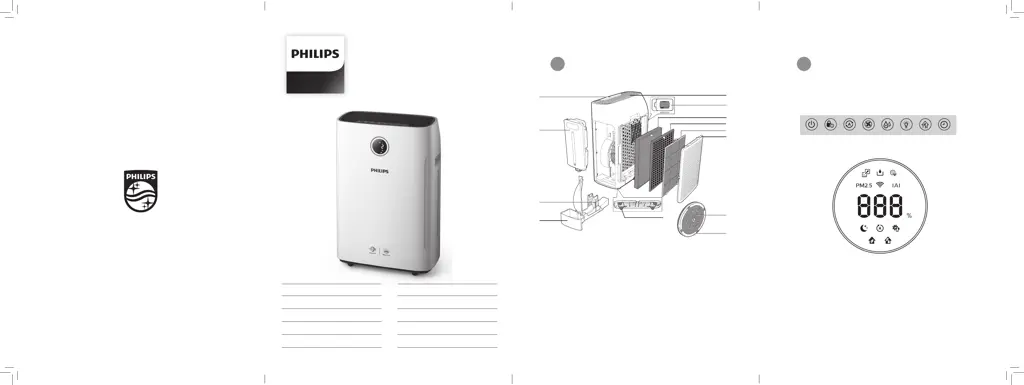
1 2
A
B
D
C
G
F
M
K
J
H
L
I
E
Control buttons
Display panel
© 2019 Koninklijke Philips N.V.
All rights reserved.
4241 210 99944
AC2729

Table of Contents

Questions and Answers

  • W
    william10Aug 17, 2025
    What to do if my Philips FY1410/30 doesn't work after plugging it in?
    • J
      Jonathan AndersonAug 17, 2025
      If the filter replacement light is flashing, but you haven't replaced the NanoProtect filter, the Philips Humidifier might be locked. Replace the filter and reset the filter lifetime counter. Also, ensure the water tank is correctly installed and contains enough water if the water refill light is flashing.
  • M
    Michelle LopezAug 20, 2025
    How to reset the filter replacement indicator on my Philips FY1410/30?
    • A
      Ashley NelsonAug 20, 2025
      If your Philips Humidifier still indicates that you need to replace a filter after you've already done so, ensure you correctly touched and held the Timer/Reset button. Plug in the appliance, touch to switch it on, and then touch and hold the Timer/Reset button for 3 seconds.
  • K
    Kelsey MyersAug 22, 2025
    Why are there white deposits on my Philips FY1410/30 Humidifier wick?
    • J
      James MataAug 23, 2025
      If you see white deposits on the NanoCloud rotary humidification wick of your Philips Humidifier, these are scale, consisting of minerals from the water. Follow the cleaning instructions in the user manual.
  • T
    Thomas HendersonAug 26, 2025
    Why does my Philips FY1410/30 Humidifier produce a strange smell?
    • V
      vperryAug 26, 2025
      The Philips Humidifier might produce a strange smell the first few times you use it; this is normal. If the appliance produces a burnt smell even with the filters removed, contact your Philips dealer or an authorized Philips service center. If it smells after a while, the filter may have absorbed indoor air. Remove the filter and place it in direct sunlight with ventilation for several hours, then reinstall it. If the odor persists, replace the filter.
  • Z
    zwilsonAug 28, 2025
    Why is the airflow weaker than before in my Philips Humidifier?
    • S
      Susan MeyerAug 28, 2025
      If the airflow coming from your Philips Humidifier's air outlet is weaker than usual, the pre-filter may be dirty. Clean the pre-filter. Also, make sure you have removed all packaging material from the NanoProtect filter.
  • J
    Jessica GrantAug 30, 2025
    Why is my Philips FY1410/30 Humidifier so loud?
    • S
      Samantha Miller DDSAug 31, 2025
      If your Philips Humidifier is extra loud, ensure you've removed all packaging material from the filters. You can also try changing the fan speed to a lower level.
  • A
    ajonesSep 2, 2025
    Why does the air quality not improve with my Philips FY1410/30 Humidifier?
    • M
      Mr. Reginald AguilarSep 2, 2025
      If your Philips Humidifier isn't improving air quality even after running for a while, check if the packing material has been removed from the filters. Ensure all filters are properly installed in the correct order, starting with the innermost filter: 1) NanoProtect filter Series 3 (FY1410); 2) NanoProtect filter Active Carbon (FY1413); 3) pre-filter. Also, make sure the air quality sensor is clean and dry.
  • G
    gwendolynvillegasSep 5, 2025
    Why does my Philips FY1410/30 take so long to reach the target humidity?
    • N
      Nicole ShawSep 5, 2025
      To optimize the humidification and purification performance of your Philips Humidifier, it's recommended to close doors and windows during use, which may help it reach the target humidity level faster.
  • D
    David MyersSep 8, 2025
    Why can't I see water vapor coming out of my Philips FY1410/30?
    • J
      Justin King DDSSep 8, 2025
      When mist is very fine, it is invisible. Your Philips Humidifier uses NanoCloud humidification technology, which produces healthy humid air without forming visible water mist. Therefore, you might not see any mist.
  • D
    Derek SinghSep 12, 2025
    What do error codes mean on my Philips FY1410/30?
    • J
      jacquelinegrahamSep 12, 2025
      If error codes "E1", "E2", "E3", "E4" or "E5" appear on the screen of your Philips Humidifier, the appliance has malfunctions. Contact the Consumer Care Center in your country.

Summary

1 Important

Safety

Guidance for safe usage and future reference.

2 You air purifier

Product overview (fig. 1)

Identifies the main components of the air purifier.

Controls overview (fig. 2)

Details the control buttons and display panel functions.

3 Get started

Installing the NanoProtect filter

Instructions for installing the NanoProtect filter.

Preparing for humidification

Steps to prepare the appliance for humidification.

Wi-Fi connection

Guide for setting up and resetting the Wi-Fi connection.

4 Use the appliance

Understanding the air quality light

Explanation of the air quality light colors and IAQ levels.

PM2.5

Details on AeraSense technology for PM2.5 detection.

IAI

Explanation of the AeraSense sensor for allergen detection.

Switching on and off

Instructions on how to power the appliance on and off.

Setting the humidity level

Guide to adjust the desired humidity level.

Using the light dimming function

How to control the brightness of the display and indicator lights.

Switching the operation mode

Details on switching between purification ONLY and 2-in-1 modes.

Switching the display mode

Instructions for cycling through display modes.

5 Cleaning

Cleaning schedule

Overview of cleaning frequency and methods for different parts.

Cleaning the body of the appliance

Instructions for cleaning the exterior and interior of the appliance.

Cleaning the air quality sensor

Procedure for cleaning the air quality sensor.

Cleaning the pre-filter

Steps to clean the pre-filter.

Descaling the NanoCloud rotary humidification wick

Procedure to descale the NanoCloud rotary humidification wick.

6 Replace the filter and wick

Understanding the healthy air protect lock

Explanation of the lock feature for filter and wick replacement.

Replacing the NanoProtect filter

Step-by-step guide to replacing the NanoProtect filter.

Replacing the NanoCloud rotary humidification wick

Instructions for replacing the NanoCloud rotary humidification wick.

7 Troubleshooting

Appliance not working when plugged in

Solutions for when the appliance is plugged in but not functioning.

Appliance not working when switched on

Troubleshooting steps for when the appliance is on but unresponsive.

White deposits on humidification wick

Explanation for white deposits on the wick and how to address them.

No air comes out of the air outlet

Checks for no airflow from the appliance outlet.

Reduced airflow from air outlet

Solutions for reduced airflow from the appliance.

Poor air quality improvement

Troubleshooting poor air quality improvement.

Slow humidity level achievement

Reasons for slow humidity level achievement and optimization tips.

Invisible water vapor output

Explanation for invisible water vapor from the appliance.

Strange smell from appliance

Troubleshooting unusual smells from the appliance.

Appliance is extra loud

Solutions for excessive noise from the appliance.

Filter replacement indicator remains on

Fix for filter replacement indicator staying on after replacement.

Error codes E1-E5 displayed

Information on appliance error codes and seeking support.

Wi-Fi setup not successful

Troubleshooting steps for failed Wi-Fi connection.

8 Guarantee and service

Order parts or accessories

Information on how to order replacement parts or accessories.

9 Notices

Electromagnetic fields (EMF)

Compliance statement regarding electromagnetic field exposure.

Compliance with EMF

Philips' commitment to EMF standards and product safety.

Recycling

Guidance on proper disposal of the product.

Notice

Information regarding App Store, Google Play, and open source software.

Simplified EU declaration of conformity

Statement of compliance with EU directives.

Philips FY1410/30 Specifications

General IconGeneral
BrandPhilips
ModelFY1410/30
CategoryHumidifier
LanguageEnglish

Related product manuals