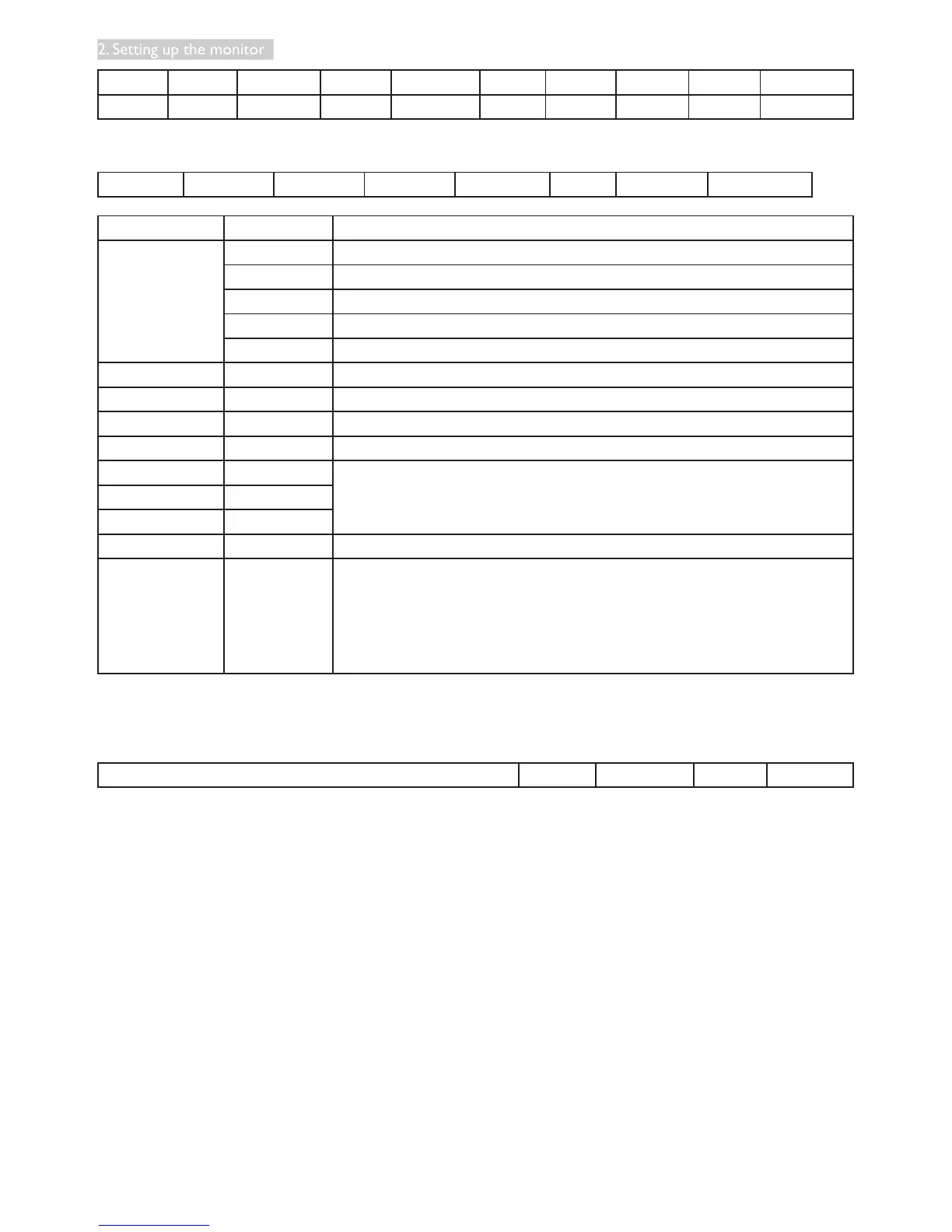
Header ID Category Page Function Length Control Data[0] Data[1] Checksum
0xA6 0x01 0x00 0x00 0x00 0x04 0x01 0x18 0x01 BB
• Responsethedata(FromMonitortoHost)
MsgSize Control Command Data [0] Data [1] … Data [N] Checksum
Name of Filed Item Value
MsgSize Header 0x21
Monitor ID 0xXX(=0~255)
Category 0x00(xed)
Page 0x00(xed)
Length 0xXX(=0~255)
Control 0x01(xed)
Command Command 0xXX(=0~255)
Data[0] Data[0] 0xXX(=0~255)
Data[1] Data[1] 0xXX(=0~255)
. 0xXX(=0~255)
. .
. .
Data[N] Data[N] 0xXX(=0~255)
Checksum Checksum 0xXX
Algorithm:TheEXCLUSIVE-OR(XOR)ofallbytesinthemessage
except the checksum itself.
Checksum= [MsgSize] XOR[Control] XOR Data[0]….XOR Data[N]
Example:
Monitor#1 response to host after received the command of user input control.
MsgSize Control Command Data[0] Checksum












 To Next Page