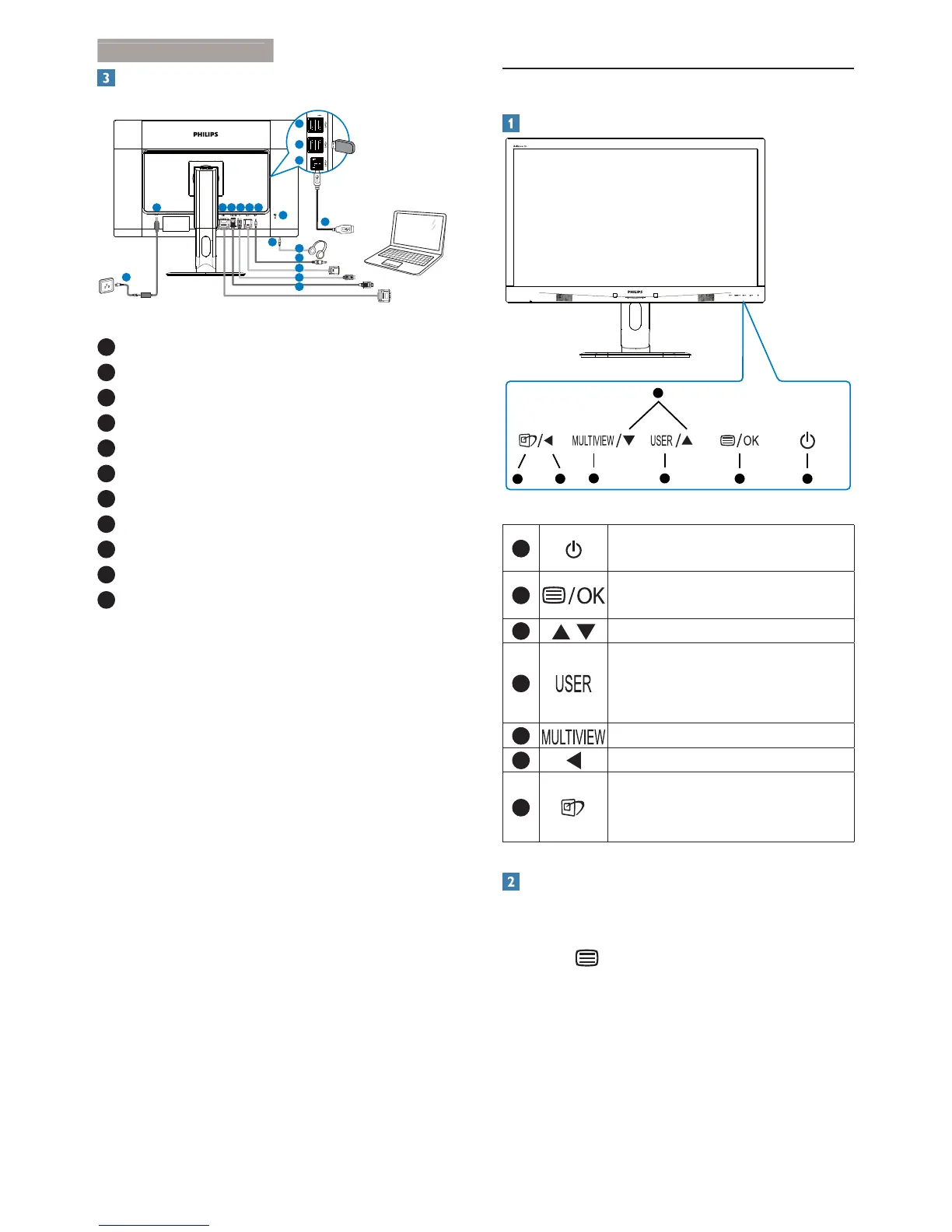
Connecting to your computer
1
2 3 4 5 6
8
7
1
3
5
4
9
10
6
11
11
7
1
DC power input
2
DVI input
3
MHL-HDMI input
4
Display port input
5
VGA input
6
Audio input
7
Earphone jack
8
Kensington anti-theft lock
9
USB fast charger
10
USB port
11
USB upstream
2.2 Operating the monitor
Description of the control buttons
5 4
3
2
1
7
6
1
Switch monitor’s power ON and
OFF
.
2
Access the OSD menu
.
&RQÀUPWKH26'DGMXVWPHQW
3
Adjust the OSD menu.
4
User preference key. Customize
your own preference function
from OSD to become the “user
key”.
5
PIP/PBP/Off/Swap
6
Return to previous OSD layer.
7
SmartImage
hot key
. There are 6
PRGHVWRVHOHFW2IÀFH3KRWR
Movie, Game, Economy, Off.
Customize your own “USER” key
This hot key allows you to setup your favorite
function key.
1. Press button on the front bezel to
enter OSD Menu Screen.


 To Next Page