7EN
4 Use Bluetooth
devices
With this speaker, you can listen to audio from
Bluetooth-enabled devices and control the
incoming call through Bluetooth.
Connect a device
Note
• Make sure that your Bluetooth device is compatible
with this speaker.
• Before pairing a device with this speaker, read its user
manual for Bluetooth compatibility.
• The speaker can memorize a maximum of 4 paired
devices.
• Make sure that Bluetooth function is enabled on your
device, and your device is set as visible to all other
Bluetooth devices.
• Any obstacle between this speaker and a Bluetooth
device can reduce the operational range.
• Keep away from any other electronic device that may
cause interference.
Option 1: Connect a device through
NFC
Near Field Communication (NFC) is a
technology that enables short-range wireless
communication between various NFC
compatible devices, such as mobile phones and
IC tags.
If your Bluetooth device supports NFC, you can
connect it with this speaker easily.
1 Enable NFC on your Bluetooth device
(refer to its user manual).
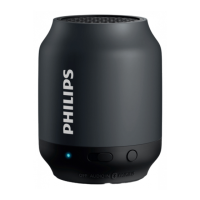
2 Press on this speaker.
» TheLEDindicatorashesblue.
3 Tap the NFC tag on the top of the speaker
with the NFC area of your Bluetooth
device.
4 Follow the on-screen instructions to
complete the pairing and connection.
» After successful pairing and connection,
the speaker beeps twice, and the LED
indicator turns solid blue.
Option 2: Connect a device manually
Note
• The operational range between this speaker and a
Bluetooth device is approximately 10 meters (30 feet).
1 Press .
» TheLEDindicatorashesblue.
2 On your Bluetooth device, enable
Bluetooth and search for Bluetooth devices
that can be paired (see the user manual of
the device).
3 When [Philips BT5500] is displayed on
your device, select it to start pairing and
connection. If necessary, input “0000” as
the pairing password.
» After successful pairing and connection,
the speaker beeps twice, and the LED
indicator turns solid blue.
LED indicator Description
Flashing blue Connecting or waiting for
connection
Solid blue Connected



 To Next Page