10 EN
Program tracks
You can program a maximum of 20 tracks.
1 Stop play, and then press PROG/SCAN to
activate programming mode.
2 For MP3 tracks, press ALBUM/PRESET /
to select an album.
3 Press / to select a track, and then
press PROG/SCANtoconrm.
4 Repeat steps 2-3 to program more tracks.
5 Press to play the programmed tracks.
• To erase the program, stop play, and
then press
.
Play from Bluetooth-enabled
devices
Note
•
Before pairing a device with this unit, read its user
manual for Bluetooth compatibility.
• Compatibility with all Bluetooth devices is not
guaranteed.
• Any obstacle between the unit and the device can
reduce the operational range.
• The effective operation range between this unit and
your Bluetooth enabled device is approximately 10
meters (30 feet).
• The unit can memorize up to 8 previously connected
Bluetooth devices.
To enjoy music through the speaker wirelessly,
you need to pair your Bluetooth enabled device
with the unit.
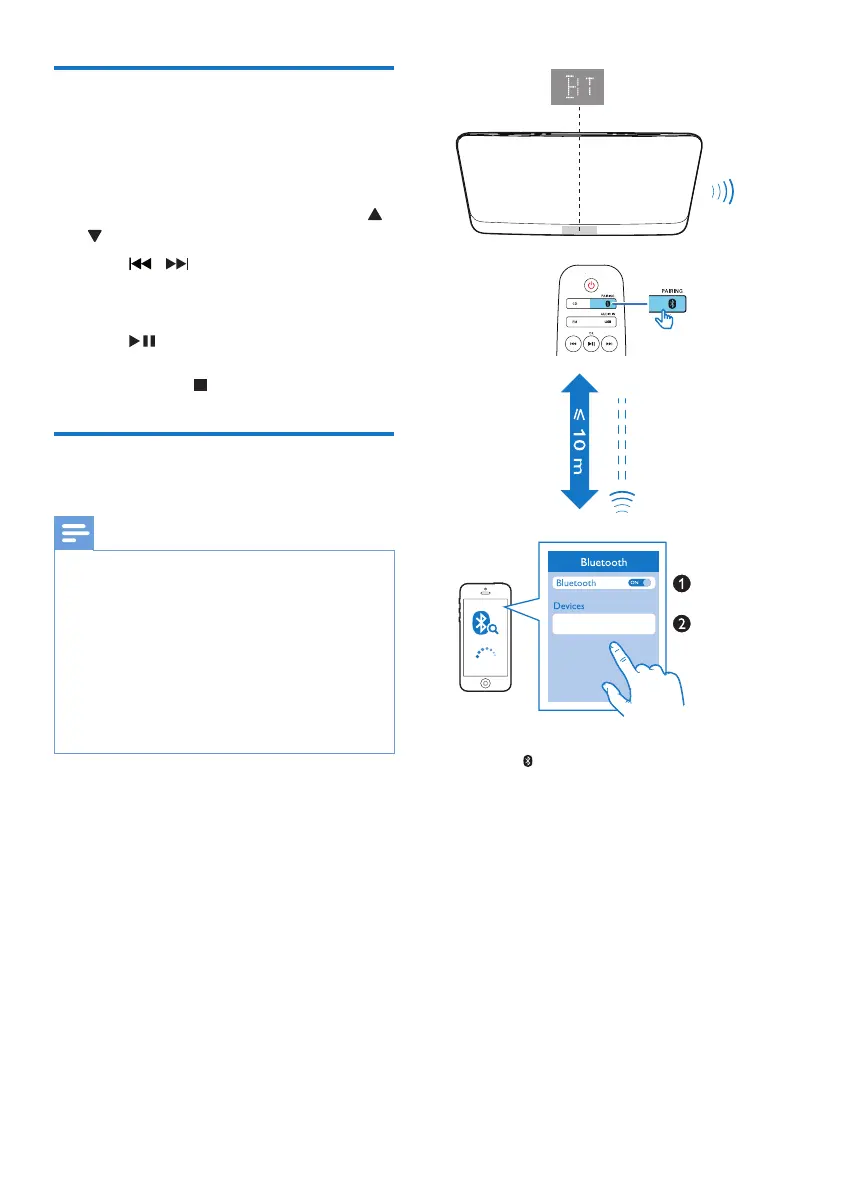
1 Press /PAIRING to select the Bluetooth
source.
» [BT] (Bluetooth) is displayed.
» TheBluetoothindicatorashesblue.
2 On your device that supports Advanced
AudioDistributionProle(A2DP),enable
Bluetooth and search for Bluetooth devices
that can be paired (refer to the user
manual of the device).
Philips BTM2460


 To Next Page