5EN
k FM ANT
• FM antenna socket.
l
• Headphone socket.
m AUDIO IN
• Audio input socket (3.5mm) for an
external audio device.
n DC IN 12V
2.5A
• Power socket.
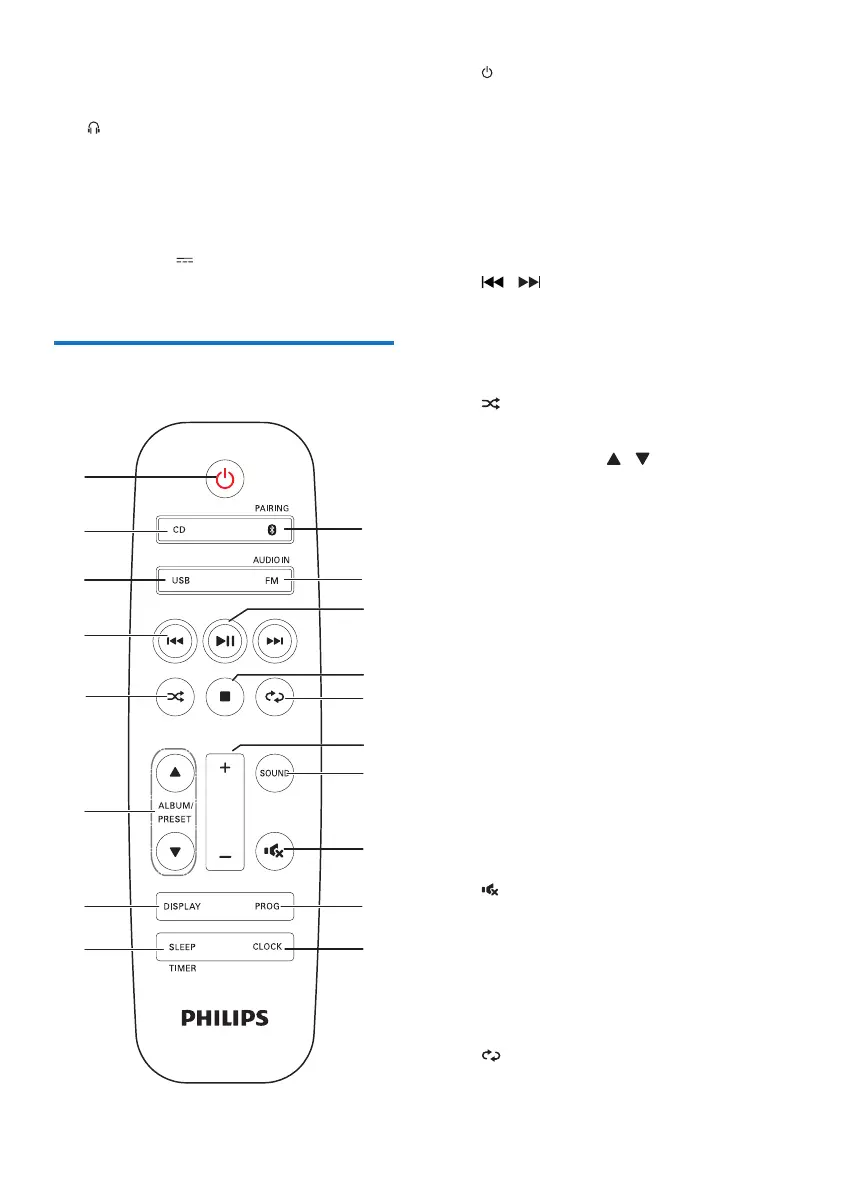
Overview of the remote
control
a
• Turn the unit on or off.
• Switch to standby mode or Eco power
standby mode.
b CD
• Select the DISC source.
c FM
• Press to select the FM source.
d
/
• Skip to the previous/next track.
• Search within a track/disc/USB.
• Tune to a radio station.
• Adjust time.
e
• Play tracks randomly.
f ALBUM/PRESET
/
• Select a preset radio station.
• Skip to the previous/next album.
g DISPLAY
• Adjust display brightness.
• During playback, display the play
information.
h SLEEP/TIMER
• Set sleep timer.
• Set alarm timer.
i CLOCK/SCAN
• Set the clock.
• View clock information.
• Scan FM radio stations.
j PROG
• Program tracks.
• Program radio stations.
k
• Mute or restore volume.
l SOUND
• Select a preset sound effect.
m +/-
• Adjust volume.
n
• Play a track or all tracks repeatedly.


 To Next Page