7EN
3 Get started
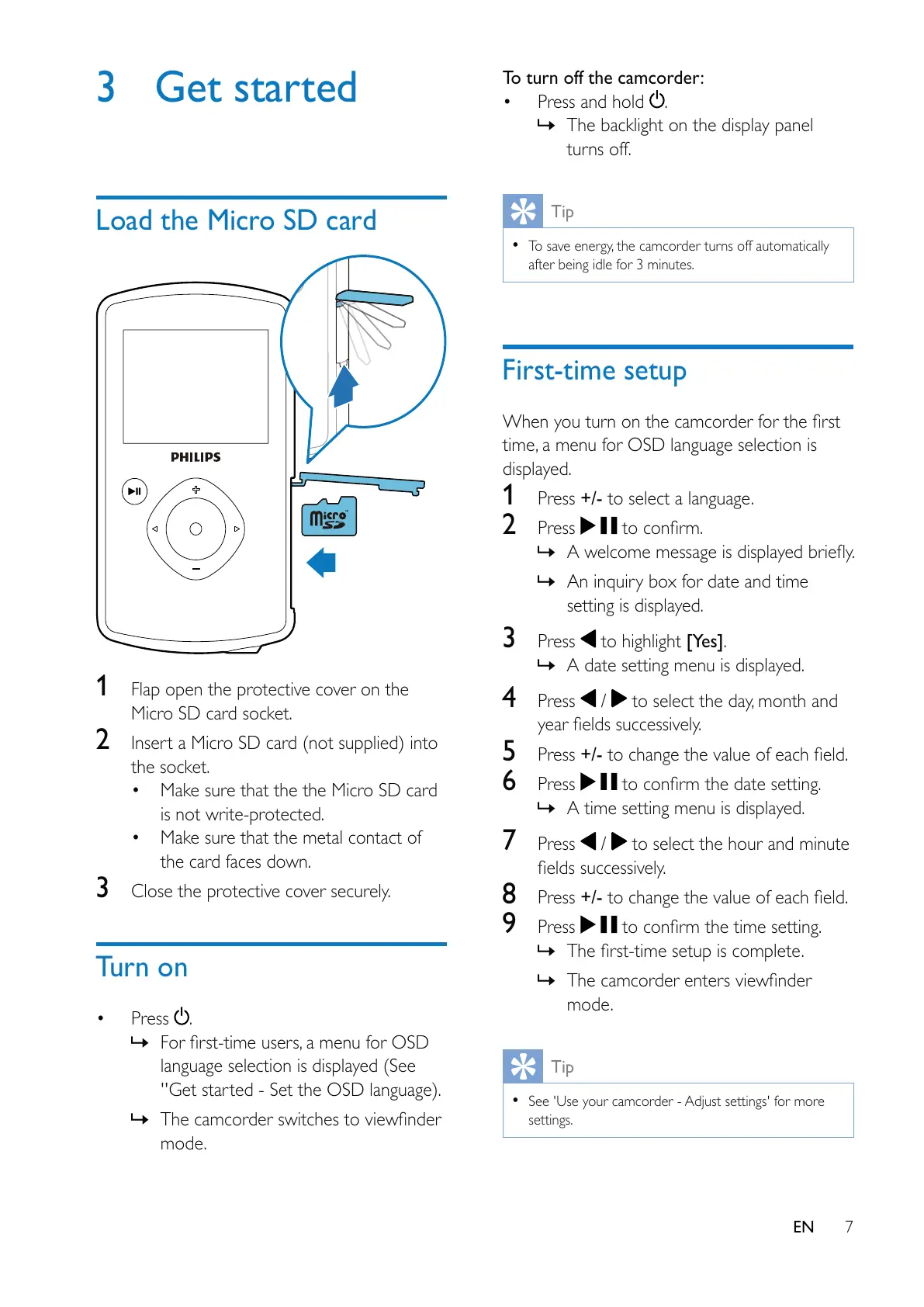
Load the Micro SD card
1 Flap open the protective cover on the
Micro SD card socket.
2 Insert a Micro SD card (not supplied) into
the socket.
Make sure that the the Micro SD card
is not write-protected.
Make sure that the metal contact of
the card faces down.
3 Close the protective cover securely.
Turn on
Press .
»
language selection is displayed (See
''Get started - Set the OSD language).
»
mode.
To turn off the camcorder:
Press and hold
.
» The backlight on the display panel
turns off.
Tip
To save energy, the camcorder turns off automatically
after being idle for 3 minutes.
First-time setup
time, a menu for OSD language selection is
displayed.
1 Press +/- to select a language.
2 Press
»
» An inquiry box for date and time
setting is displayed.
3 Press to highlight [Yes].
» A date setting menu is displayed.
4 Press / to select the day, month and
5 Press +/-
6 Press
» A time setting menu is displayed.
7 Press / to select the hour and minute
8 Press +/-
9 Press
»
»
mode.
Tip
See 'Use your camcorder - Adjust settings' for more
settings.



 To Next Page