Need help?
Do you have a question about the Philips CD190 and is the answer not in the manual?
Covers essential safety guidelines, warnings, and operational temperature limits.
Lists the items included in the product packaging.
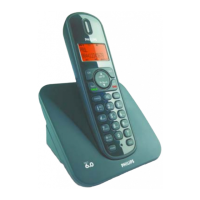
Details the physical layout and components of the handset.
Describes the physical layout and components of the base station.
Explains the meaning of icons shown on the handset display.
Step-by-step instructions for connecting the base station to power and telephone line.
Instructions for preparing the handset for use, including battery installation.
Guides users through initial country and language setup.
Configuring the current date and time on the phone.
Instructions for changing the PIN code for remote answering machine access.
Details the process of charging the handset.
Explains how to check the current battery status.
Describes the phone's standby mode and what is displayed.
Instructions on how to check the signal strength between handset and base.
How to power the handset on and off.
Explains various methods to initiate a phone call.
Methods for terminating an active phone call.
How to receive an incoming phone call.
Instructions for muting the microphone during a call.
How to control the audio volume during a call.
Steps to initiate a second call while on an existing call.
How to respond to an incoming call during an active call.
Managing multiple calls by switching between them.
Steps to set up a three-way conference call.
Guide on inputting characters and digits for various phone functions.
How to access and view stored phonebook entries.
Methods for finding specific contacts within the phonebook.
Navigating through the phonebook entries.
Quick method to find contacts by their initial letter.
How to dial a number directly from the phonebook.
Accessing contacts while already on a call.
Steps to save a new contact into the phonebook.
How to modify existing phonebook entries.
Removing a single contact from the phonebook.
Erasing all entries from the phonebook.
Setting the display preference for incoming or missed calls.
Accessing and reviewing the history of calls.
Adding a call log entry to the phonebook.
How to dial back a number from the call log.
Removing a single entry from the call log.
Erasing all entries from the call log.
Accessing the list of recently dialed numbers.
How to redial a previously dialed number.
Adding a redial list entry to the phonebook.
Removing a single entry from the redial list.
Erasing all entries from the redial list.
Adjusting ringtone volume, ringtone, and key tone sounds.
Managing the sound made when placing the handset on the charger.
Assigning a custom name to the handset.
Changing the language displayed on the handset screen.
Setting the type of call history to view (incoming or missed).
Enabling the auto conference feature for calls.
Selecting the appropriate network type for the phone.
Setting the duration for call recall.
Configuring the phone’s dial mode (tone or pulse).
Adding new handsets to the base station.
Removing handsets from the base station.
Resetting all phone settings to factory defaults.
Instructions for activating or deactivating the answering machine.
Changing the language for answering machine announcements.
Configuring how the answering machine handles incoming calls.
Information about pre-recorded and custom announcements.
Steps to record a personalized announcement.
Playing back recorded or default announcements.
Reverting to the factory default announcement.
Information about receiving and indicating new voice messages.
How to play back recorded messages from the answering machine.
Removing a single received message.
Erasing all stored messages.
Configuring the number of rings before the answering machine answers.
Operating the answering machine remotely via phone.
Enabling or disabling remote access to the answering machine.
Modifying the PIN code for remote access.
Step-by-step guide to using the answering machine from a remote location.
Technical specifications of the phone's display.
List of general features like caller ID, conference calls.
Capacity details for phonebook, redial, and call logs.
Specifications for compatible batteries.
Details of the power adapter specifications.
Information on power usage in standby mode.
Physical dimensions and weight for the CD190 model.
Physical dimensions and weight for the CD195 model.
Statement of compliance with relevant directives and standards.
Explanation of GAP standard and its implications for compatibility.
Philips' policy and safety measures regarding electromagnetic fields (EMF).
Guidelines for environmentally responsible disposal of the product and batteries.
Troubleshooting steps for a missing signal bar.
Solutions for problems encountered during handset registration.
Troubleshooting steps for the absence of a dial tone.
Reasons for the docking tone not sounding and how to fix it.
Guidance on managing voice mail settings via service provider.
Troubleshooting steps for charging issues.
Steps to take when the handset screen is blank.
Solutions for poor audio quality during calls.
Troubleshooting steps for a silent handset.
Reasons and solutions for caller ID not appearing.
Tables detailing character input for different languages.
 General
| Microphone mute | Yes |
|---|---|
| Phonebook capacity | 50 entries |
| Battery type | AAA |
| Standby time | 250 h |
| AC input voltage | 100 - 240 V |
| Battery capacity | 600 mAh |
| AC input frequency | 50 - 60 Hz |
| Battery technology | Nickel-Metal Hydride (NiMH) |
| Battery recharge time | 8 h |
| Power consumption (typical) | 0.6 W |
| Backlight color | Amber |
| Display diagonal | 1.6 \ |
| Package weight | 0.708 kg |
| Packaging net weight | 0.599 kg |
| Packaging tare weight | 0.109 kg |
| Specific absorption rate (SAR) value (EU) | 0.1 W/kg |
| Type | DECT telephone |
| Number of melodies | 10 |
| Maximum indoor range | 50 m |
| Maximum outdoor range | 300 m |
| Mounting type | Desk |
| Product color | Black, Grey |
| Call log entries | 20 |
| Volume control | Digital |
| Number of handsets included | 2 |
 Weight and Dimensions
| 708 g | Weight of the packaged product in gram. |
|---|---|
| Weight | 599 g |
| Cable length | 1.8 m |
| Package depth | 104 mm |
| Package width | 136 mm |
| Package height | 185 mm |


 To Next Page