10
If you disconnect the car battery in
a car that has an on-board drive or
may lose its memory.
bare wires do not touch each other.
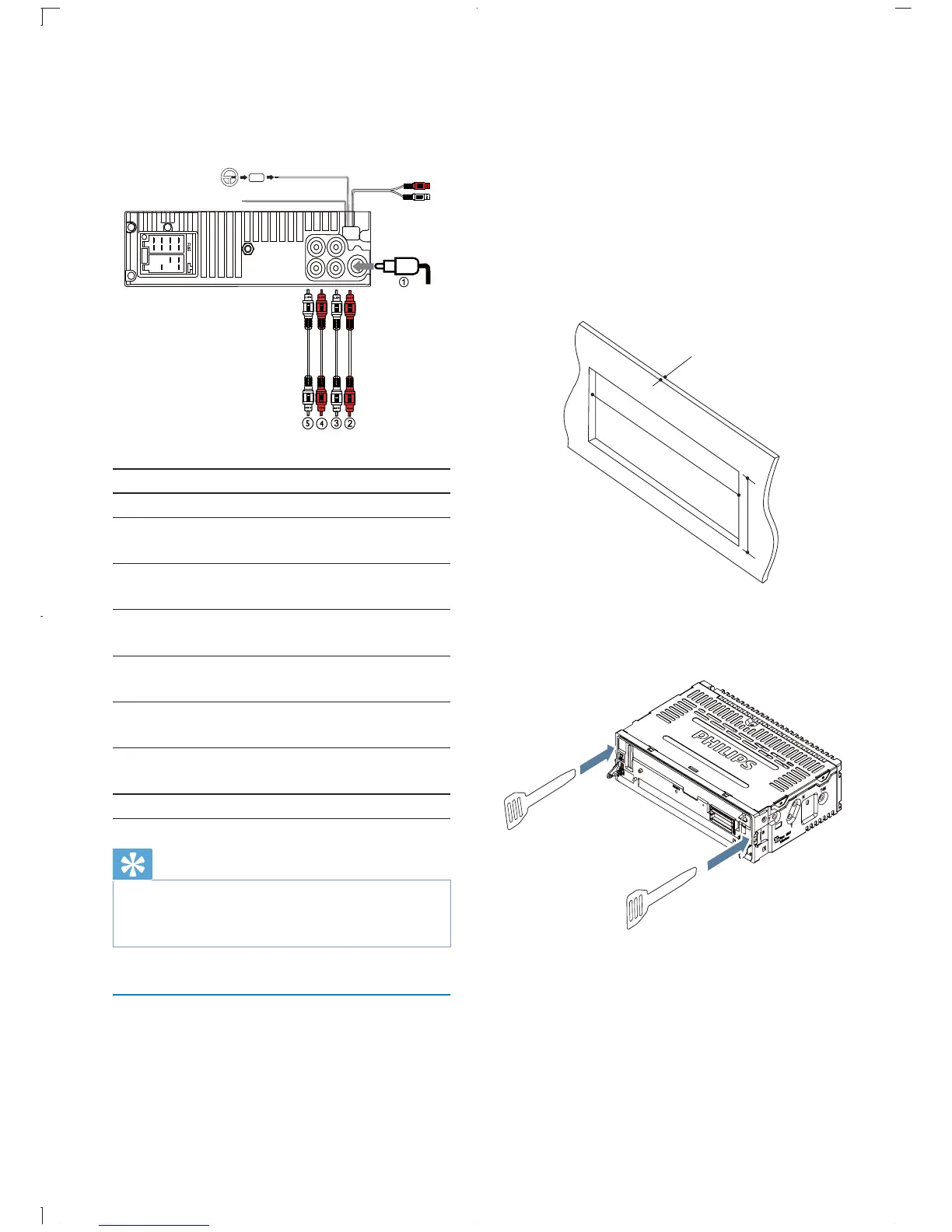
2 Ensure that car dashboard opening is
within these measurements:
3 Remove the mounting sleeve with the
supplied disassembly tools.
183 mm
53mm
5mm
3
Connector Connect to
1 ANTENNA Antenna
2 FRONT LINE OUT
R (Socket)
Front right
speaker
3 FRONT LINE OUT L
(Socket)
Front left
speaker
4 REAR LINE OUT R
(Socket)
Rear right
speaker
5 REAR LINE OUT L
(Socket)
Rear left
speaker
6 OE REMOTE
(Purple)
OE Remote
7 TEL MUTING (Blue) To cellular
phone system
8 REAR AUX (Yellow) Aux right/left
Tip
The pin arrangement for the ISO connectors depends
on the type of vehicle you drive. Be sure to make
proper connections to prevent damage to the unit.
Mount into the dashboard
1 If the car does not have an on-board drive
negative terminal of the car battery.
f
g
h
L
R
Rear
Front
L
R
Rear
Front
EN



 To Next Page