24 EN
12 Additional
information
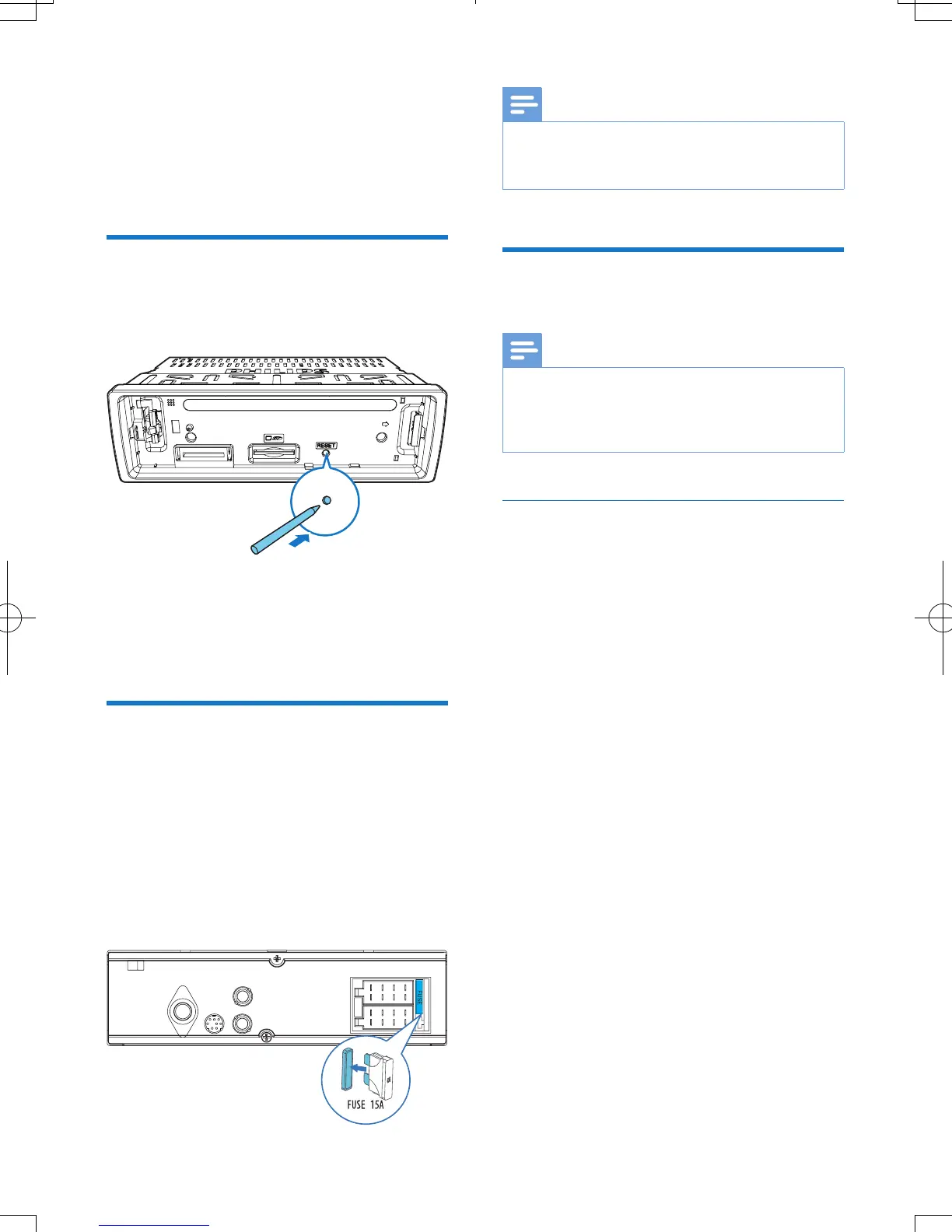
Reset the system
If the system works abnormally, reset the
system to factory default settings.
1 Detach the front panel.
2 Press the RESET button with the tip of a
ball-point pen or toothpick.
» All settings are reset to factory default.
Replace the fuse
If there is no power, check the fuse and replace
it if it is damaged.
1 Check the electric connection.
2 Remove the damaged fuse from the rear
panel.
3 Insert a new fuse with the same
specications (15 A).
Note
•
If the fuse gets damaged immediately after it is
replaced, an internal malfunction may occur. In such
case, consult your Philips retailer.
Upgrade the rmware
Note
•
Power supply must not be interrupted during the
upgrade.
• When the rmware upgrade succeeds, all settings are
restored to the factory default status.
Register your product
1 Go to www.philips.com/welcome.
2 Click the link of "Register my product"
(the exact wording of this link name may
vary in different languages).
3 Log in with your account on the prompt
Web page.
• If you have no account for Club Philips,
create one rst on this Web page.
4 Search your product with "CE153DR/05"
as the keyword.
5 Click the link of search result to access the
Web page for registering your product.
6 Fill in necessary information about this
product to complete the registration.
» With the registration, you can get
information about software update and
product support at this Web page or
via your mailbox that is registered as
the account for Club Philips.



 To Next Page