12
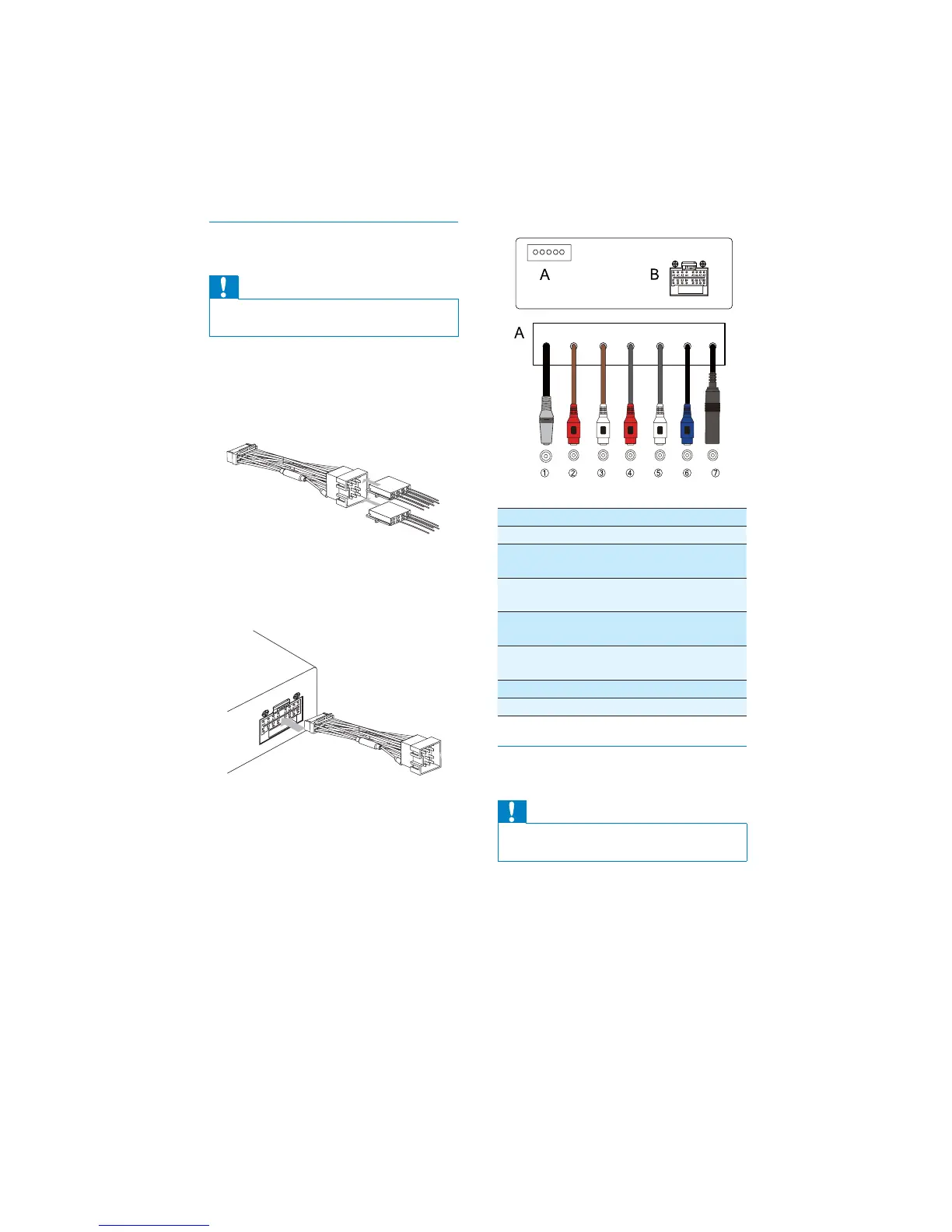
Connector Connect to
1MIC Microphone
2FRONT LINE
OUT R
Front right
speaker
3FRONT LINE
OUT L
Front left
speaker
4 REAR LINE
OUT R
Rear right
speaker
5 REAR LINE
OUT L
Rear left speaker
6SUB OUT Subwoofer
7 ANTENNA Antenna
Connection: for cars without ISO
connectors
Caution
Be sure to connect the black ground (earth) •
lead fi rst.
1 Connect the antenna and amplifi er as
illustrated, if applicable.
Connection: for cars with ISO
connectors
Caution
Ensure that all loose leads are insulated with •
electrical tape.
1 Pull out the ISO connectors from car
dashboard and connect them to the
bigger end of the supplied standard
connector.
2 Connect the other end of the supplied
standard connector to the unit.
3 Connect the antenna and amplifi er as
illustrated, if applicable.
EN



 To Next Page