9
d MENU
Access system menu.•
Access RDS (Radio Data System) •
menu.
e AUDIO
Access audio setting menu.•
f 5/6/7/8/9/0+
Select track or preset radio station.•
Enter phone number.•
g
Answer phone.•
Dial number.•
h 1,
Start play from the beginning of the •
fi rst track.
Pause or resume play.•
Select preset station 1.•
Enter phone number.•
i SHUF, 4
Set shuffl e play mode.•
Select preset station 4.•
Enter phone number.•
j SEL
Confi rm selection.•
k
/
Tune for radio station•
Skip/search for MP3/WMA track.•
Select RDS program type.•
l
Return to previous menu.•
Disable screen blackout. •
m SOURCE
Select audio source.•
n VOLUME +/-
Adjust volume.•
o EQ
Select EQ setting.•
p DBB
Turn on or off Dynamic Bass Boost •
(DBB) sound.
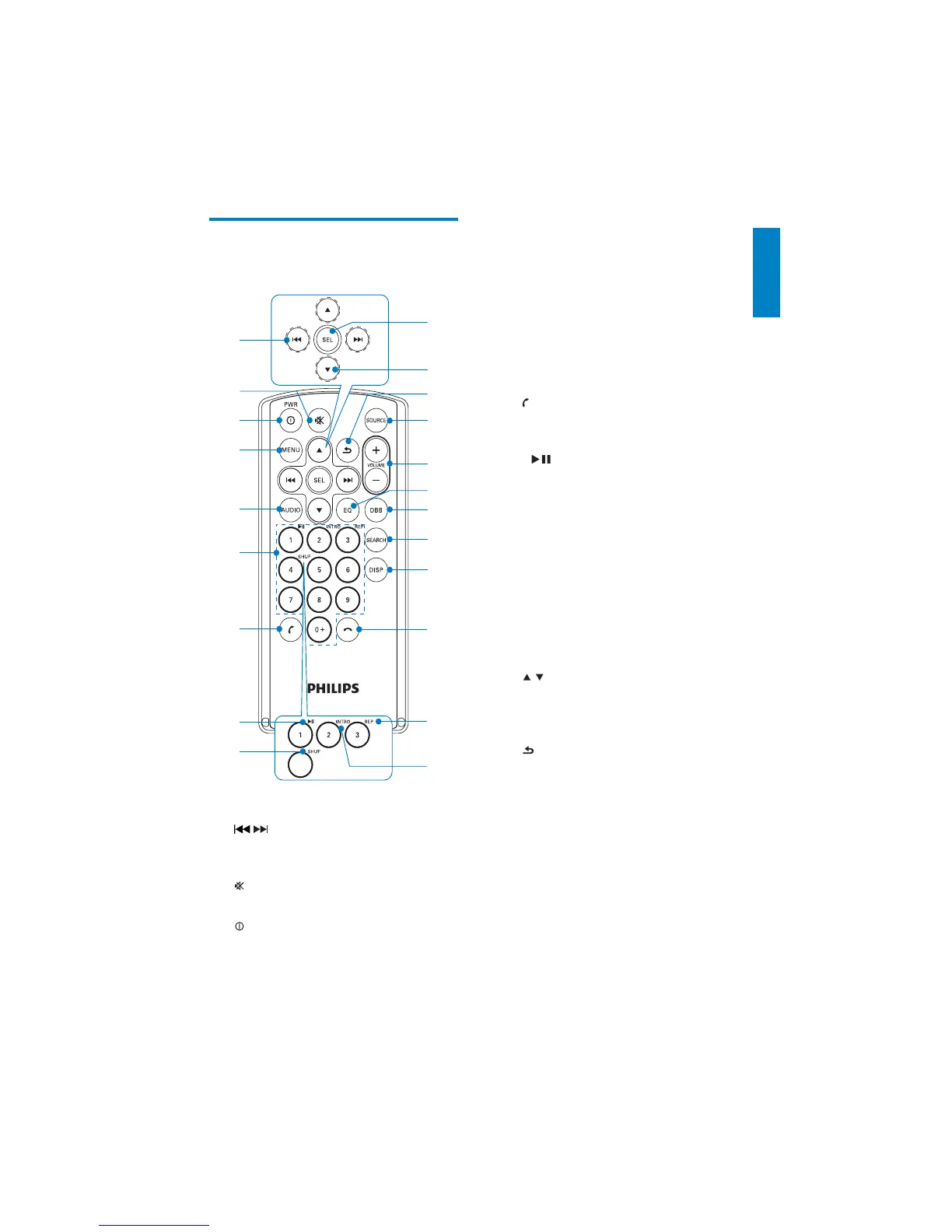
Overview of the remote
control
a /
Tune to a radio station•
Skip/search for a track.•
b
Mute or restore volume.•
c
PWR
Turn the unit on or off.•
a
c
d
e
f
g
b
k
m
n
p
q
r
s
o
j
l
h
i
t
u
English
EN



 To Next Page