7
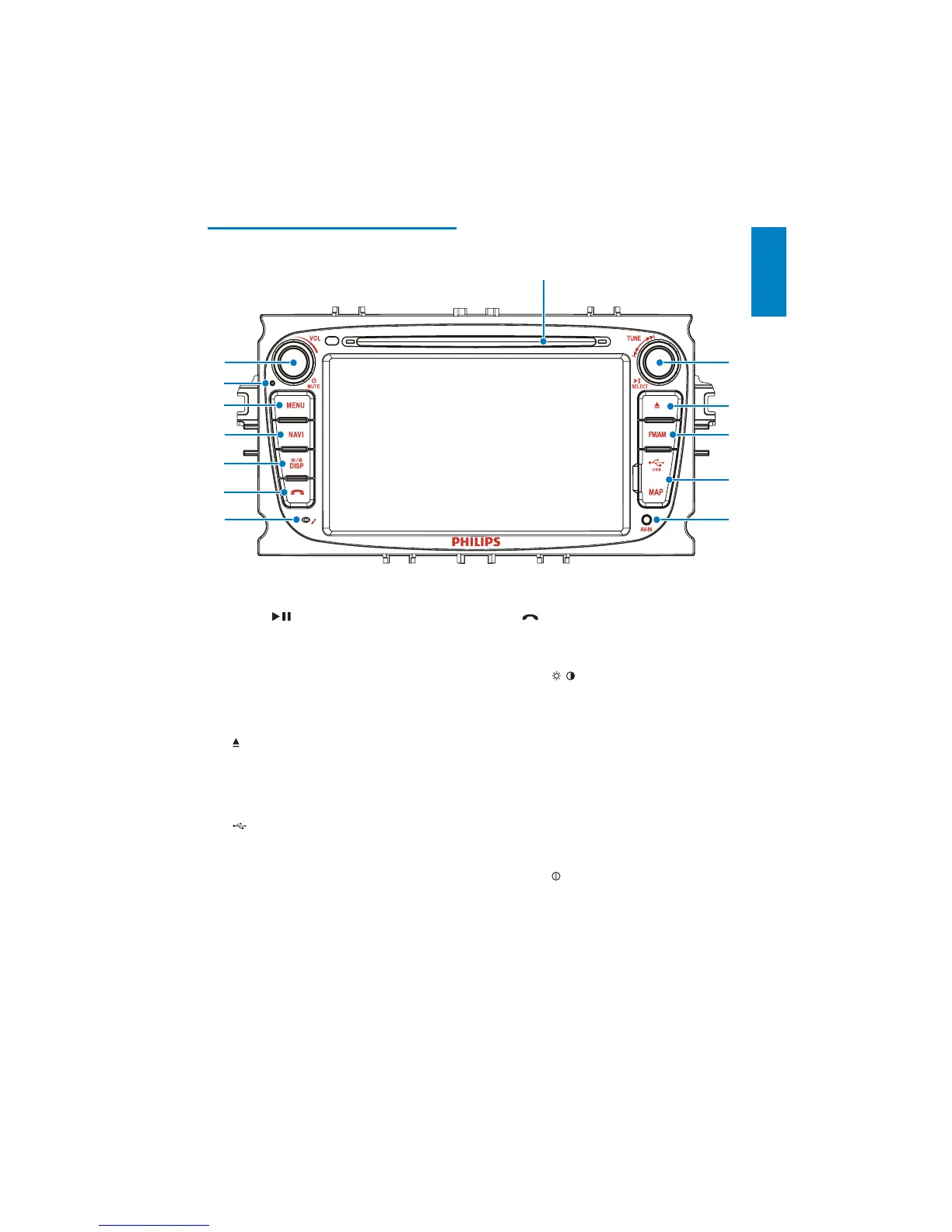
g Built-in microphone
h
Answer phone.
Dial number.
i DISP/
/
Adjust screen brightness.
Turn on/off the screen display.
j NAVI
Enter the GPS navigation system or
exit.
k MENU
Return to the home menu.
l RESET
Reset when it hangs up. the unit
m VOL/
/MUTE
Adjust volume.
Turn the unit on or off.
Turn mute on or off.
Overview of the main unit
a Disc slot
b TUNE/
SELECT
Skip to the previous or next title,
chapter, or track.
Search backward/forward at
different speeds.
&RQÀUPDQHQWU\RUVHOHFWLRQ
Start, pause or resume play.
c
Eject disc.
d FM/AM
Switch to the FM/AM source.
e
/MAP
Open the cover to insert/remove
USB device or map card.
f AV IN
External equipment audio/video in
socket.
b
c
d
e
f
m
k
j
i
h
g
l
a
English
EN



 To Next Page