9
English
EN
Pair up with the speakers
1 Turn on the main unit and the
surround wireless speakers.
» If the connection to the main unit
is lost, the red and orange LEDs
on the wireless speaker blink
alternatively.
2 Dock the left and right wireless
speakers onto the main unit (the left
and right base speakers) to pair up
automatically.
» If the pairing is successful, the
orange LED on the wireless
speaker lights up for ve seconds.
» If the pairing fails, the red and
orange LEDs on the wireless
speaker blinks alternatively.
3 If the paring fails, re-dock the wireless
speakers onto the main unit.
Pair up with the subwoofer
1 Turn on the main unit, and the
subwoofer.
» If the connection to the main
unit is lost, the white LED on the
subwoofer blinks slowly.
2 Press the CONNECT (connect)
button on the subwoofer to enter the
pairing mode.
» The white LED on the subwoofer
blinks quickly.
3 In OPTICAL mode (press OPTICAL)
, within six seconds, on the remote
control, press twice then Volume +
once, and then hold down BASS +.
» If the pairing succeeds, the white
LED on the subwoofer lights up.
» If the pairing fails, the white LED
on the subwoofer blinks slowly.
4 If the pairing fails, repeat the steps
above.
Note
• After the subwoofer is manually
connected to the main unit, pair the
surround speakers with the main unit
again for re-connection.
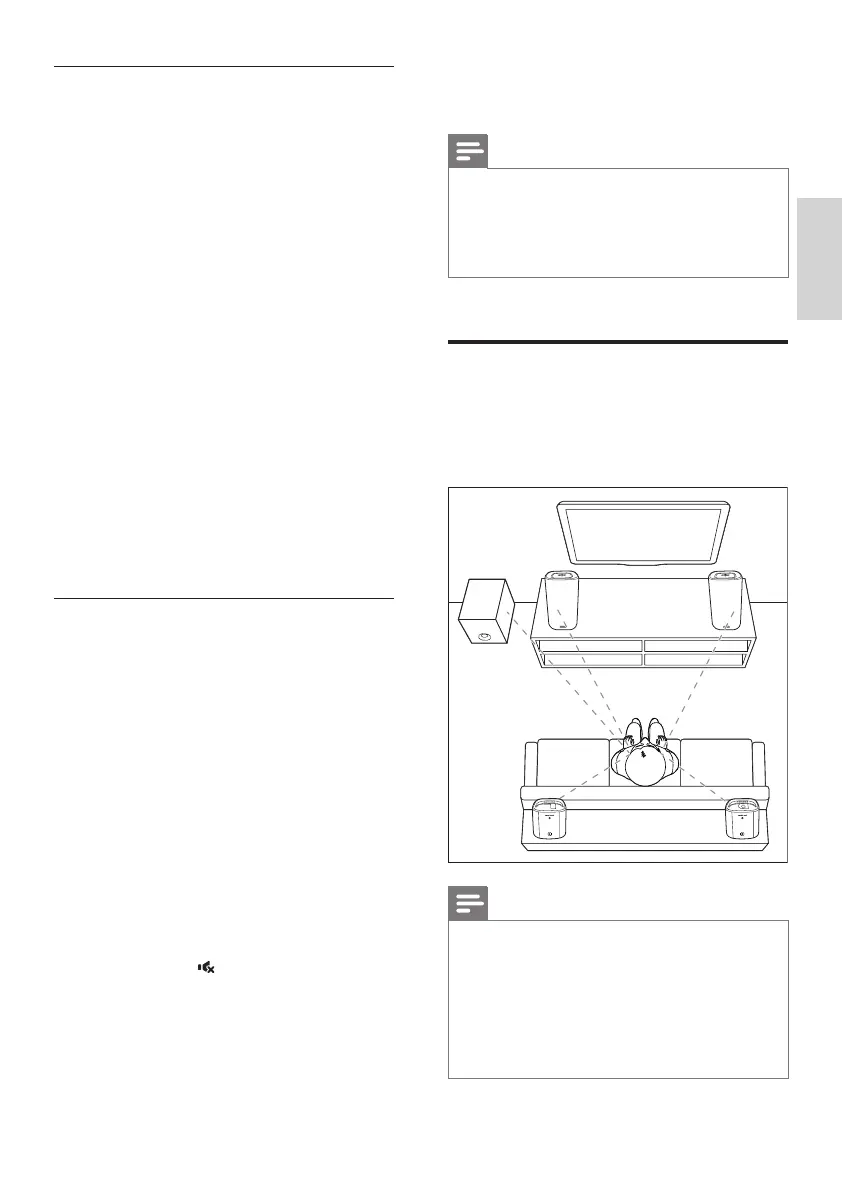
Place speakers
For best sound effect, position all the
speakers towards the seating position and
place them close to your ear level (seated).
Note
• Surround sound depends on factors
such as room shape and size, type of
wall and ceiling, windows and reective
surfaces, and speaker acoustics.
Experiment with the speaker positions
to nd the optimum setting for you.
SUB
WOOFER
RL
CSS5235Y_93_UM_V1.0.indb 9 4/24/2015 3:50:56 PM


 To Next Page