20
11 Product
information
Note
Product information is subject to change
without prior notice.
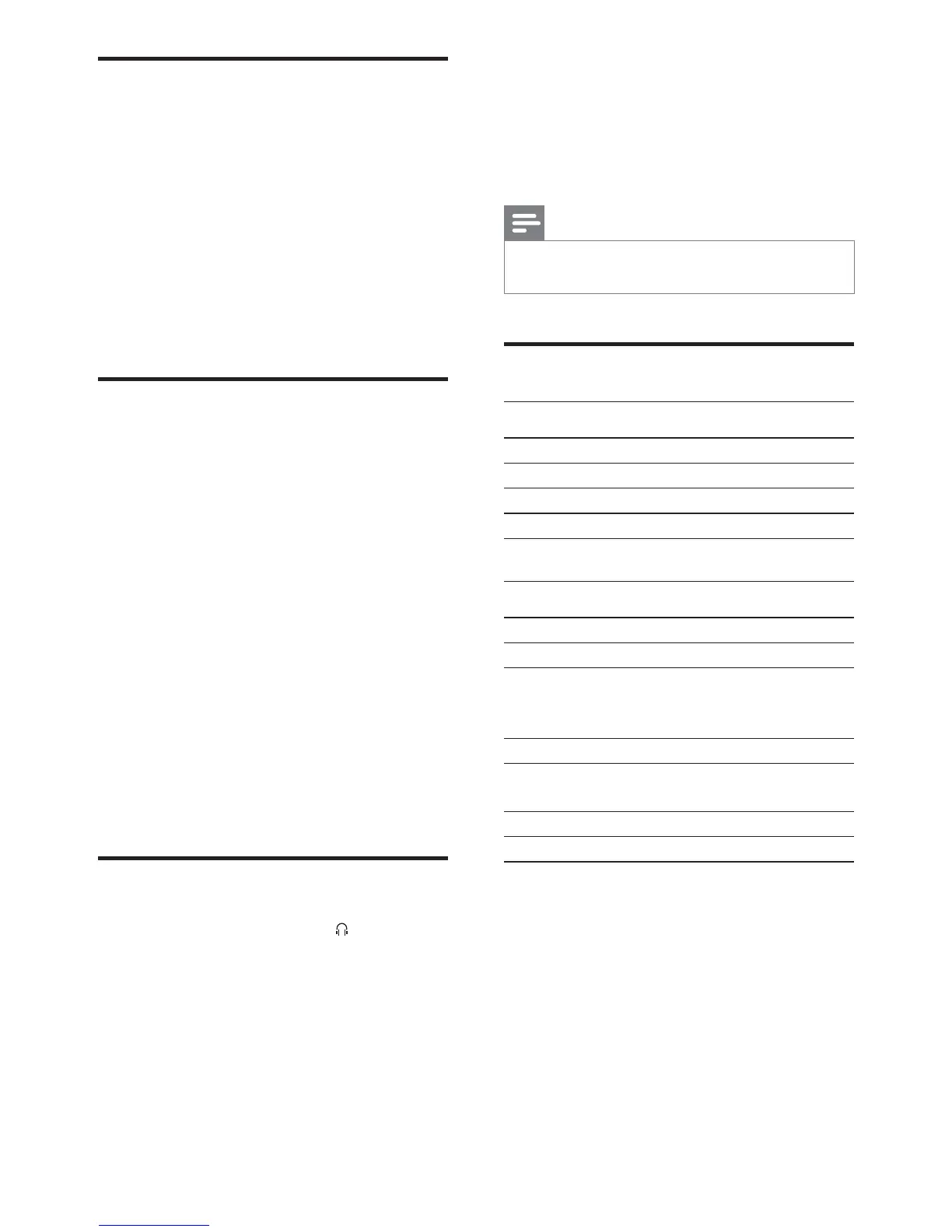
6SHFLÀFDWLRQV
$PSOLÀHU
Rated Output Power 2X20W RMS
Frequency Response 20 -20000 Hz, -3dB
Signal to Noise Ratio >77dB
Aux Input 0.5 V RMS 20kohm
Disc
Laser Type Semiconductor
Disc Diameter 12cm/8cm
Support Disc CD-DA, CD-R,
CD-RW, MP3-CD,
WMA-CD
Audio DAC 24Bits / 44.1kHz
Total Harmonic
Distortion
<0.8% (1 kHz)
Frequency Response 4Hz - 20kHz (44.1kHz)
S/N Ratio >77dBA
Listen to an external device
You can also listen to an external audio device
through this unit.
1 Press AUX/MP3 LINK to select the MP3
link source.
2 Connect the supplied MP3 link cable to:
the MP3 LINK jack on this unit
the headphone jack on the device
3 Start to play the device. (See the device
user manual)
Listen to an audio player
You can listen to audio player through this unit.
1 Connect the audio player.
For audio players with red/white
audio output sockets:
Connect a red/white audio cable
(not supplied) to the AUX-IN
sockets and to the audio output
sockets on the audio player.
For audio players with headphone
sockets:
Connect the supplied MP3 Link cable
to the MP3 LINK socket and to the
headphone socket on the audio
player.
2 Select the MP3 Link/AUX source.
3 Start play on the audio player.
Listen through headphone
1
Plug a headphone into the socket on
the unit.
EN



 To Next Page