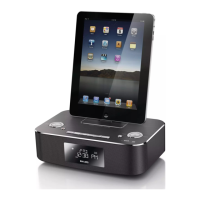
a Dock for iPod/iPhone/iPad
• Load an iPod/iPhone/iPad.
b +/-
• Select a preset radio station.
• Skip to the previous/next album.
• Adjust hour/minute digits.
c
• Turn on the system, switch to standby
mode.
d /
• Skip to the previous/next track.
• Search within a track.
• Tune to a radio station.
e
• Start or pause play.
• Conrm a selection.
f STOP/MENU
• Stop play.
• Access iPod/iPhone or DAB menu.
a
b
d
f
g
h
r
s
t
c
e
p
o
m
k
n
l
i
j
q
g MODE/SCAN
• Select repeat/shufe mode.
• Search FM/DAB radio stations.
h IR sensor
• Detect signals from the remote
control. Always point the remote
control at the IR sensor.
i Disc slot
• Insert a disc.
j Display panel
• Show current status.
k DISPLAY
• During play, select display information.
l SOURCE
• Select a source: DISC, USB, DOCK,
DIGITAL RADIO, FM TUNER, or
MP3-Link.



 To Next Page