EasyManua.ls Logo

Philips DCC 380 - Page 10

Philips DCC 380
17 pages
Print Icon
To Next Page IconTo Next Page
To Previous Page IconTo Previous Page
Loading...
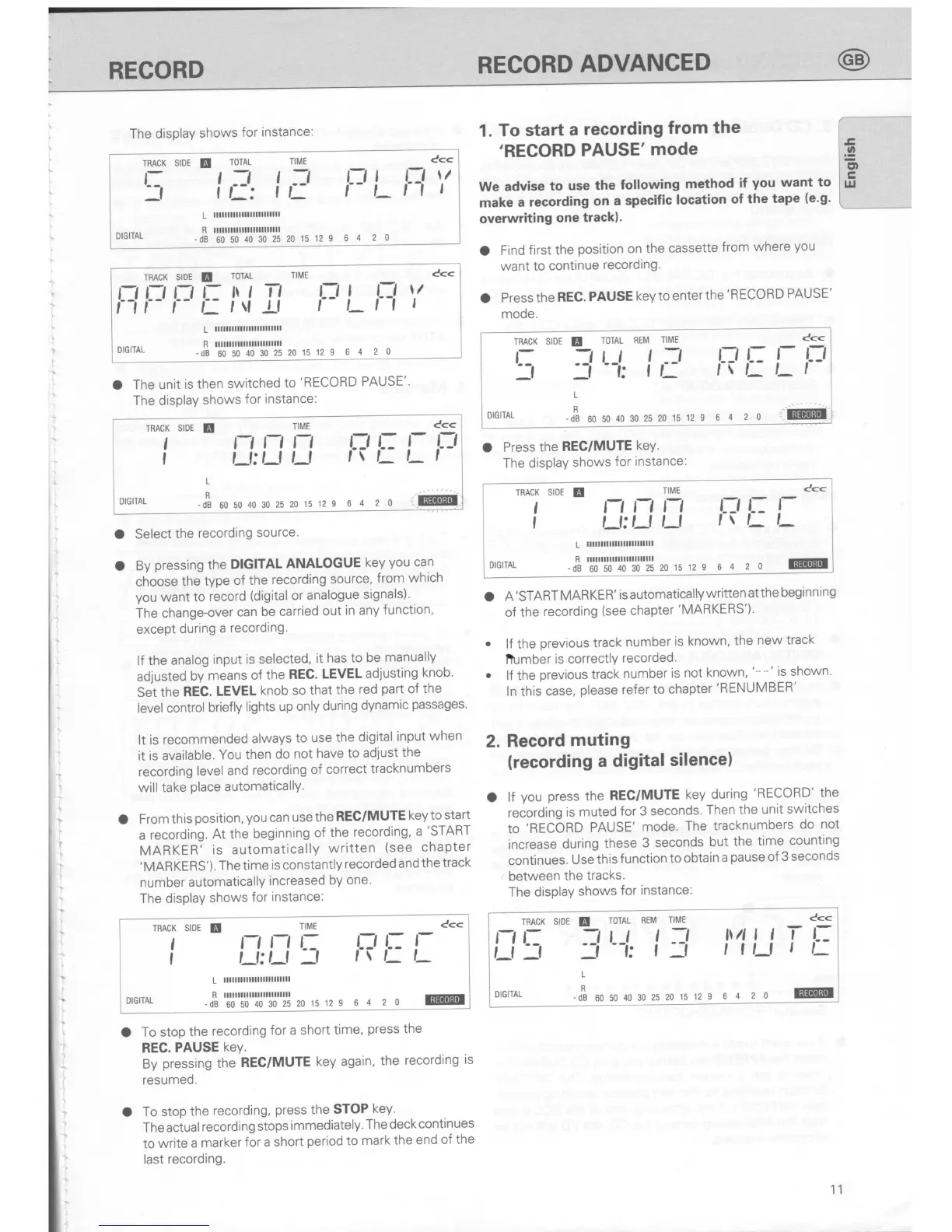
The display
shows
for
instance:
TRACK SIDE
E
L:
_f
TOTAL
TIME
t
-J
t
.:-t
lL:
tt-
r-, I
f-
t-
64
20
n
tt
Cc<
\/
I
DIGITAL
L
illlllllllllllllllllllll
-dB
60
50
40 30
25 20
15 12
S
O
The unit
is then
switched
to
'RECORD
PAUSE'
The display
shows
for
instance:
1.
To
start
a
recording
from
the
'RECORD
PAUSE'mode
We advise
to
use
the
following
method
if
you
want
to
make
a
recording
on
a specific
location
of
the
tape
(e'g'
overwriting
one
track).
O
Find
first
the
position
on
the
cassette
from
where
you
want
to
continue
recording.
O
Press
the
REC.
PAUSE
key
to enter
the
'RECORD
PAUSE'
mode.
O
Press
the
REC/MUTE
keY.
The
display
shows
for
instance:
TRACK
SIDE
E
TOTAL
TIME
C<<
nFrrt:lJ
Il
l='Lr-l
"'
L
lllllllllllllllllnlllll
R llllllllllllllllllllllll
DIGilAL
_dB6050403m25201512I
64
20
O
Select
the
recording
source'
O
By
pressing
the
DIGITAL
ANALOGUE
key
you
can
choose
the
type
of
the
recording
source,
from
which
you
want
to
record
(digital
or analogue
signals)'
The
change-over
can
be carried
out
in
any
function,
except
during
a
recording.
lf the
analog
input
is selected,
it has
to be
manually
adiusted
by
means
of
the
REC.
LEVEL
adjusting
knob'
Set the
REC.
LEVEL
knob
so
that
the
red
part
of
the
level control
briefly
lights
up
only
during
dynamic
passages'
It is
recommended
always
to use
the
digital
input
when
it is available.
You then
do
not
have
to adjust
the
recording
level and
recording
of correct
tracknumbers
will take
place
automaticallY.
O
From
this
position,
you
can
use
the
REC/MUTE
key to
start
a
recording.
At the
beginning
of
the
recording,
a
'START
MARKER'
is automatically
written
(see
chapter
'MARKERS').
Thetime
is constantly
recorded
and
the
track
number
automatically
increased
by
one.
The display
shows
for
instance:
TRACK
S|DE
E
TIME
t
t-l
l-,
L:
I
'-l:
,-f
-f
L
llllllllllllllllllllllll
c<<
f?r:
l:
DIGITAL
-dB
605040302520'15129
6
4 2 0
@u
O
To stop
the
recording
for a
short
time,
press
the
REC.
PAUSE
keY.
By
pressing
the
REC/MUTE
key
again,
the
recording
is
resumed.
O
To stop
the
recording,
press
the
STOP
key'
The
actual
recording
stops
immediately'
The
deck
continues
to
write
a marker
for
a short
period
to
mark
the
end
of
the
last
recording.
A'START
MARKER'
is automatically
written
atthe
beginning
of the
recording
(see
chapter
'MARKERS').
lf the
previous
track
number
is
known,
the
new
track
Ifumber
is
correctlY
recorded.
lf the
previous
track
number
is
not
known,
'--'
is
shown'
ln this
case,
please
refer
to
chapter
'RENUMBER'
Record
muting
(recording
a digital
silence)
lf
you
press
the
REC/MUTE
key
during
'RECORD'
the
recording
is muted
for 3
seconds.
Then
the
unit
switches
to
'RECORD
PAUSE'
mode.
The
tracknumbers
do
not
increase
during
these
3
seconds
but
the
time
counting
continues.
Use
this
f unction
to obtain
a
pause
of
3 seconds
between
the
tracks.
The
display
shows
for
instance:
o
2.
a
11
TRACK
SIDE
E
TOTAL
REM
TIME
C<<
r
1
r-t
t
:-t
fJ
i:
l- !-:,
r
-:t'-i:
tr:
rr'-Lt
DrGrrAL
-o!
*
u,
40 30
25
20
is 12 9
6
4
2 0
.,ii
TRACK
SIDE
E
TIME
c<<
t
,1
rtrt
rJ
;rt:t
|
,_f:,J
,-f
,
\
L
t-
t
L
DrcrTAL
-o[
uo
ro
40 30
25 20.rs
12 9 6
4 2 o
TRACK SIDE
E
rrniS
,_t:
,_l ,_f
Ccc
I
I
r?
r:
r
,_
DIGITAL
L
llllllllllllllllllllllll
R
illlllllrlllllllllllllll
-Ji'l';"!';"1';"1';"1'i
ro,u
12 s
6
4
2 o r@I
srDE
E
TOTAL
REM
TIME
c<<
=t-t
!:J
l\/!llf !-:
-Ii
--i:
f
-1
,tt-t
I
t-
TRACK
NE
,_f
_f
L
R
DIGITAL
-Ji
uouo40302s201s12e
6
4
2 o @I
RECORD
REGORD
ADVANCED
E
o
l-or
q
LrJ
t__
E@TT
I

Related product manuals