EasyManua.ls Logo

Philips DCC 380 - Page 11

Philips DCC 380
17 pages
Print Icon
To Next Page IconTo Next Page
To Previous Page IconTo Previous Page
Loading...
@
RECORD
ADVANCED
3.
CD
Dubbing
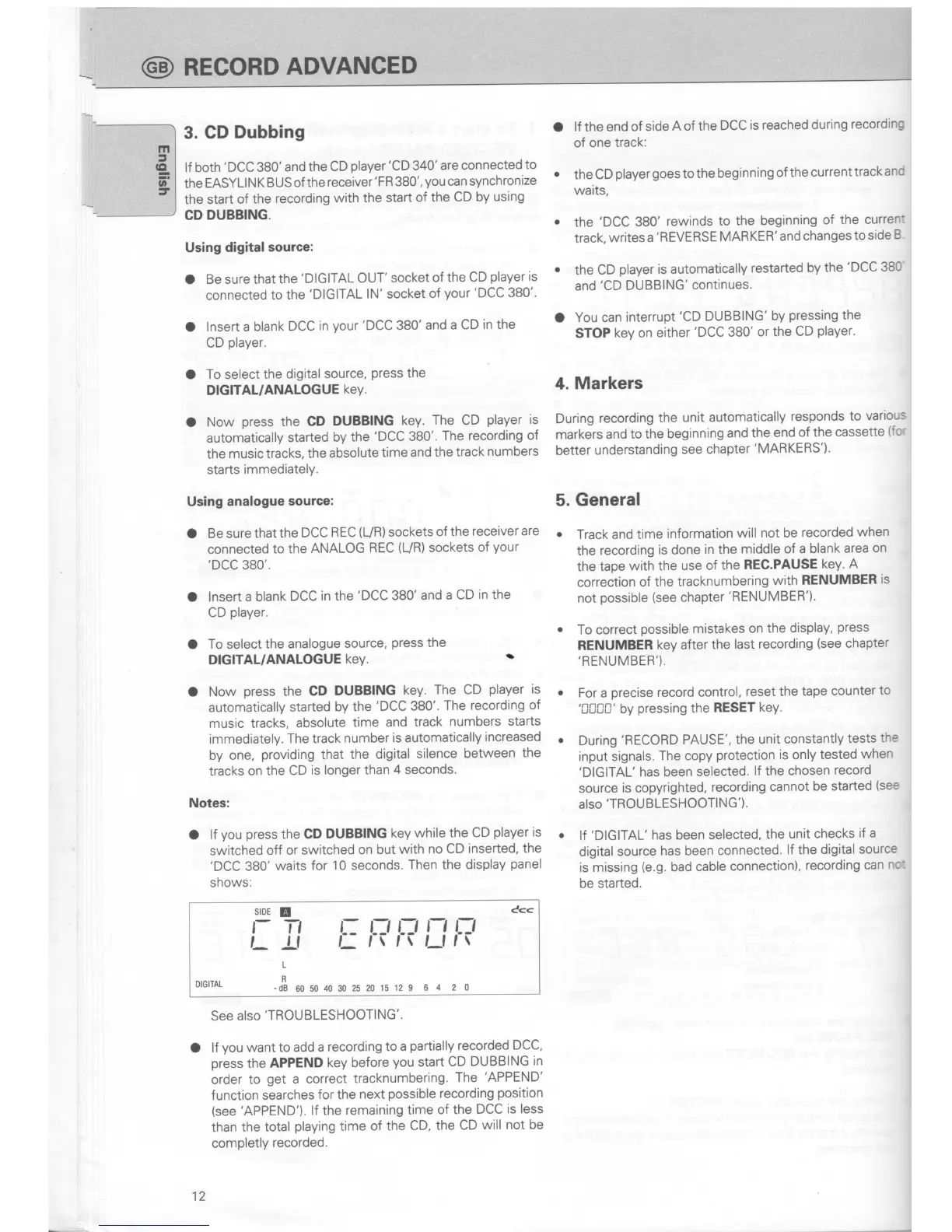
lf both
'DCC
380'and
the
CD
player'CD
340'are
connected
to
the
EASYLIN
K BUS
of the
receiver'FR
380',
you
can synchronize
the start
of the
recording
with the
start
of the
CD by
using
CD
DUBBING.
Using
digital source:
O
Be sure that
the
'DIGITAL
OUT'
socket
of the
CD
player
is
connected
to the
'DIGITAL
lN',
socket
of
your
'DCC
380',.
O
lnsert a blank
DCC
in
your'DCC
380'
and a CD
in
the
CD
player.
O
To
select
the
digital source,
press
the
DIGITAL/ANALOGUE
keY.
O
Now
press
the CD
DUBBING
key.
The CD
player
is
automatically
started
by
the
'DCC
380'.
The recording
of
the
music tracks,
the
absolute
time
and
the track
numbers
starts
immediately.
Using
analogue
sourcel
O
Be sure
that the
DCC
REC
(UR)
sockets
of the
receiver are
connected
to
the
ANALOG
REC
(UR)
sockets
of
your
,DCC
380"
O
lnsert a blank
DCC in the
'DCC
380' and
a CD
in the
CD
player.
O
To select
the analogue
source,
press
the
DIGITAL/ANALOGUE
keY.
r'
O
Now
press
the
CD
DUBBING
key. The
CD
player
is
automatically
started
by
the
'DCC
380''
The recording
of
music tracks,
absolute
time and
track
numbers starts
immediately.
The track
number
is automatically
increased
by one,
providing
that
the
digital
silence
between
the
tracks
on the
CD
is longer
than
4
seconds.
Notes:
O lf
you
press
the CD
DUBBING
key while
the CD
player
is
switched
off or
switched
on but
with
no CD
inserted,
the
'DCC
380'
waits
for 10 seconds.
Then the
display
panel
shows:
srDE
!
f- Tt
t_
!l
c<<
L: L:' TJ
N
TJ
l_,\r\Lllt
L
DlGlrAL
-#
uo
uo 40 30
2s 20
t5 t2 9 o
4 2 0
See also'TROUBLESHOOTING'.
O
lf
you
want
to add
a recording
to
a
partially
recorded
DCC,
press
the
APPEND
key before
you
start
CD
DUBBING
in
order
to
get
a correct
tracknumbering.
The
'APPEND'
function
searches
for the
next
possible
recording
position
(see 'APPEND').
lf the
remaining
time
of the
DCC
is less
than
the
total
playing
time
of the
cD,
the cD
will
not be
completly
recorded.
12
o lf the
end of
side
A of the
DCC
is
reached
during
recording
of one
track:
the CD
player
goes
to the
beginning
of the
current
track
and
waits,
.
the
'DCC
380'
rewinds
to
the beginning
of the
curren:
track,
writes
a
'REVERSE
MARKER'
and changes
to side
B
.
the
CD
player
is automatically
restarted
by
the
'DCC
380
and'CD
DUBBING'
continues.
O
You can
interrupt
'CD
DUBBING'
by
pressing
the
STOP
key on either
'DCC
380'
or
the CD
player.
4.
Markers
During
recording
the
unit
automatically
responds
to
various
markers
and to
the beginning
and the
end
of the
cassette
(fo'
better
understanding
see
chapter'MARKERS').
5. General
.
Track and
time
information
will
not be
recorded
when
the
recording
is
done
in the
middle
of a blank
area
on
the
tape
with the
use of
the
REC.PAUSE
key.
A
correction
of
the tracknumbering
with
RENUMBER
is
not
possible
(see
chapter
'RENUMBER').
o
To
correct
possible
mistakes
on the
display,
press
RENUMBER
key after
the
last recording
(see
chapter
,RENUMBER').
o
For
a
precise
record control,
reset the
tape
counter
to
'[[0[J'
by
pressing
the
RESET
key.
o
During
'RECORD
PAUSE',
the unit
constantly
tests
the
input signals.
The copy
protection
is only
tested
when
'DIGITAL'
has been
selected.
lf the
chosen
record
source
is copyrighted,
recording
cannot
be
started
(see
also'TROU
BLESHOOTING').
.
lf
'DIGITAL'
has
been
selected,
the
unit
checks
if a
digital
source
has been
connected.
lf the
digital
source
is missing
(e.g.
bad
cable
connection),
recording
can
nc:
be started.

Related product manuals