EasyManua.ls Logo

Philips DCC 380 - Page 12

Philips DCC 380
17 pages
Print Icon
To Next Page IconTo Next Page
To Previous Page IconTo Previous Page
Loading...
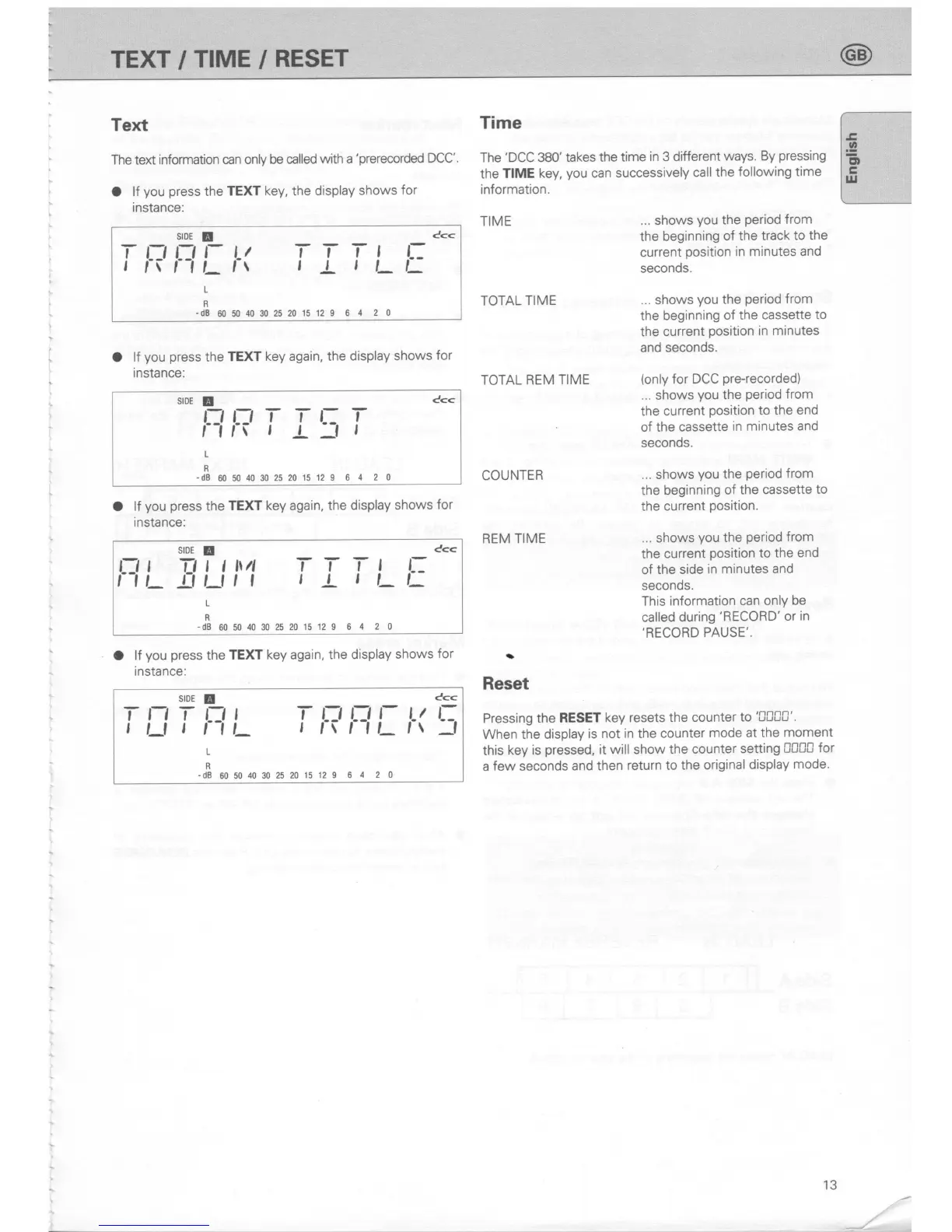
Text
The text
information
can only be
called
with a
'prerecorded
DCC'.
O lf
you
press
the
TEXT
key,
the
display
shows
for
instance:
O
lf
you press
the
TEXT
key again, the
display shows
for
instance:
stDE
E
c<<
EtTl-It;l-
L
R
-dB
60504030252015129
6
4 2 0
O
lf
you press
the
TEXT key again,
the display
shows
for
instance:
O
lf
you
press
the
TEXT key again,
the display
shows
for
instance:
Time
The
'DCC
380'
takes the
time
in
3 different
ways.
By
pressing
the
TIME key,
you
can successively
call the
following
time
information.
TIME
...
shows
you
the
period
from
the beginning
of the track
to the
current
position
in minutes
and
seconds.
... shows
you
the
period
from
the beginning
of the
cassette
to
the current
position
in minutes
and
seconds.
(only
for DCC
pre+ecorded)
...
shows
you
the
period
from
the current
position
to
the end
of the cassette
in minutes
and
seconds.
... shows
you
the
period
from
the beginning
of
the cassette
to
the
current
position.
... shows
you
the
period
from
the current
position
to
the end
of the
side
in minutes
and
seconds.
This
information
can only
be
called during
'RECORD'
or
in
,RECORD
PAUSE"
TOTAL
TIME
TOTAL
REM TIME
COUNTER
REM TIME
a
Reset
Pressing the
RESET
key resets
the counter
to
'000C'.
When
the display
is not in the counter
mode at
the
moment
this
key is
pressed,
it will show the
counter
setting
0CC0
for
a
few
seconds
and
then
return to
the original
display
mode'
c<<
SIDE
E
T-f,
rt
r
tl
TT'T-t
t
fiI-tLfr
t
L,
t-
r
r
L
R
-d8605040302520
15129 64
20
stDE
E
C<<
Ttttt\4
T-T-T-t
L:
-illlrt
t
L
t
t_t:
L:'
I
IU_
L
R
-d8605040fi2520
15129
64
20
srDE
!
c<<
II:I
T
NL
IF
NL
I(
!;
t
R
-ds
60504030252015129
6
4 2 0
Z,
13
TEXT/TIME/RESET

Related product manuals