7
English
FUNCTIONAL OVERVIEW
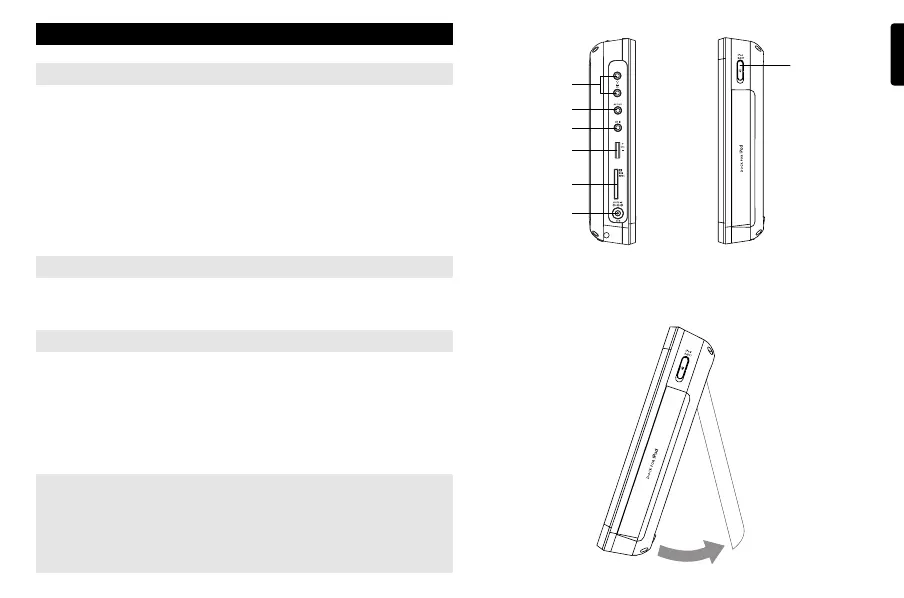
Left of player ( see figure 2)
0
1
p
2
... .......................Headphone jacks.
! AV OUT.........................Audio/Video output jack.
@ AV IN... .........................Audio/Video input jack.
# VOL +/-.. .......................Volume control.
$ SD/MMC CARD...........Insert an SD/MMC card.
% 9V DC IN and CHG .....Power supply socket.
..... charge indicator.
Right of player ( see figure 2)
^ iPod EJECT..................Push to eject the iPod player.
Desk stand of the player ( see figure 3)
You can prop up the DVD player on your table for movie watching.
Pull out the stand at the rear of the player.
CAUTION
Use of controls or adjustments or performance of procedures
other than herein may result in hazardous radiation exposure
or other unsafe operation.
0
!
@
#
$
%
^
2
3
P001-022_DCP851_37_Eng 2008.3.7 11:34 Page 7



 To Next Page