6
English
English
FUNCTIONAL OVERVIEW
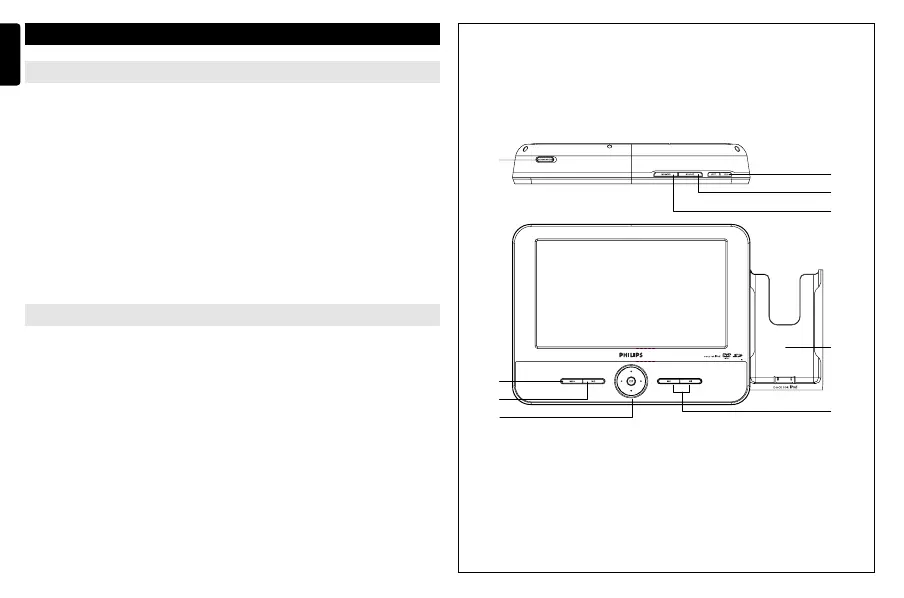
Main unit controls ( see figure 1)
1 MENU.....................Display the MENU page.
2 2
;
.........................Start or interrupt playback.
3 3, 4, 1, 2 ...........Navigate in a menu.
...........(1 / 2) search backward/forward in a disc at different
speeds.
OK ..........................Confirm a selection.
................................Power indicator.
4 J( / § ..................Skip to the previous/next chapter, track or title.
5 DOCK for iPod... ...Place an iPod player.
Top of player ( see figure 1)
6 OPEN .....................Open the disc door to insert or remove disc.
7 MONITOR ..............Switch the aspect ratio between 16:9 or 4:3.
8 SOURCE... ..............Select respective sources: DISC, iPod, SD/MMC or AV.
9 ON/OFF ... ..............Switch the power on/off.
6
9
1
2
3
5
4
8
7
1
P001-022_DCP851_37_Eng 2008.3.7 11:34 Page 6



 To Next Page