The Walk-Up View also consists of the Personal Dose Overview (see
section “Personal Dose Overview” on page 3-8), which is the default Walk-
Up view. It has two sub views:
•
the Annual Personal Dose view (see section “Annual Personal Dose” on
page 3-9)
• the Personal Dose History view (see section “Personal Dose History” on
page 3-10)
Personal Dose Overview
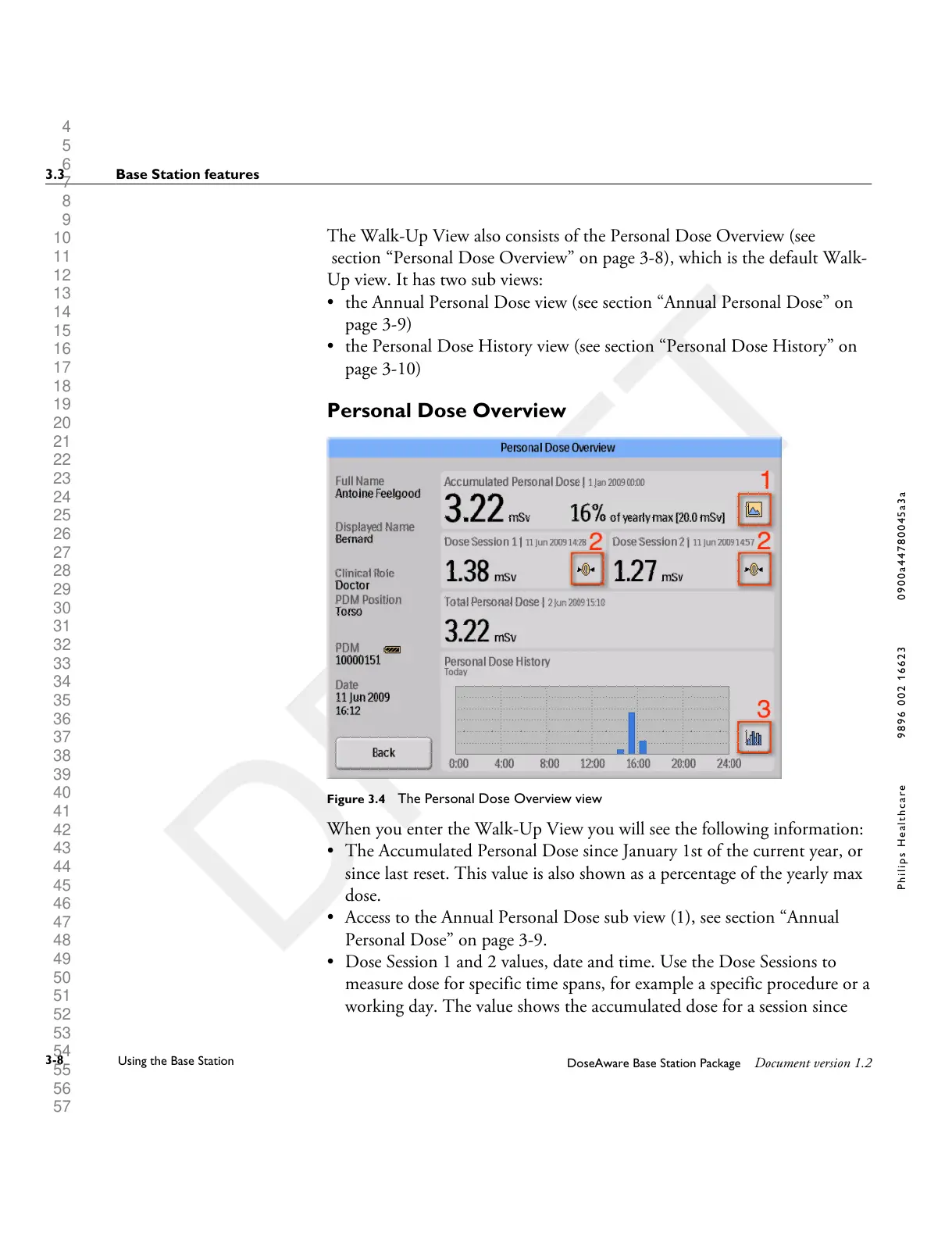
Figure 3.4 The Personal Dose Overview view
When you enter the Walk-Up View you will see the following information:
•
The Accumulated Personal Dose since January 1st of the current year, or
since last reset. This value is also shown as a percentage of the yearly max
dose.
• Access to the Annual Personal Dose sub view (1), see section “Annual
Personal Dose” on page 3-9.
• Dose Session 1 and 2 values, date and time. Use the Dose Sessions to
measure dose for specific time spans, for example a specific procedure or a
working day. The value shows the accumulated dose for a session since
3.3 Base Station features
3-8
Using the Base Station
DoseAware Base Station Package Document version 1.2
P h i l i p s H e a l t h c a r e 9 8 9 6 0 0 2 1 6 6 2 3 0 9 0 0 a 4 4 7 8 0 0 4 5 a 3 a











 To Next Page