last Dose Session reset, measured in Sv. Use the reset buttons (2) to
reset a Dose Session to zero. Information about dose session reset will
appear as an event in Dose Manager.
•
Total Personal Dose since the last Dose History reset.
• The current day’s Personal Dose History graph. You can also access
the Personal Dose History sub view (3), see section “Personal Dose
History” on page 3-10.
Annual Personal Dose
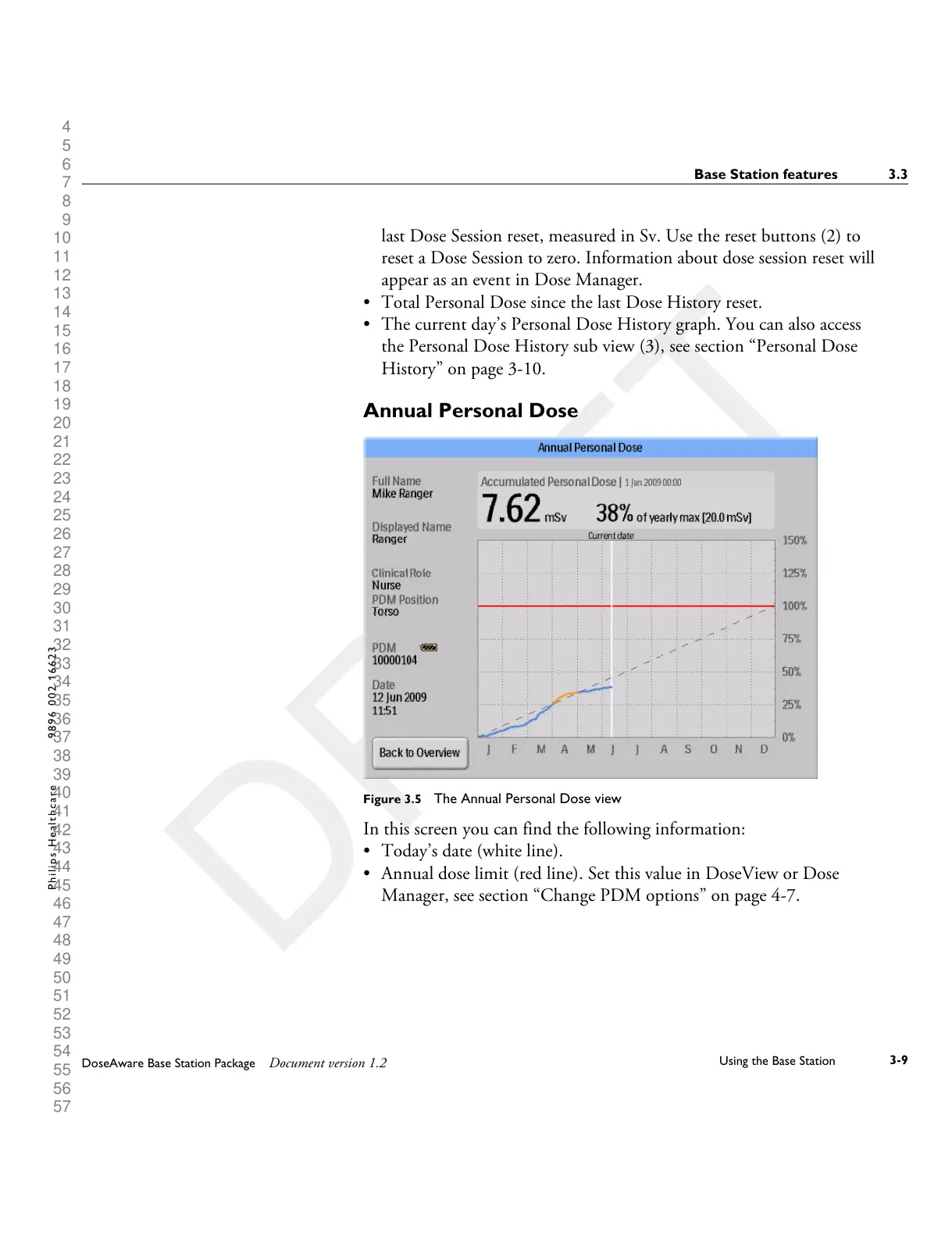
Figure 3.5 The Annual Personal Dose view
In this screen you can find the following information:
•
Today’s date (white line).
• Annual dose limit (red line). Set this value in DoseView or Dose
Manager, see section “Change PDM options” on page 4-7.
Base Station features 3.3
DoseAware Base Station Package Document version 1.2
Using the Base Station
3-9
P h i l i p s H e a l t h c a r e 9 8 9 6 0 0 2 1 6 6 2 3











 To Next Page