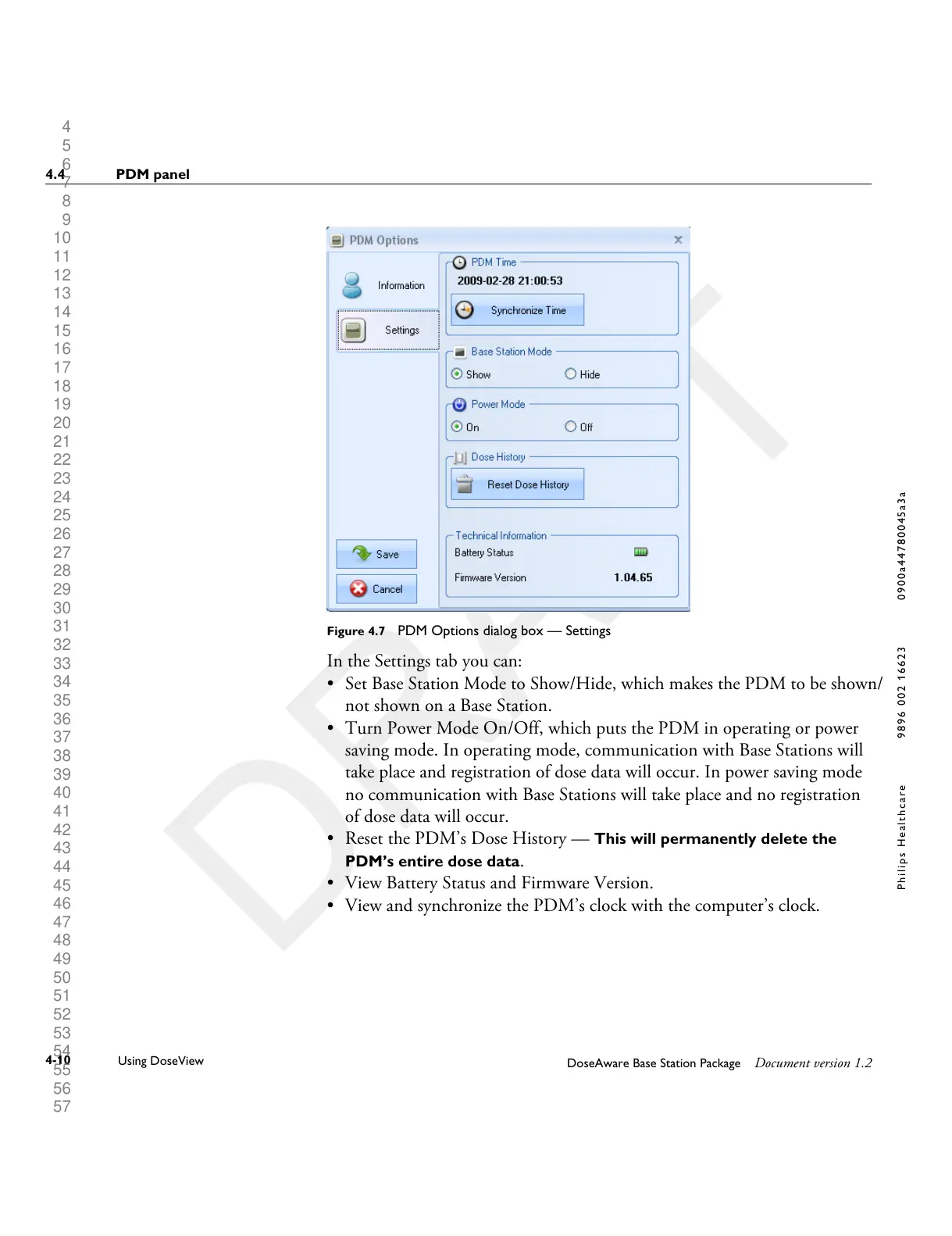
Figure 4.7 PDM Options dialog box — Settings
In the Settings tab you can:
• Set Base Station Mode to Show/Hide, which makes the PDM to be shown/
not shown on a Base Station.
•
Turn Power Mode On/Off, which puts the PDM in operating or power
saving mode. In operating mode, communication with Base Stations will
take place and registration of dose data will occur. In power saving mode
no communication with Base Stations will take place and no registration
of dose data will occur.
• Reset the PDM’s Dose History — This will permanently delete the
PDM’s entire dose data.
• View Battery Status and Firmware Version.
• View and synchronize the PDM’s clock with the computer’s clock.
4.4 PDM panel
4-10
Using DoseView
DoseAware Base Station Package Document version 1.2
P h i l i p s H e a l t h c a r e 9 8 9 6 0 0 2 1 6 6 2 3 0 9 0 0 a 4 4 7 8 0 0 4 5 a 3 a











 To Next Page