PDM options
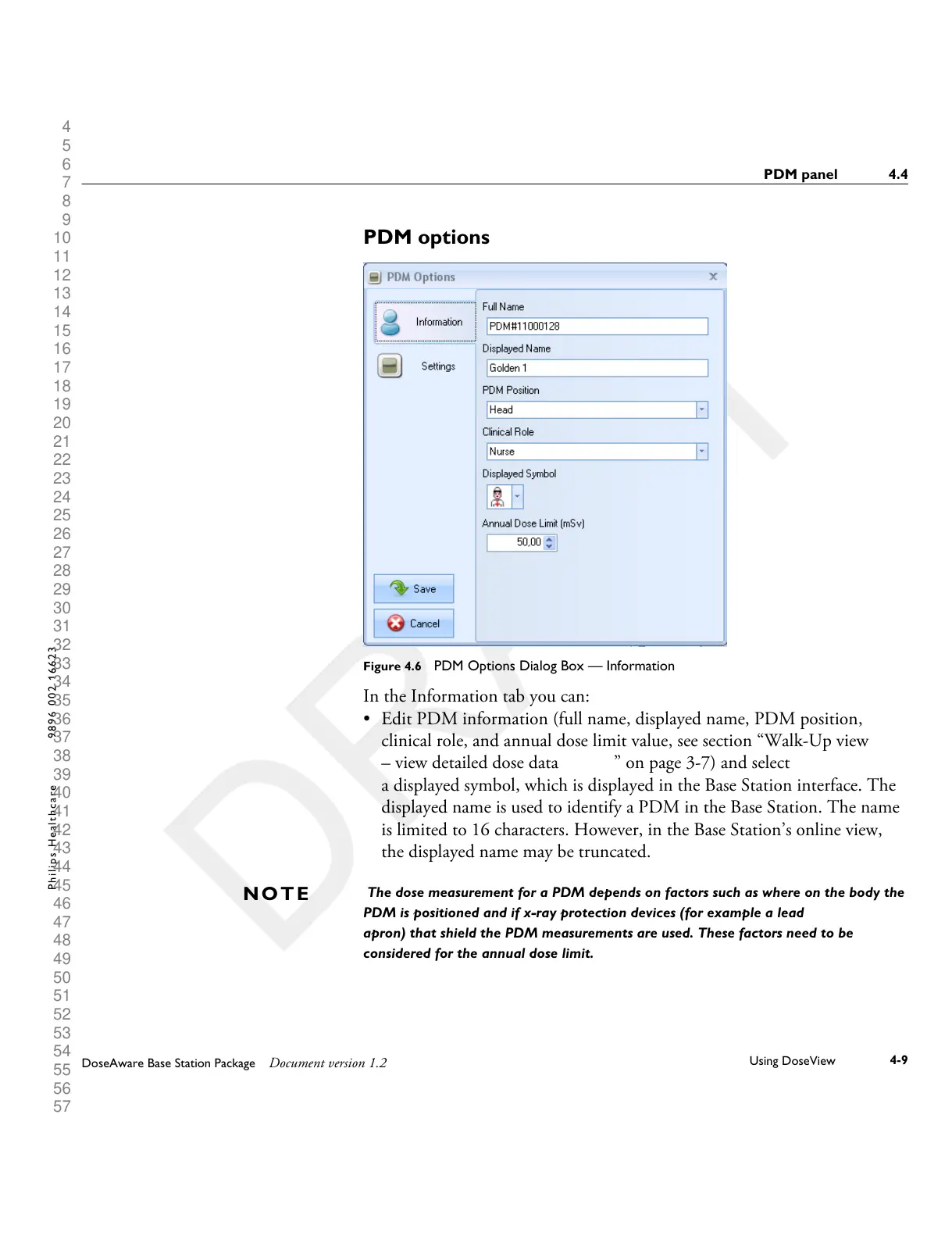
Figure 4.6 PDM Options Dialog Box — Information
In the Information tab you can:
•
Edit PDM information (full name, displayed name, PDM position,
clinical role, and annual dose limit value, see section “Walk-Up view
– view detailed dose data ” on page 3-7) and select
a displayed symbol, which is displayed in the Base Station interface. The
displayed name is used to identify a PDM in the Base Station. The name
is limited to 16 characters. However, in the Base Station’s online view,
the displayed name may be truncated.
The dose measurement for a PDM depends on factors such as where on the body the
PDM is positioned and if x-ray protection devices (for example a lead
apron) that shield the PDM measurements are used. These factors need to be
considered for the annual dose limit.
N O T E
PDM panel 4.4
DoseAware Base Station Package Document version 1.2
Using DoseView
4-9
P h i l i p s H e a l t h c a r e 9 8 9 6 0 0 2 1 6 6 2 3











 To Next Page