22
English
OPERATION - AUDIO
Shuffle
¶ Press SHUFFLE during playback.
➜ The playing order of the tracks is changed.
¶ To return to normal playback, press SHUFFLE again.
Repeat track/disc
¶ To repeat the current track, press REPEAT.
➜ REPEAT TRACK appears on the display.
¶ To repeat the entire disc, press REPEAT a second time.
➜ REPEAT appears on the display.
¶ To exit Repeat mode, press REPEAT a third time.
Repeat A-B
To repeat a specific portion of a track:
¶ Press REPEAT A-B at your chosen starting point.
➜ A- appears on the player display.
¶ Press REPEAT A-B again at your chosen end point.
➜ A-B appears on the display, and the sequence begins to
play repeatedly.
¶ To cancel the sequence and continue playback, press
REPEAT A-B.
Scan
Scanning plays the first 10 seconds of each track on the
disc.
¶ Press SCAN.
¶ To continue playback at your chosen track, press SCAN
again or press B PLAY.
FTS (Favourite Track
Selection) - Audio CD only
¶ The FTS Programme allows you to store your favourite
tracks for a particular disc in the player memory.
¶ Each FTS Programme can contain 20 tracks.
¶ Each time a FTS program is played it will be placed at top
of the list. When the list is full and a new program is added,
the last program on the list will be removed from the list.
¶ The selections can be called up and played at any time.
¶ FTS programming is not possible in Audio Direct mode.
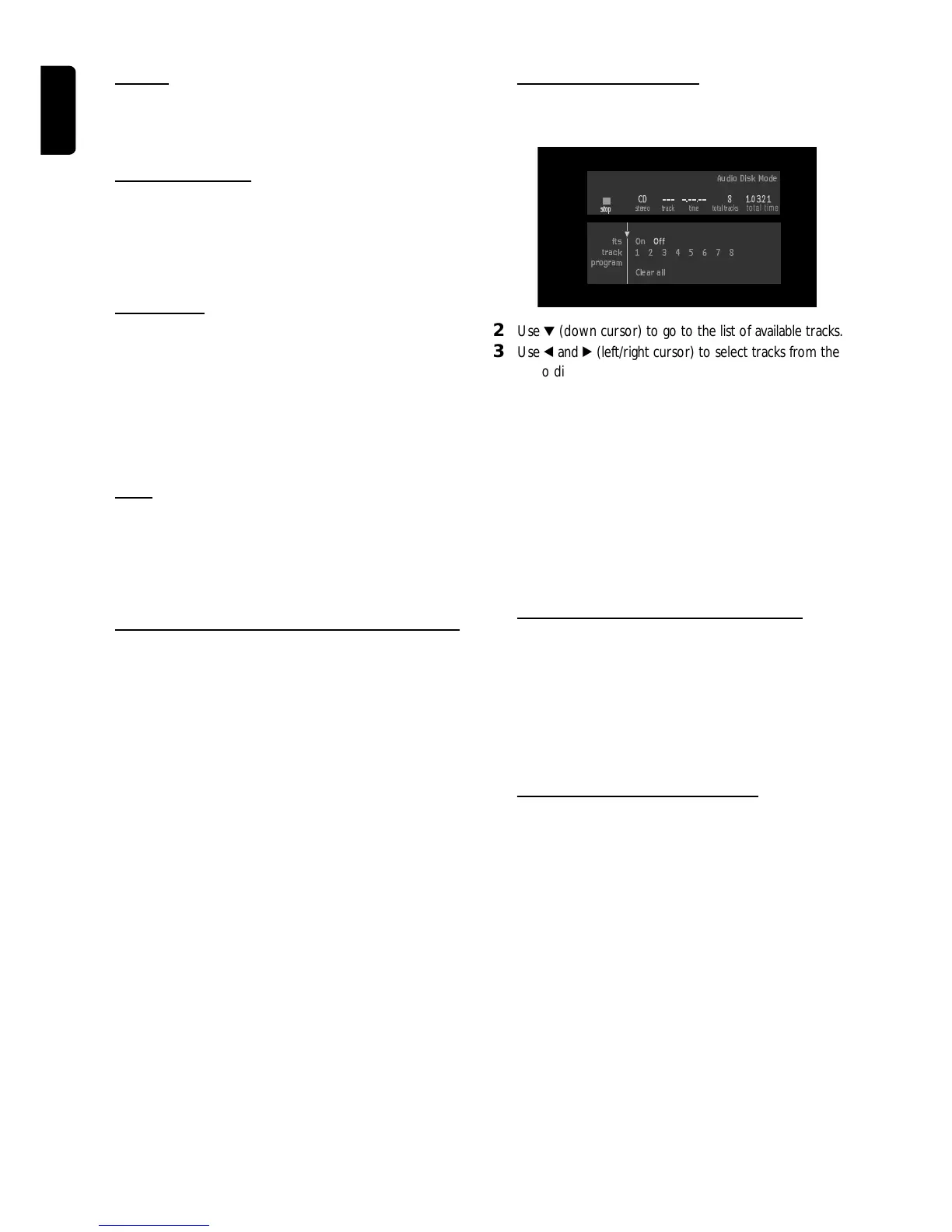
Storing a FTS program
1 Load a disc and stop playback.
stop
stereo track
time
total tracks
Audio Disk Mode
track 1 2 3 4 5 6 7 8
program
Clear all
fts On Off
CD 8 10321
total time
stop
2 Use 4 (down cursor) to go to the list of available tracks.
3 Use 1 and 2 (left/right cursor) to select tracks from the list.
To go directly to any track, enter the track number using
the numerical keys (0-9).
4 Store each track by pressing OK.
➜ The track numbers will be added to the list.
➜ The number of tracks and the playing time of the
programme will be shown on the TV screen and the player
display.
When your FTS program is complete, press B PLAY to
start playing; the FTS program will be automatically
memorized.
¶ Press FTS or use the 1 2 (left/right cursor) to set FTS to
ON or OFF.
Erasing a track from a FTS-program
1 Use 4 (down cursor) to go to the list of selected tracks.
2 Use 1 and 2 (left/right cursor) to select the track number
you wish to erase. To go directly to any track, enter the
track number using the numeric keys 0-9.
3 Press OK.
➜ The track number will be erased from the list of selected
tracks.
Erasing the complete program
¶ Use 4 (down cursor) to select CLEAR ALL and press OK.
➜ The complete FTS Programme for the disc will be
erased.



 To Next Page