7
GUIDE Plus+
®
System Demonstration
When you first receive the DVD Recorder, a Demo Pin is inserted
in the G-LINK jack on the rear of the DVD Recorder.When this
pin is in place, the automatic demonstration of the GUIDE Plus+
®
System will run continuously.
Remove the Demo Pin to stop the demonstration. Grasp the tag
near the metal pin and pull the pin out of the G-LINK jack.The
demonstration will stop.
You must remove the Demo Pin before you can connect the G-
Link cable to the G-LINK jack.This will be necessary if you are
using a Cable Box with the DVD Recorder.
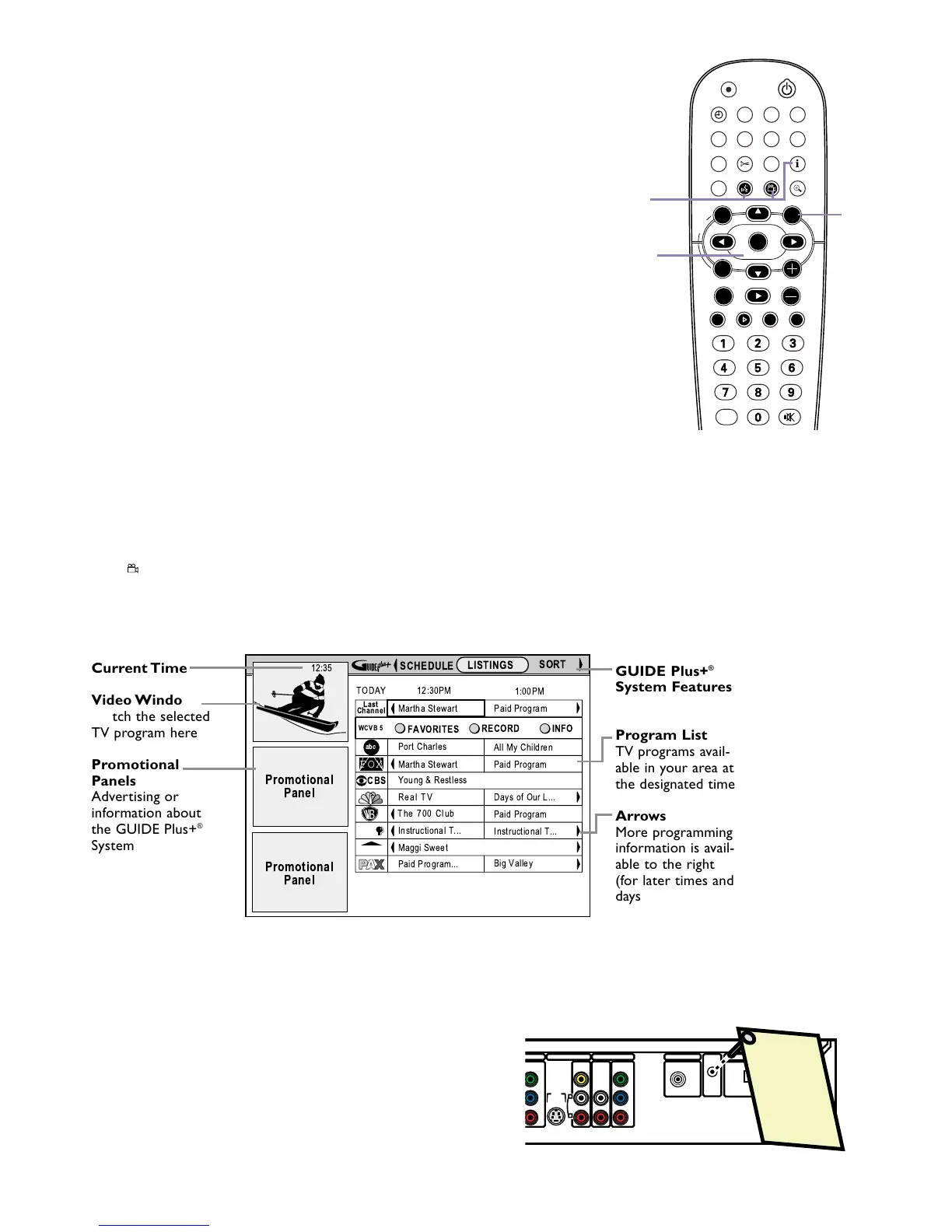
GUIDE Plus+
®
System
Your DVD Recorder has the GUIDE Plus+
®
System, which lists TV
programs available in your area. Use it to select or record TV pro-
grams. Complete details are in the accompanying owner’s manual.
1
Press GUIDE/TV to see the GUIDE Plus+
®
System
screen. The TV channel you were viewing will appear in the
Video Window in the top left corner of the screen. (To
remove the GUIDE Plus+
®
System screen, press CLEAR or
press GUIDE/TV again.)
2
Press 8CH+ or 9CH- to select a TV program. The
selected show will appear in the Video Window. Press OK to
view the selected program and remove the GUIDE Plus+
®
System screen.
(You can add or delete TV channels to customize the channel
list for your area. See the owner’s manual for details.)
3
Or, in the top line of the GUIDE Plus+
®
System screen, you
can access different features. Press 8CH+ to access the
features, then press ; or : to choose:
LISTINGS: TV programs and their descriptions
SORT: See TV shows by category (Movies, Sports, etc.)
PROMOTIONS: Advertisements for special TV programs
SETUP: Change the settings of the GUIDE Plus+
®
System
MESSAGES: Messages about the GUIDE Plus+
®
System,
including an identification of your software version.This may
be useful if you need assistance or service.
SCHEDULE: Lists planned recordings or Favorite programs
4
Use the Blue AUDIO
YY
button or the Green ANGLE
button on the remote to activate GUIDE Plus+
®
System features that are marked with a Green or Blue circle.
Or, use the i button on the remote to see more informa-
tion about a TV show or feature.















 To Next Page