15
• [PC
M Only] - Downmix to two-channel
audio format.
• [LPCM Output] - Select the LPCM (Linear
Pulse Code Modulation) output sampling rate.
• [48kHZ] - For discs recorded at sampling
rate of 48 kHz.
• [96kHZ] - For discs recorded at sampling
rate of 96 kHz.
Note
• [LPCM Output] setting is only available if the [Digital
Output] is set to [PCM Only].
The higher the sampling rate, the better the sound
•
quality.
[Volume]
Set the default volume level when you play a disc.
1. Press OK.
2. Press
to set the volume.
3. Press OK to confirm and exit.
[Sound Mode]
Select a preset sound effect to enhance the audio
output.
• [3D] - Select a virtual surround sound effect
that is produced from the left and right audio
channels.
• [Movie Mode] - Select a sound effect for
movies.
• [Music Mode] - Select a sound effect for
music.
[CD Upsampling]
For better sound quality in stereo mode, convert
the music CD to a higher sampling rate.
• [Off] - Turn off CD-upsampling.
• [88.2kHz] - Convert to twice the original
sampling rate.
• [176.4kHz] - Convert to four times the original
sampling rate.
[Night Mode]
Make loud sound level softer and soft sound level
louder so that you can watch the DVD movies at a
low volume, without disturbing others.
• [On] - Enjoy quiet viewing at night.
• [Off] - Enjoy surround sound with a full
dynamic range.
Note
Applicable only to Dolby Digital encoded DVDs. •
[DivX(R) VOD Code]
Display the DivX
®
registration code and
deregistration code.
• [Registration] - Obtain a registration code to
register this product on website.
• [Deregistration] - Obtain a deregistration
code to cancel the registration of this product
on website.
Note
Use this product’s DivX registration code when you rent •
or purchase video from www.divx.com/vod. The DivX
videos rented or purchased through the DivX
®
VOD
(Video On Demand) service can be played only on the
device to which it is registered.
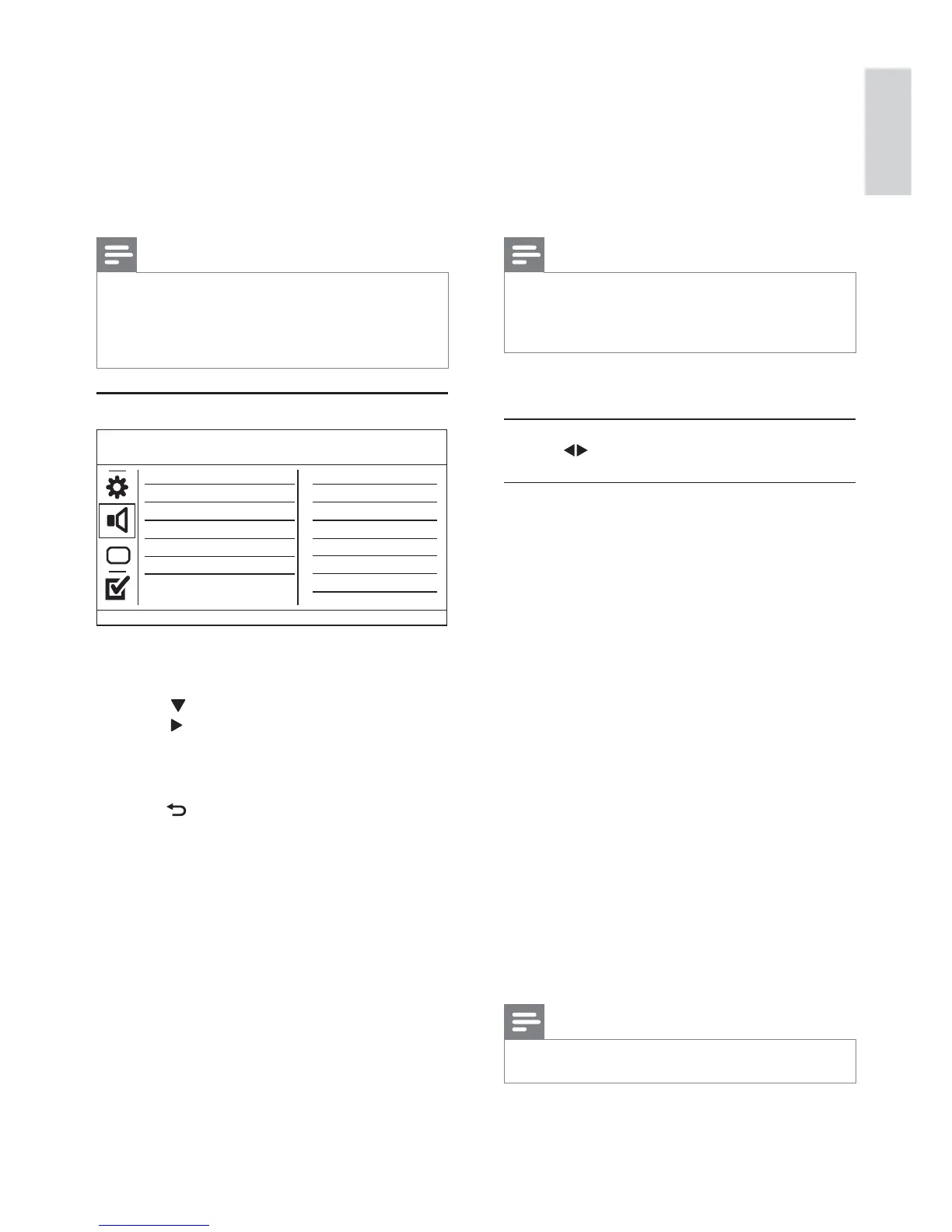
Audio setup
1 Press SETUP.
» [General Setup] menu is displayed.
2 Press to select [Audio Setup], and then
press
to enter the submenu.
3 Select an option, and then press OK.
4 Select a setting, and then press OK.
To return to the previous menu, press •
BACK .
To exit the menu, press • SETUP.
[Analogue Output]
Select an analogue setting based on the audio
device that is connected through the analogue
audio jack.
• [LT/RT] - For the surround sound output
through two speakers.
• [Stereo] - For the stereo output.
[Digital Audio]
Select a digital setting based on the digital amplifier/
receiver that is connected through the digital jack
(coaxial/digital).
• [Digital Output] - Select a type of digital output.
• [All] - Support multi-channel audio formats.
• [Off] - Disable digital output.
Sound Mode
CD Upsampling
Digital Audio
Analogue Output
Volume
Audio Setup
Night Mode
English
EN


 To Next Page