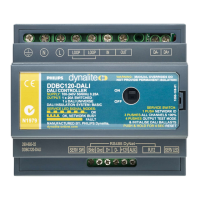
3 x DALI Control Outputs, each supporting a full DALI universe of 64 channels (192 total), including backward
channel
DDBC300-DALI Instruction Manual Rev E Specifications subject to change without notice
Dynalite manufactured by WMGD Pty Ltd (ABN 33 097 246 921) Unit 6, 691 Gardeners Road Mascot NSW 2020 Australia Tel: +61 2 8338 9899 Fax: +61 2 8338 9333
E-Mail: dynalite.info.@philips.com Web: Philips.com/dynalite
installation steps
1. Mount the device on a DIN rail inside an approved enclosure.
2. Connect mains cables: Connect a 0.1A single phase supply to the Supply terminals, this will operate the product’s
electronics. This device must be earthed.
3. Connect the DALI bus cables: Use a mains rated 2 core cable to connect the DALI bus to the DALI ports on all DALI
devices. The DALI bus cable should not be longer than 300 Metres, and should have a minimum cross section area
based on cable length as follows:
- Up to 100 Metres: 0.5mm
2
- 100 to 150 Metres: 0.75mm
2
- 150 to 300 Metres: 1.5mm
2
The DALI bus is not SELV and must be treated as a mains cable. It is not polarity conscious. A maximum of 64 DALI
devices can be wired to each DALI port.
4. Connect data cables to the device as per diagrams below. Segregate data cables from mains cables.
5. If the Auxiliary input is to be used, connect a dry contact device in between the AUX and GND terminals. Keep cable
runs between the AUX terminals and the dry contacts under two metres. The function of the Auxiliary input will need
to be programmed at the time of commissioning.



 To Previous Page