8 EN
Control your phone call
After Bluetooth connection, you can
control an incoming call with this
speaker.
Button Function
Press to answer an
incoming call.
Press and hold for two
seconds to reject an
incoming call.
During a call, press to end
the current call.
During a call, press and
hold for two seconds to
transfer the call to your
mobile device.
5 Other features
Listen to an external
device
With this speaker, you can also listen
to an external audio device such as an
MP3 player.
Note
•
Make sure that music playback through
Bluetooth is stopped.
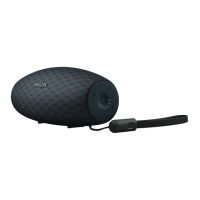
1 Connect an audio input cable (not
supplied) with a 3.5 mm connector
on both ends to
• the AUDIO IN socket on this
speaker, and
• the headphone socket on the
external device.
2 Play audio on the external device
(refer to its user manual).
Tip
•
When you start music streaming from
a connected Bluetooth device, the
speaker switches to the Bluetooth source
automatically.


 To Next Page