POWER SUPPLY/LINE OUT
9
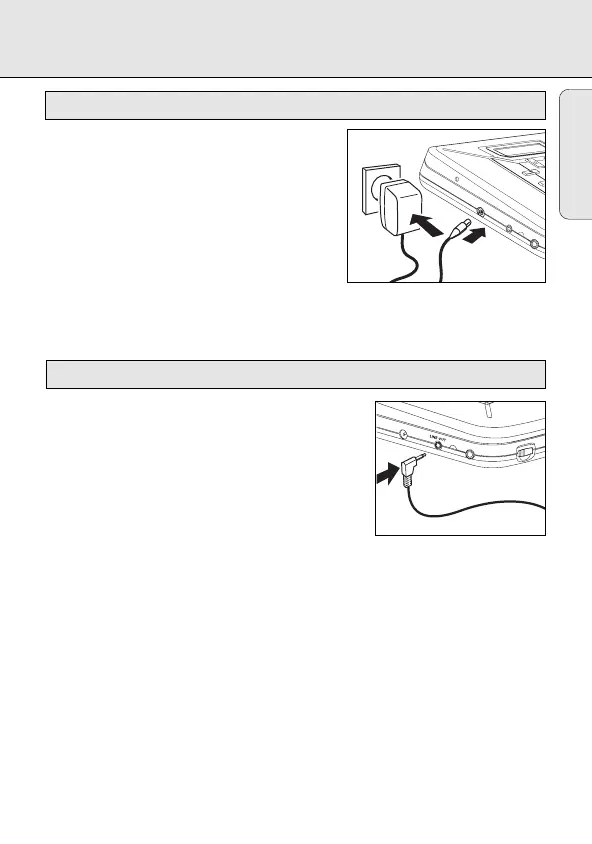
Only use the AY 3170 power adapter
(4.5 V/300mA direct current, positive pole to the
center pin). Any other product may damage the set.
1 Make sure the local voltage corresponds to the
adapter’s voltage.
2 Connect the power adapter to the 4.5V DC jack
of the player and to the wall outlet.
Note: Always disconnect the adapter when you are not using it.
You can connect the CD player to an additional
appliance, E.g. amplifier, radio cassette recorder, etc.,
with a LINE IN jack.
1 Turn down the volume on the additional appliance.
2 Connect an audio signal cable (not supplied,) to the
LINE OUT jack of the CD player and the CD IN, AUX
IN or LINE IN jack of the additional appliance.
3 To adjust the sound and volume, use the controls on
the connected appliance.
Line out
MODE
CD REWRITABLE COMPATIBLE
MAGIC ELECTRONIC SKIP PROTECTION
Power adapter (supplied or optionally available)
English
0
EXP101/17 eng 28/11/00 8:56 Page 9






 To Next Page