9EN
3 Connect
This section helps you connect your
subwoofer to a TV and other devices,
and then set it up.
Note
•
For identication and supply ratings, see the
type plate at the back or bottom of the product.
• Before you make or change any connections,
make sure that all devices are disconnected
from the power outlet.
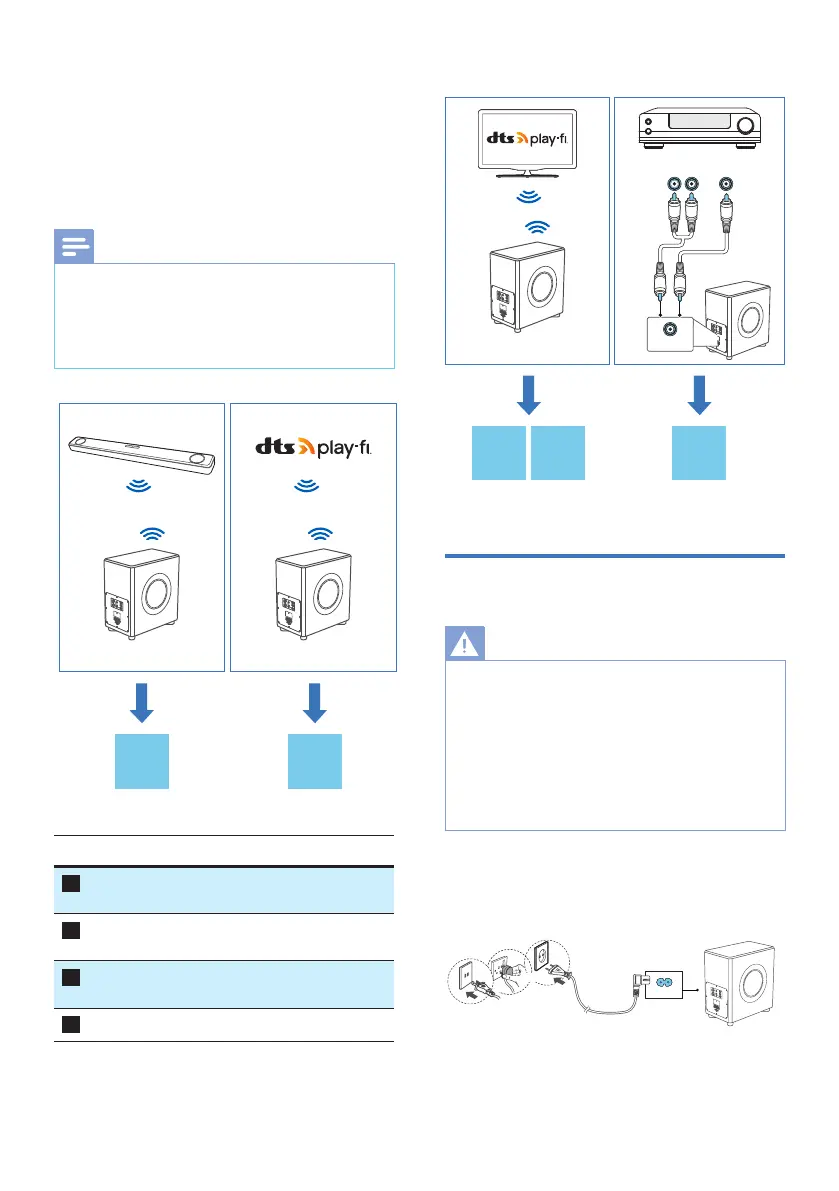
Preamp
Output
Subwoofer
out
ON
Fidelio FW1 Fidelio FW1
Fidelio FB1
A B
Connection Go to page
A
Manual pairing with FB1 soundbar /
Initial set up to RF link
10
B
Connect to Wi-Fi
(Wireless Operation)
11
C
Connect the subwoofer to
Philips Play- enabled TV
14
D
Wired connection (Sub-in) 15
Preamp
Output
Subwoofer
out
ON
Fidelio FW1 Fidelio FW1
Fidelio FW1
Sub in
Connect to power
WARNING!
•
Risk of product damage! Make sure that the
power supply voltage corresponds to the
voltage printed on the back or the underside of
the product.
• Risk of electric shock! When you unplug the
power cord, always pull the plug from the
socket. Never pull the cord.
• Before connecting the AC power cord, ensure
you have completed all other connections.
Connect the mains cable to the AC in~
socket of the subwoofer and then into a
mains socket.
or
or
AC in ~
* Power cord quantity and plug type
vary by regions.


 To Next Page